Fix 'from langchain.agents import create_tool_calling_agent' Error
Swarnava Dutta8 min read
Tool Calling Agent LangchainAI Agent Error Handling
Contents
A from langchain.agents import create_tool_calling_agent snippet copied from a three-month-old tutorial fails with a clean ImportError. Three months is roughly the half-life of LangChain examples, short enough to ruin an afternoon. The fix takes five minutes once you know which API generation your installed package belongs to, and finding that answer is the part that burns the hours.
Quick answer
The from langchain.agents import create_tool_calling_agent error occurs because LangChain moved this factory across releases. Run pip show langchain to confirm your version. For 0.2+, ensure langchain-core matches; for new projects, migrate to LangGraph's create_react_agent. A local file named langchain.py or a stale Jupyter kernel causes the same error.
Why the from langchain agents import create_tool_calling_agent error happens
ImportError: cannot import name 'create_tool_calling_agent' means Python found the langchain package but the symbol doesn't exist in your installed version. ModuleNotFoundError means the package isn't installed in the active environment at all.
The common causes:
- Wrong LangChain generation. You copied an import written for 0.1.x but you're running 0.2+, or the reverse.
- Environment mismatch.
pip installwent to system Python while your IDE runs a venv. - A local file named
langchain.pyshadowing the real package. - Stale kernel. You upgraded the package but never restarted the notebook runtime.
- Dependency conflicts.
langchain-coreandlangchainat incompatible versions.
| Installed stack | Agent factory | Import path |
|---|---|---|
langchain 0.1.x |
create_tool_calling_agent |
from langchain.agents import create_tool_calling_agent |
langchain 0.2+ |
create_tool_calling_agent |
Same, but requires matching langchain-core>=0.2 |
langgraph 0.2+ |
create_react_agent |
from langgraph.prebuilt import create_react_agent |
Verify the exports your installed version ships rather than trusting a tutorial's import line.
Confirm the LangChain version and Python environment first
python -m pip show langchain langchain-core langgraph
python -m pip check
python -c "import langchain; print(langchain.__version__, langchain.__file__)"
Compare that __file__ path against your IDE's interpreter setting. In Jupyter, run import sys; print(sys.executable) inside a cell - these disagree often enough that I check it before anything else.
After any pip install --upgrade, restart your Python process. Avoid upgrading langchain, langchain-core, and langgraph simultaneously across an existing lockfile - upgrade one, run pip check, then move to the next.
Build a tool-calling agent in LangChain with the current API
The create_tool_calling_agent factory (the function that constructs the agent runnable) still exists in langchain 0.2+, but the recommended path for new code is create_react_agent from langgraph.prebuilt. If you're staying inside LangChain proper, you need matching versions of langchain and langchain-core.
The base langchain package doesn't bundle model providers. You need langchain-openai, langchain-anthropic, or similar - each with its own API-key env var. Missing the provider package gives you a second ImportError right after you fix the first.
You need three things for a working agent: a chat model that supports tool calling, typed tools, and the agent executor. The agent handles the full loop internally - binding tools, parsing tool-call requests, executing them, and feeding results back.
Calling bind_tools yourself before passing the model to the agent factory means tools get bound twice. Some providers silently accept this; others reject it with a schema error. Don't do it.
Minimal LangChain tool-calling agent example
from langchain_openai import ChatOpenAI
from langchain.agents import create_tool_calling_agent, AgentExecutor
from langchain_core.prompts import ChatPromptTemplate
from langchain_core.tools import tool

@tool
def multiply(a: int, b: int) -> int:
    """Multiply two integers and return the product."""
    return a * b

llm = ChatOpenAI(model="gpt-4o")
prompt = ChatPromptTemplate.from_messages([
    ("system", "You are a helpful assistant."),
    ("human", "{input}"),
    ("placeholder", "{agent_scratchpad}"),
])

agent = create_tool_calling_agent(llm, [multiply], prompt)
executor = AgentExecutor(agent=agent, tools=[multiply])

result = executor.invoke({"input": "What is 17 times 24?"})
print(result["output"])  # Expected: 408
If the model answers "408" without intermediate_steps, tool calling didn't fire - check that your model version supports it [1]. The LangChain MCP integration guide covers adjacent provider-wiring issues.
Keep legacy create_tool_calling_agent code working safely
Pinning makes sense when you have a working production agent and no reason to rewrite it. A pinned 0.1.x agent can run for months, handling document-classification tool calls with the pytest suite green and no new feature requests. The migration conversation usually starts only when a requirement like a human-approval gate, which AgentExecutor cannot provide, arrives.
Pin the entire dependency cluster, not just langchain:
langchain==0.2.xat a tested minorlangchain-core==0.2.xat a compatible release- Your provider package at a tested version
pydanticpinned to v1 or v2 - mixing causes silent schema failures
Leaving langchain-core unpinned while locking langchain is the fastest way to break a Friday deploy.
| Legacy concept | Current (LangGraph) equivalent |
|---|---|
create_tool_calling_agent |
create_react_agent from langgraph.prebuilt |
AgentExecutor |
Compiled graph (.invoke()) |
agent_scratchpad in prompt |
Managed internally by graph message state |
max_iterations |
Recursion limit on the graph |
The CrewAI vs LangGraph comparison covers decision points for choosing your target API.
Run a tool-calling agent in LangGraph when you need control
AgentExecutor gives you max_iterations and not much else. LangGraph exposes the graph structure directly - you add conditional branches, human approval nodes, per-node retry policies, and checkpointers for durable execution across server restarts.
create_react_agent from langgraph.prebuilt builds a StateGraph with a model node and a tool node. You call .invoke({"messages": [("user", "What is 17 times 24?")]}) and get back a dict whose "messages" key holds the full message list. Your code parses messages[-1].content for the final answer instead of result["output"].
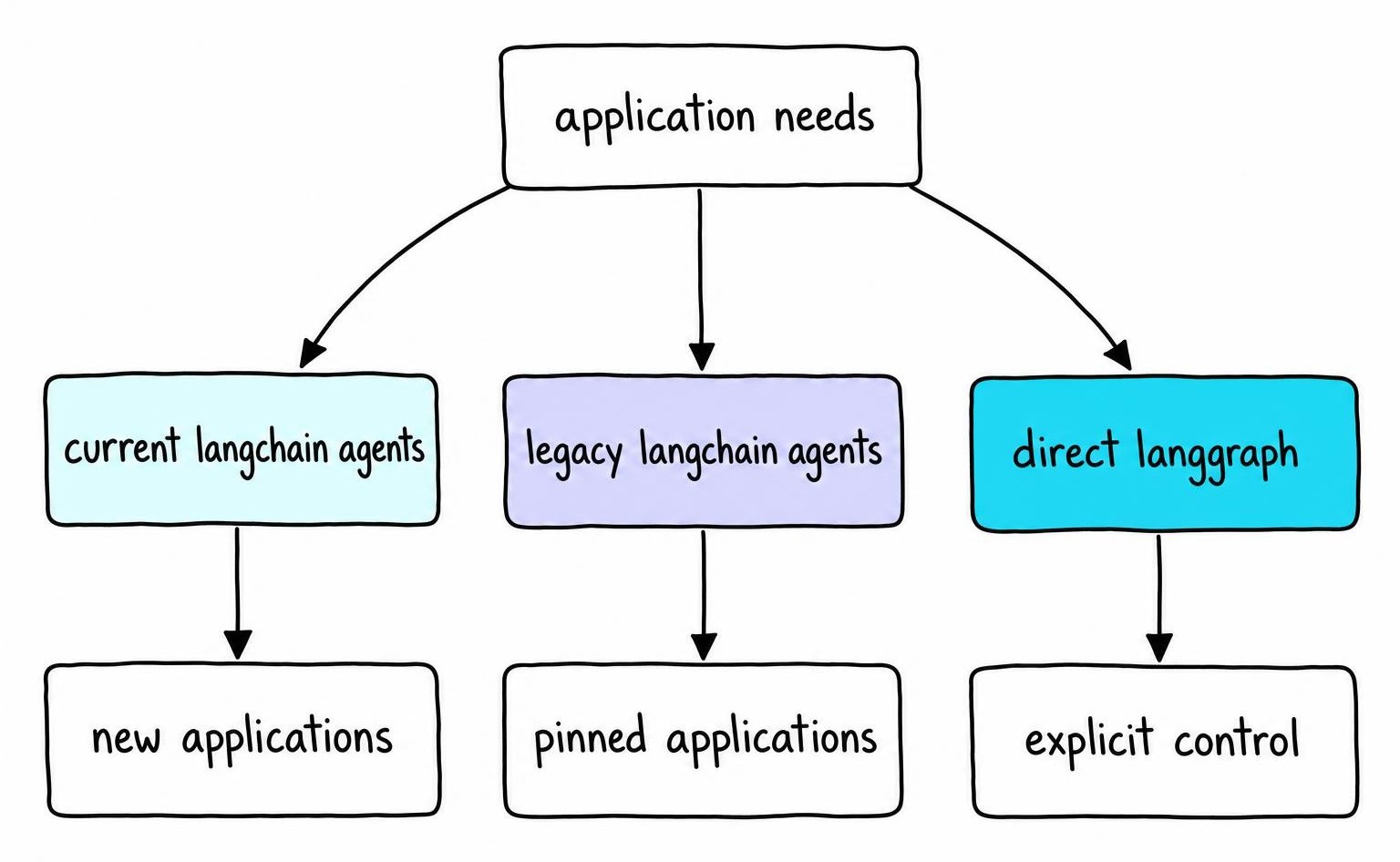
One gotcha deserves its own warning. create_react_agent in LangGraph accepts no prompt template containing {agent_scratchpad}, because the graph manages scratchpad state through its message list. Pass a LangChain-style prompt carrying that placeholder and the model returns confident-sounding answers that ignore prior tool results, with no error and no warning. Removing the placeholder fixes it.
Choose between LangChain and LangGraph agent APIs
| Criteria | Current LangChain (create_tool_calling_agent) |
Legacy LangChain (pinned) | LangGraph (create_react_agent) |
|---|---|---|---|
| Setup effort | Low | Low (already built) | Medium |
| Control flow | Linear loop | Linear loop | Arbitrary graph |
| Persistence | None built-in | None built-in | Checkpointers |
| Human-in-the-loop | Manual | Manual | interrupt_before |
| Debugging | intermediate_steps |
intermediate_steps |
Per-node traces |
| Best for | Simple single-loop agents | Maintained pinned apps | Branching, durable workflows |
The LangGraph alternatives guide covers other options if LangGraph's graph model doesn't fit.
Fix failures that appear after the import succeeds
The import works. The agent crashes anyway. Before blaming the executor, inspect the raw model response - check response.tool_calls and response.additional_kwargs to confirm whether the model even attempted a tool call.
| Symptom | Cause | Fix |
|---|---|---|
KeyError: 'tool_calls' |
Model lacks tool-calling support | Use gpt-4o, Claude 3.5+, etc. |
ValidationError on tool input |
Pydantic v1/v2 conflict | Pin one Pydantic version |
Agent loops to max_iterations |
Missing {agent_scratchpad} |
Add the placeholder to prompt |
| Direct answer, no tool use | Weak tool description | Improve docstring, set tool_choice |
bind_tools called twice |
Manual .bind_tools() before agent factory |
Remove the manual call |
The "direct answer" case is easy to miss because no error is raised. Vague tool descriptions let the model skip tool use entirely. Write docstrings that describe when to fire the tool, not just what it does. Some providers support tool_choice="required" to force a call [2].
Add AI agent error handling, retries, and traces
A ValidationError from a malformed schema will fail identically on retry. A rate-limit 429 will likely clear in seconds. Your retry logic needs to separate these - bounded retries with backoff for transient failures, immediate surfacing for deterministic errors.
An agent that retries a "send notification" tool three times after an ambiguous timeout sends three identical Slack messages. For any tool with side effects, either make the operation idempotent with a unique request ID or don't retry - return a clear error and let a human decide.
LangGraph's interrupt_before gates execution on human approval before destructive tools fire. Return safe, typed error messages to the model rather than raw tracebacks. A tool returning {"error": "Payment service unavailable"} gives the model enough context without leaking internals.
Structured logs should capture tool name, validated arguments, result, and latency. Strip API keys and PII. LangSmith provides built-in tracing for LangChain and LangGraph agents without custom instrumentation.
What tool calling means and how the agent loop works internally
Tool calling lets a model emit a structured JSON request - function name plus typed arguments - asking the host application to execute something. The model never runs Python or hits external APIs directly. Your application validates arguments, calls the function, and feeds the result back as a message.
An agent needs six pieces:
- A model capable of structured tool-call output
- A system prompt defining behavior
- Tool schemas describing available functions
- Mutable state (message history)
- An execution loop connecting model and tools
- Safeguards like iteration caps and input validation
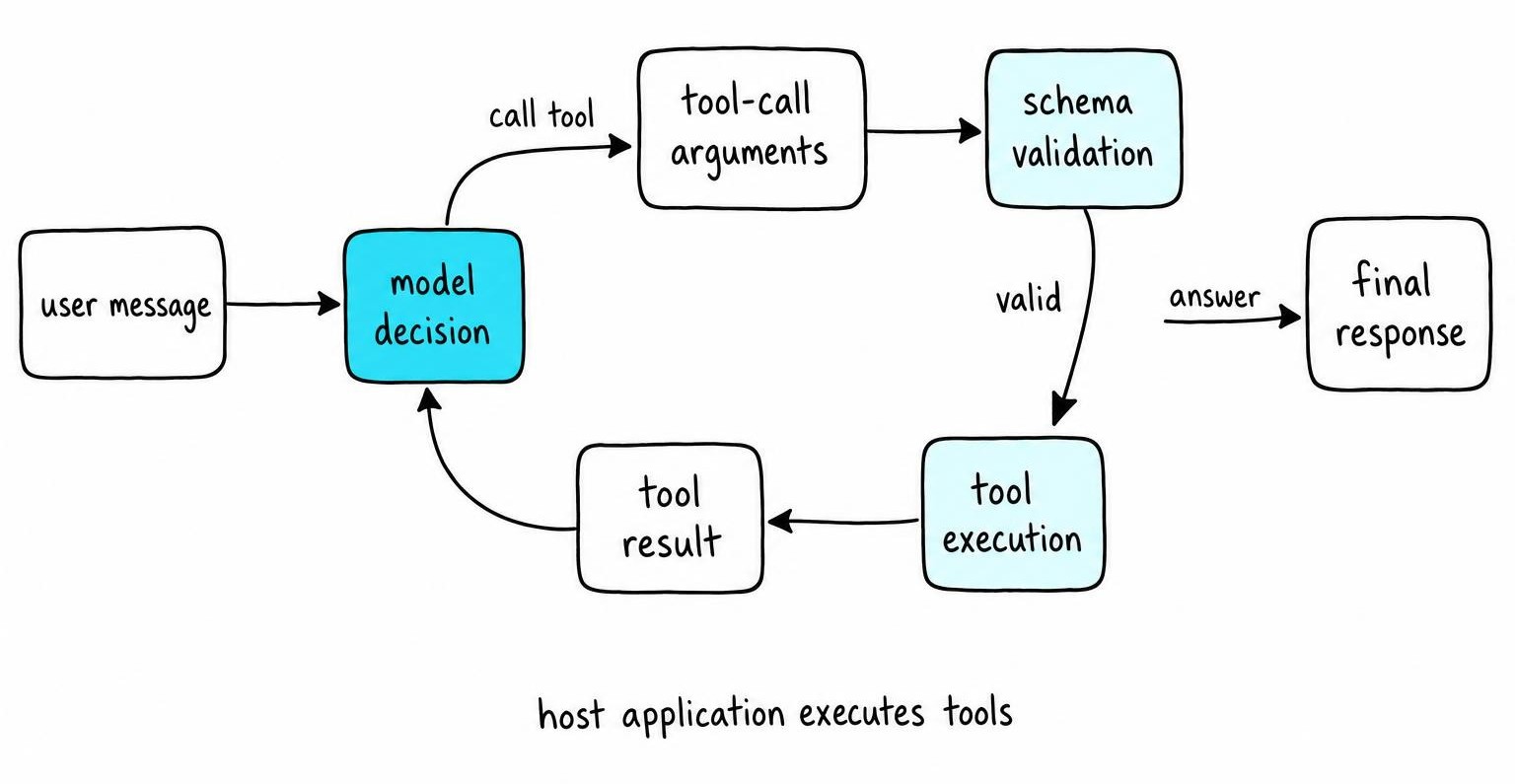
The loop runs until the model responds without requesting a tool or a stopping condition fires.
Single-agent tool use means one model deciding which tools to call. Multi-agent communication is a different pattern where multiple models exchange messages and delegate subtasks - the multi-agent evaluation guide covers testing those systems.
FAQ
What is tool calling in AI agents?
Tool calling is a mechanism where a language model outputs a structured JSON request - a function name and typed arguments - instead of plain text. The host application executes the requested function and returns the result as a message. The model proposes actions; the application decides whether to carry them out and controls all external access.
How do AI agents work internally?
An agent runs a loop: the model receives a user message, decides whether to answer or request a tool call, and waits. If it requests a tool, the executor validates arguments, runs the function, and feeds the result back. The loop repeats until the model produces a final answer or a stopping condition like max_iterations or a recursion limit fires.
How are AI agents built?
An agent requires a tool-calling-capable model, typed tool schemas, a behavior-defining prompt, mutable conversation state, an execution loop connecting model and tools, and safeguards like iteration limits and input validation. In LangChain, create_tool_calling_agent plus AgentExecutor assembles these. In LangGraph, create_react_agent builds a state graph exposing individual nodes for customization.
References
- ToolRegistry: A Protocol-Agnostic Tool Management Library for Function-Calling LLMs - Peng Ding, Rick Stevens (2025)
- Critical behavior of Fredenhagen-Marcu string order parameters at topological phase transitions with emergent higher-form symmetries - Wen-Tao Xu, Frank Pollmann, Michael Knap (2024)