Fixing LangChain Error Code 429 in Agents and Tools
Swarnava Dutta7 min read
Langchain Error Code 429Langchain Error CodesLangchain Tool Error
Contents

A common response to a langchain error code 429 is increasing max_retries and redeploying. That can turn one throttled embedding call inside a tool into a retry storm when the outer chain multiplies every failed attempt.
A 429 in a LangChain app can originate from at least four different services, and adding retries at the wrong layer makes the failure worse.
Quick answer
LangChain error code 429 means an upstream API - typically OpenAI, Azure, Anthropic, or an embedding endpoint - rejected a request because the caller exceeded a rate or quota limit. Fixing it requires identifying which provider returned the 429, then applying the right combination of exponential backoff, concurrency throttling, and token-per-minute budgeting at the correct layer.
What LangChain Error Code 429 Means and Where It Starts
HTTP 429 is the standard "too many requests" status code. LangChain doesn't define its own error codes - it surfaces whatever the upstream provider returned. So a langchain rate limit error is really an OpenAI, Anthropic, or Azure error wearing a LangChain traceback.
The 429 can originate at any layer in your stack: the agent's parallel tool calls, the ChatOpenAI or embeddings wrapper, the provider's API gateway, your vector database, or any Tool hitting a third-party endpoint.
Catch the exception and inspect the raw response:
from openai import RateLimitError

try:
    result = chain.invoke({"input": query})
except RateLimitError as e:
    print(e.status_code)        # 429
    print(e.response.headers)   # x-ratelimit-remaining-requests, retry-after
    print(e.body)               # error type and message from the provider
The retry-after and x-ratelimit-remaining-tokens headers tell you whether you're hitting RPM or TPM limits. A 429 that never clears even at one request per minute usually isn't transient throttling - it's quota exhaustion or a billing issue that won't respond to backoff.
Diagnose Provider Rate Limits Before Changing Retries
Before touching retry config, figure out which limit you're hitting.
| OpenAI | Azure OpenAI | Anthropic | Vector DB / Tool API | |
|---|---|---|---|---|
| Exception type | openai.RateLimitError |
openai.RateLimitError (Azure variant) |
anthropic.RateLimitError |
HTTPError / SDK-specific |
| Useful headers | x-ratelimit-remaining-tokens, retry-after |
retry-after-ms |
retry-after, anthropic-ratelimit-tokens-remaining |
Varies; check Retry-After |
| Common bottleneck | Often TPM on lower tiers | TPM per deployment | Often RPM on lower tiers | Concurrent requests or daily quota |
| Retryable? | Yes, with backoff | Yes, but deployment caps need portal changes | Yes | Often not - quota resets are calendar-based |
Check the current limits and response headers in the official OpenAI rate-limit guide and Anthropic rate-limit documentation.
The fastest diagnostic step is to call each component in isolation.
llm.invoke("ping")                     # chat model
embeddings.embed_query("ping")         # embedding endpoint
retriever.invoke("test query")         # vector store
tool.invoke({"query": "test"})         # individual tool
If the chat model succeeds but the chain still 429s, your embeddings call or a tool endpoint is the culprit. Changing ChatOpenAI retry settings cannot fix a Pinecone limit firing inside a retrieval tool.
Configure LangChain Retry with Exponential Backoff
LangChain's Runnable.with_retry wraps any runnable with retry logic, but its defaults can be too generous for production:
from openai import RateLimitError

retryable_chain = chain.with_retry(
    retry_if_exception_type=(RateLimitError,),
    stop_after_attempt=4,
    wait_exponential_jitter=True,
)
Prevent nested retries. The OpenAI Python SDK retries a small number of times by default before giving up. If you wrap ChatOpenAI with with_retry(stop_after_attempt=4), a single user request can generate up to 12 API attempts. Set max_retries=0 on the LLM constructor and let one layer own the backoff.
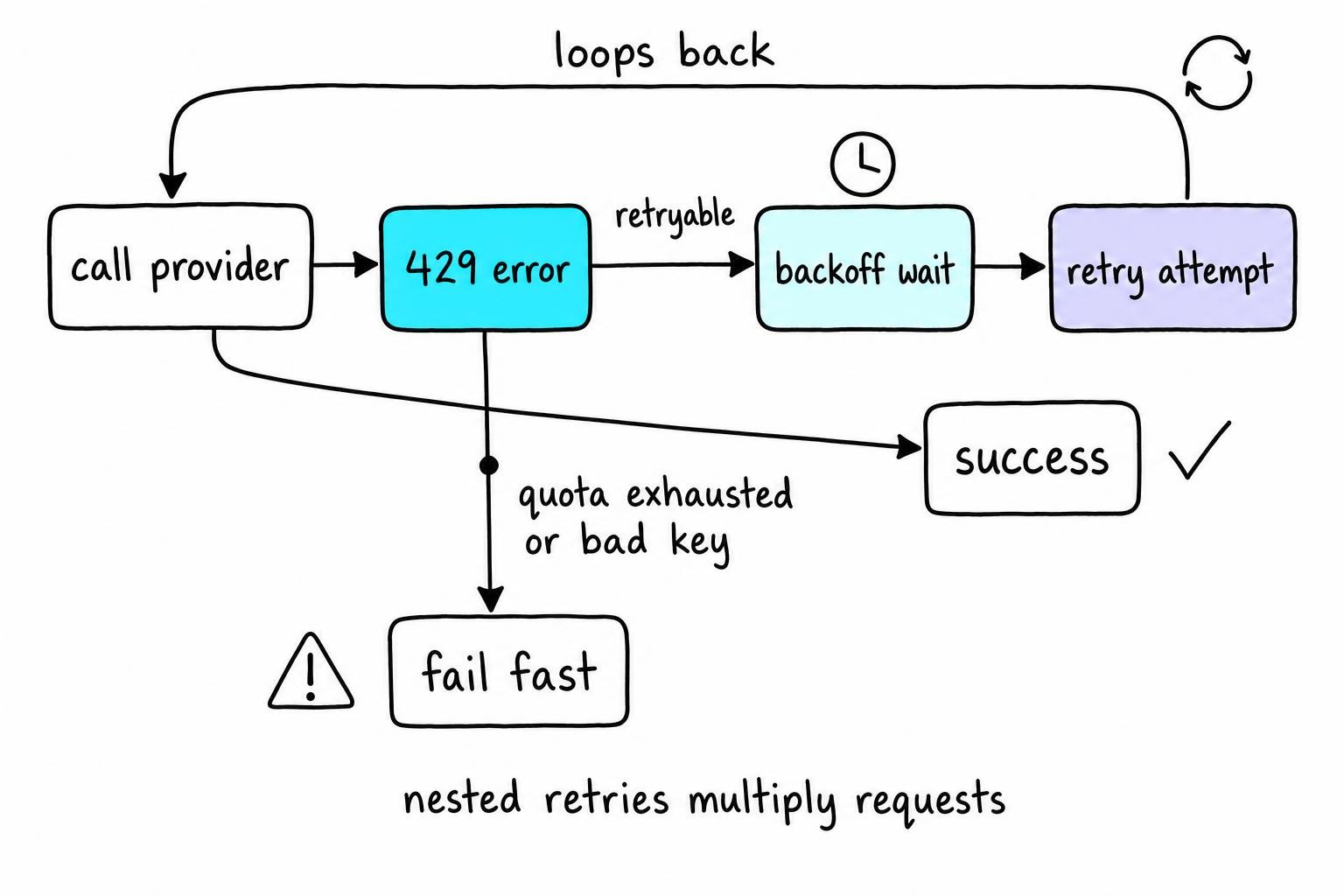
Fail fast on non-retryable errors. A 401, 400, or quota-exhausted 429 won't clear with patience. Keep AuthenticationError and BadRequestError out of retry_if_exception_type; retrying a revoked API key only burns more attempts.
Idempotency for state-changing tools. Retrying a tool that sends an email means duplicated side effects. If your agent calls tools that mutate state, either attach an idempotency key or exclude those tools from the retry wrapper.
Control Concurrency and Token-Per-Minute Usage
A single chain.invoke() looks fine. Five running concurrently through chain.batch() blow past your RPM ceiling instantly. Parallel tool calls inside an agent compound this - one planning step fans out to three tools, each hitting the same endpoint.
Four async workers sharing one API key can each respect a local 15 RPM cap while the provider sees 60 RPM from one organization. Distributed workers need a shared rate-limit counter, such as Redis, instead of separate local counters.
Use max_concurrency in RunnableConfig to cap parallel branches:
import asyncio
from langchain_core.runnables import RunnableConfig

# Cap LangChain-level parallelism
config = RunnableConfig(max_concurrency=3)
results = await chain.abatch(inputs, config=config)

# For finer control, use a semaphore across your entire process
sem = asyncio.Semaphore(5)

async def throttled_call(query):
    async with sem:
        return await chain.ainvoke({"input": query})
Request-rate limiters alone can't protect you from TPM limits. A single request with a 12k-token context and max_tokens=4096 consumes more budget than twenty short classification calls. Count prompt tokens with tiktoken, set max_tokens to the smallest value your task needs, and trim retrieval context aggressively.
LangChain Tool Error Handling for Agent Call Loops
Did the tool's external API return a 429, or did the model call between tool steps hit the limit? Check the exception type. A requests.HTTPError with status 429 means the tool's target API throttled you. An openai.RateLimitError means the agent burned through quota deciding what to do next. For tool-API 429s, add backoff inside the tool wrapper; for model-provider 429s, throttle the outer agent loop.
Bound your agent's execution. In LangGraph, set recursion_limit on the graph config. In legacy AgentExecutor, use max_iterations and max_execution_time. Without these, a confused agent loops until something breaks.
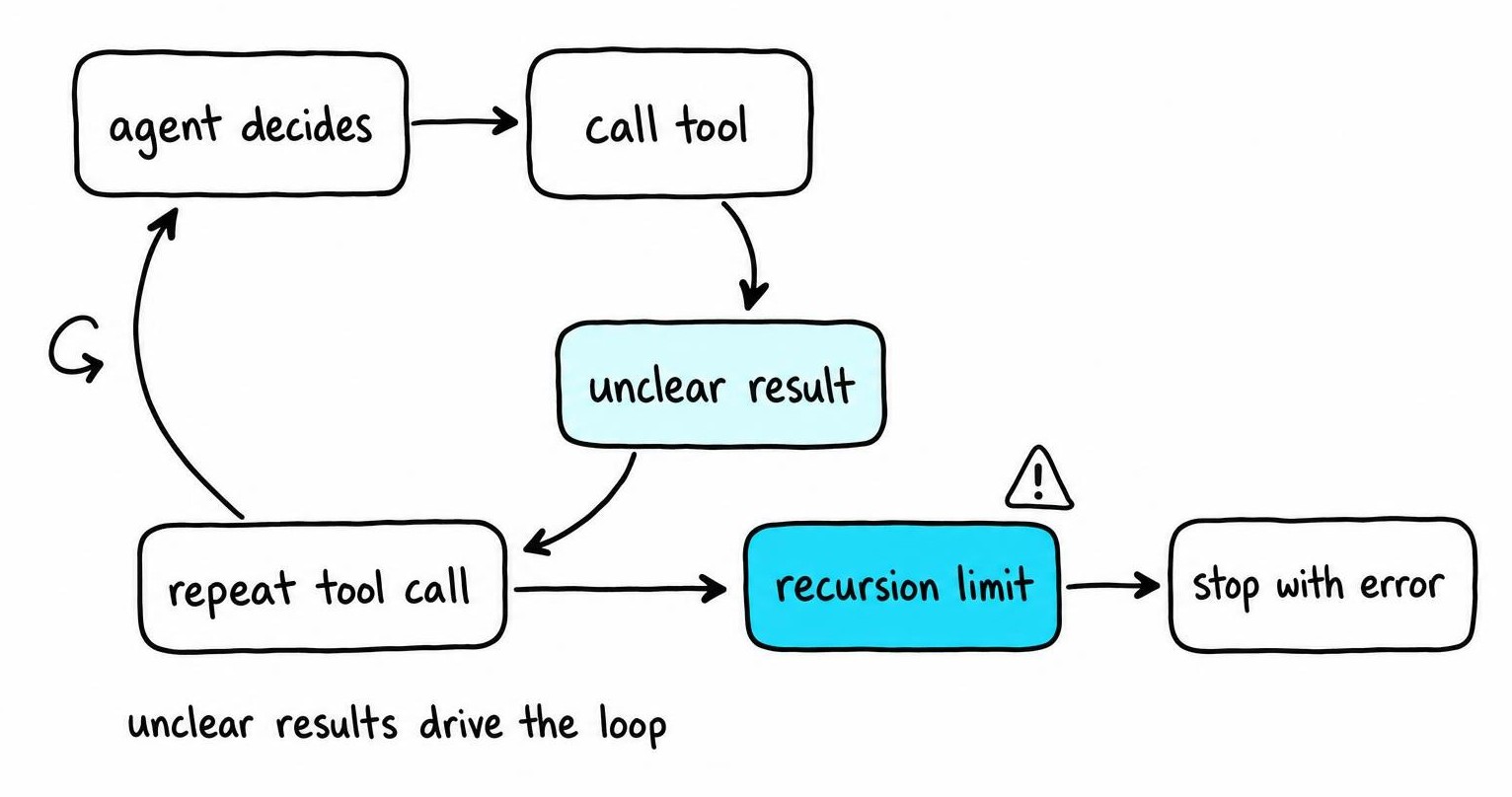
For tools hitting external APIs, wrap the tool function so it catches errors and returns a structured message like "Tool rate-limited. Do not retry this tool." while logging the full traceback. An explicit terminal string stops the model from re-calling the same tool.
A common failure is a tool's Pydantic schema rejecting the model's input, raising a ValidationError that the agent interprets as "try again." Add handle_tool_error=True on the tool definition so the error message reaches the model. Otherwise you get a loop that looks like rate limiting but is a schema bug burning quota from the inside.
Resolve Quota, Billing, API Key, and Deployment Limits
A 429 that persists at one request per minute isn't transient. Walk this path:
- Billing status - an expired card silently downgrades access. OpenAI returns 429 (not 403) for some billing failures.
- Usage tier - OpenAI publishes per-tier rate limits on their platform docs, and lower tiers get substantially less headroom.
- Spending caps - a hard cap at $50 behaves identically to rate limiting.
- Organization vs. project - confirm the key belongs to the intended project and organization, because each can have different limits.
Rotating API keys won't help when keys share the same organization quota. Three keys under one org hit one shared RPM pool.
Azure OpenAI enforces per-deployment TPM quotas separate from global model limits, and regional capacity can cap what you're allowed to provision. If one deployment is maxed, create a second in another region and load-balance. LangChain's with_fallbacks lets you chain a primary AzureChatOpenAI instance to a secondary deployment so overflow routes automatically without retry storms.
When the limit is structural, request a quota increase, route overflow to an alternate deployment, or apply backpressure upstream.
Prevent LangChain Error Code 429 in Production
Inject synthetic 429 responses using respx or responses to verify your backoff logic fires correctly. Run these tests against a mock provider before every deploy that changes retry config; a misconfigured stop_after_attempt can turn a brief rate-limit blip into a cascading failure.
Track per provider and model: request rate, input/output tokens, retry count, tool invocations, agent iterations, and terminal failures. Without per-model granularity, a noisy embedding endpoint hides behind aggregate dashboards.
Review agent evaluation traces for repeated reasoning cycles, unnecessary tool calls, and bloated prompts. A poorly worded system prompt can dramatically increase token consumption per agent run - and higher consumption means you hit your rate limit sooner.
Set alerts on sustained 429s over a sliding window and exhausted retry budgets. Document what happens when those alerts fire - does the system degrade gracefully, drop the request, or queue it? A circuit breaker that short-circuits calls for 60 seconds after consecutive 429s prevents retry storms from compounding.
Verify your fix in four stages: single call, controlled concurrency, a full agent run with tools, then production-scale traffic with a gradual ramp.
FAQ
How does LangChain work?
LangChain connects language models to external data and tools through composable abstractions called runnables. Each runnable wraps a single operation - an LLM call, a retriever query, a tool invocation - and pipes output to the next. LCEL lets you compose these declaratively with built-in streaming, batching, retries, and fallback routing.
How do LangChain agents work?
A LangChain agent sends a user query to a language model along with tool descriptions. The model decides which tool to call and with what arguments. LangChain executes the tool, feeds the result back, and repeats until the model produces a final answer or hits an iteration limit. Each loop consumes at least one LLM request, making agents especially prone to rate-limit errors.
What is AI agent evaluation?
Agent evaluation measures whether an agent completes tasks correctly and efficiently across multi-step workflows. It tracks tool selection, reasoning loops, total token consumption, and clean termination. Trace-based frameworks replay recorded runs and score each decision point, catching regressions like unnecessary tool calls that silently inflate API costs.