LangChain MCP Integration: 7 Production Failure Fixes
Swarnava Dutta8 min read
Langchain MCP IntegrationLangchain MCP ServerLangchain MCP Client
Contents

A LangChain MCP integration runs perfectly on a laptop - tools loading, agent calling a local file server, clean responses. Put the same code behind a reverse proxy and every tool call times out silently. No error, no retry. The stdio transport wired up for local work doesn't survive a networked deployment, and the HTTP transport needs session headers the proxy has to forward.
Quick answer
LangChain supports the Model Context Protocol through its langchain-mcp-adapters package, which converts MCP tools into LangChain-compatible tool objects usable by any agent. Integration requires choosing the correct transport (HTTP or stdio), managing session lifecycles, and validating tool schemas at startup. Production reliability depends on explicit timeout configuration and permission scoping.
How LangChain MCP integration works end to end
Yes, LangChain supports MCP. The langchain-mcp-adapters package converts MCP tool definitions into LangChain BaseTool objects that any agent can call.
The architecture has three layers. Your LangChain or LangGraph application is the host - it owns the LLM, memory, and orchestration. An MCP client manages one connection per server. Each MCP server exposes tools, resources, or prompts through a standardized protocol.
The lifecycle follows four steps:
- Initialize: client and server negotiate supported capabilities.
- Discover: client pulls the tool/resource catalog with JSON schemas.
- Invoke: agent selects a tool, client forwards the call, server executes.
- Return: server sends structured results back through the client.
LangChain handles model abstraction, agent routing, and memory. MCP standardizes how external capabilities describe themselves and accept calls. Neither replaces the other.
MCP compatibility means the handshake works and schemas parse. It doesn't mean your server handles concurrent sessions or your tool permissions are scoped correctly. Every trust boundary needs explicit hardening the spec intentionally leaves to you.
Build a LangChain MCP client and custom server
Pin these dependencies - minor version bumps break schema discovery silently.
pip install langchain-mcp-adapters==0.1.0 langchain-openai mcp
export OPENAI_API_KEY="sk-your-key"
Here's a custom MCP server exposing one typed tool, running as a standalone process your client connects to via stdio.
from mcp.server.fastmcp import FastMCP

mcp = FastMCP("demo")

@mcp.tool()
def lookup_order(order_id: str) -> str:
    """Return status for a given order ID."""
    orders = {"A100": "shipped", "A101": "processing"}
    return orders.get(order_id, "not found")

if __name__ == "__main__":
    mcp.run(transport="stdio")
Now connect, discover tools, and hand them to a LangGraph agent.
import asyncio
from langchain_mcp_adapters.client import MultiServerMCPClient
from langgraph.prebuilt import create_react_agent
from langchain_openai import ChatOpenAI

async def main():
    async with MultiServerMCPClient({
        "orders": {"command": "python", "args": ["server.py"], "transport": "stdio"}
    }) as client:
        tools = client.get_tools()
        agent = create_react_agent(ChatOpenAI(model="gpt-4o"), tools)
        result = await agent.ainvoke({"messages": [{"role": "user", "content": "Status of order A100?"}]})
        print(result["messages"][-1].content)

asyncio.run(main())
The client spawns the server, negotiates capabilities, pulls the lookup_order schema, and exposes it as a BaseTool. Shutdown happens automatically when the async with block exits. Scaling to multiple servers means adding keys to that dictionary - each key namespaces its tools, so credential and name collisions stay isolated.
Map MCP tools into LangGraph agent workflows
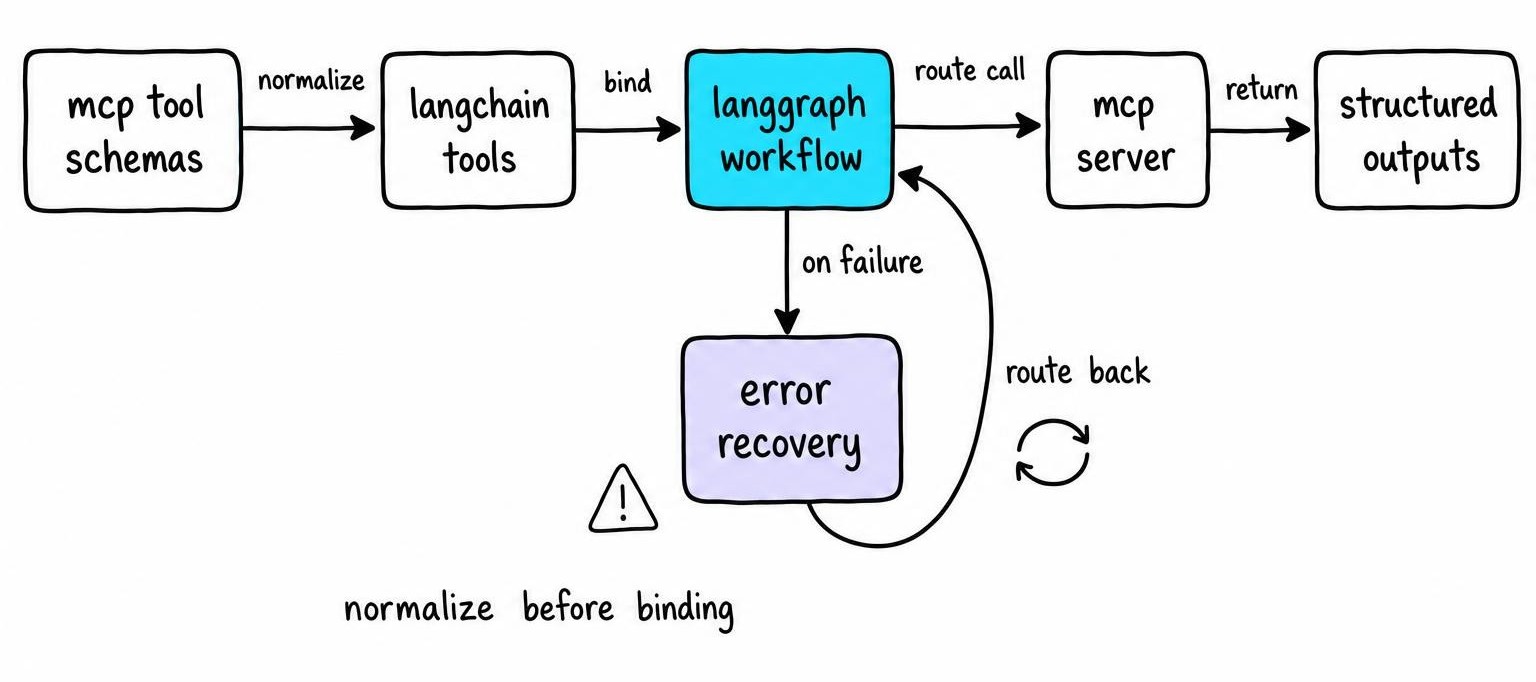
When MultiServerMCPClient discovers tools, it converts each MCP JSON schema into a BaseTool with a name, description, and Pydantic input model. The description matters more than you'd expect - a vague server-side description is one of the most common reasons an agent keeps reaching for the wrong tool, and rewriting it usually fixes selection faster than editing the agent prompt does.
For LangGraph workflows, bind tools with explicit routing edges rather than letting create_react_agent handle everything. This gives you error edges that catch malformed outputs before they poison downstream nodes. When aggregating multiple servers, two servers exposing search shadow each other silently - the namespace prefix from MultiServerMCPClient prevents this only if you keep server keys unique.
Tools, resources, and prompts: choose the right MCP primitive
- Tools handle model-initiated actions with typed inputs - database writes, API calls, anything with side effects.
- Resources are addressable, read-only context. Your application loads these into the prompt or RAG pipeline before the model runs, not during tool selection.
- Prompts are reusable interaction templates defined server-side, while your application controls final system instructions.
Treating resources as tools is a common mistake. Resources don't accept arbitrary arguments or trigger side effects - mixing them up creates agents that try to "call" a static document and fail silently.
Choose HTTP, stdio, and stateful MCP sessions correctly
Transport selection doesn't change what your MCP server can do - it changes how it deploys, authenticates, and fails.
- Local dev or subprocess tools → stdio. Zero network config.
- Remote services, containers, multi-user production → HTTP.
- Stateful multi-turn workflows → either transport, but manage session lifecycle explicitly.
Keep connection config in environment variables or a secrets manager. Never embed credentials in the server dictionary.
HTTP transport for remote MCP servers
Point your client at the server's URL, pass auth headers, and enforce TLS. Set explicit timeouts - the defaults are generous enough to hang indefinitely behind a reverse proxy. Proxy buffering breaks SSE streams; disable response buffering in nginx or you'll see tools "complete" with empty results.
For user-scoped data, pass per-user authorization tokens rather than a single service credential.
stdio transport for local MCP servers
The client spawns your server as a subprocess using command, args, and optional env keys. All MCP protocol messages travel over stdout; application logs must go to stderr. Mix them and the JSON parser chokes on log lines with no useful error.
Watch for missing executables (generic FileNotFoundError), inherited environment leaking secrets, and container path differences.
Stateful session lifecycle and concurrency
Some MCP servers maintain state between calls - conversation context, cursors, transaction handles. Reusing one session across concurrent agent runs means interleaved state that corrupts both.
Rule: one session per user request or concurrent graph run. Open at request start, close at request end. In async code, scope sessions inside the async with block - never store them at module level.
Secure and observe production MCP agents
Every MCP server is an attack surface. Treat tool descriptions, resource contents, and tool outputs as untrusted input - a compromised server can inject prompts through its own tool descriptions.
- Least privilege: allowlist servers and tools per agent. Scope credentials per tenant. Restrict network egress.
- Tool interceptors: validate arguments, enforce rate limits, redact PII, and gate destructive actions behind human approval before the call reaches the server.
- Elicitation: when a tool needs user input (confirmation codes, secrets), use MCP's elicitation flow to keep secrets out of conversation history.
Capture structured logs with run IDs, server names, tool names, latency, and sanitized arguments. Wire progress notifications to user-visible status and cancellation controls - without them, a 30-second tool call looks identical to a hang.
I'd run agent evaluation cases on every deploy, covering tool selection, argument accuracy, and recovery from server faults. They catch regressions that unit tests against the server alone never surface.
Debug 7 LangChain MCP integration failure modes
- Connection lifecycle: session closes before the agent finishes. Scope sessions inside
async withat request level. - Transport configuration: wrong
commandpath, stdout/stderr mixing. Test the server binary standalone first. - Schema validation: MCP servers can emit JSON Schema constructs (
anyOf, recursive refs) that LangChain's Pydantic converter doesn't handle. Inspect schemas at discovery time. - Tool collisions: two servers exposing
searchshadow each other. Use distinctMultiServerMCPClientkeys and rewrite vague descriptions. - Authentication: distinguish missing credentials (startup crash), expired tokens (intermittent 401), and insufficient scopes (partial results). Each needs a different fix.
- Timeouts: set bounded timeouts on every transport. Retry only idempotent reads. Propagate cancellation.
- State leaks: shared sessions across concurrent runs corrupt state. One session per request, cleaned up in
finally.
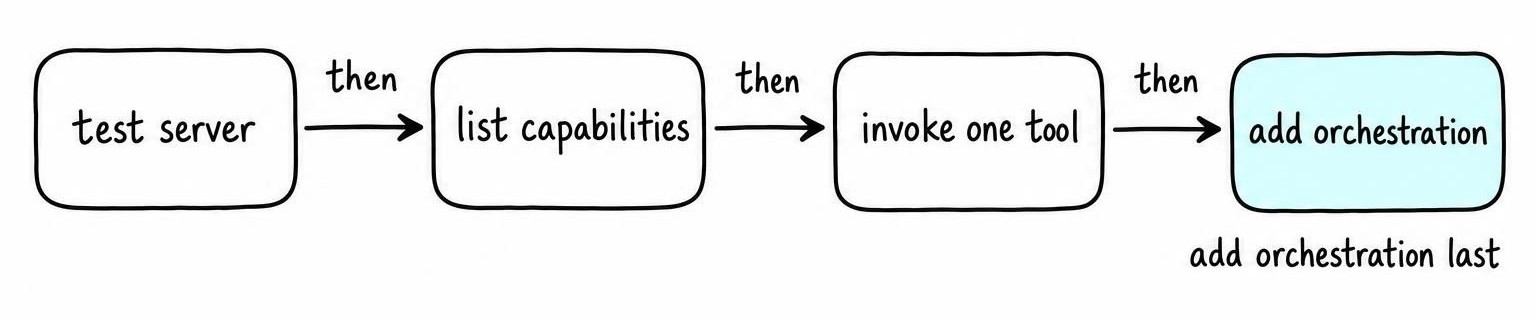
Debugging workflow: test the MCP server independently, list capabilities through the client, invoke one tool directly, then add LangGraph orchestration. Each layer isolates a different failure class.
MCP vs API vs RAG: which architecture should you use?
| Criterion | MCP | Conventional API | RAG |
|---|---|---|---|
| Primary purpose | Standardized tool discovery for AI hosts | Direct service contract | Evidence retrieval for grounded generation |
| Write/action support | Yes, first-class | Yes | No - read-only |
| Interoperability | Any MCP-compatible host discovers tools | Tied to client implementation | Tied to vector store and embeddings |
| Operational complexity | Medium - transports, sessions, schemas | Low - familiar HTTP | Medium - indexing pipeline, embedding drift |
| Best fit | Multi-host portable tool access | Single stable internal service | Evidence-grounded answers over a corpus |
MCP standardizes discovery and invocation - the API is still the underlying service contract. An MCP server often wraps an API, adding schema advertisement any compliant host can consume.
RAG retrieves evidence for generation. MCP can expose that same retrieval as a tool, meaning agents call a retrieval server through MCP rather than hardcoding vector-store logic. The approaches layer naturally.
Decision checklist:
- Multiple AI hosts need the same tool? → MCP's portability pays off.
- Single internal service, one consumer? → conventional API wrapper is simpler.
- Need grounded answers over a static corpus? → RAG.
- Latency budget under 200ms? → direct API calls avoid protocol overhead.
FAQ
How is MCP different from API?
MCP adds a discovery and schema layer on top of APIs. A conventional API requires each consumer to hardcode endpoints and data contracts. MCP lets any compatible AI host automatically discover available tools and their input schemas at runtime, then invoke them through a standardized protocol. The underlying service often still exposes a regular API that MCP wraps for portable, model-initiated access.
How does the Model Context Protocol work?
An AI host connects through an MCP client to one or more MCP servers. On connection, client and server negotiate capabilities, then the client pulls a catalog of tools, resources, and prompts described by JSON schemas. When the LLM selects a tool, the client forwards a structured call to the server, which executes it and returns typed results back through the same channel.
What exactly does LangChain do?
LangChain provides Python and JavaScript abstractions for LLM-powered applications - model orchestration, prompt management, memory, tool execution, and output parsing. With LangGraph it extends to stateful multi-step agent workflows. It connects models and services into composable chains rather than replacing them.
What is MCP vs RAG?
MCP standardizes how AI agents discover and call external tools, including actions with side effects. RAG retrieves documents from a corpus to ground LLM generation and is read-only. They solve different problems and combine well - an agent can call an MCP-exposed retrieval server for evidence while using other MCP tools for writes and actions.
Is LangChain still relevant?
LangChain remains actively maintained and widely adopted for agent orchestration, especially through LangGraph for stateful workflows. Its MCP adapter package makes it one of the fastest paths to connecting agents with MCP servers. Alternatives exist, but the ecosystem breadth keeps it a practical default.