Implement LLM Function Calling in OpenAI, Claude, Gemini
Swarnava Dutta8 min read
Openai Responses APIAnthropic Tool UseGemini Function Calling
Contents

Your LLM returns a perfectly structured get_weather call - then passes "latitude" as a string, hallucinates a parameter that doesn't exist, and your app throws a KeyError at 2 AM. The model knows how to request a function. The problem is everything around that request: schema design, argument validation, execution safety, and retry logic, all working as one loop.
Quick answer
Implementing function calling in an LLM requires four steps: define each tool as a JSON Schema with strict type constraints, send the schema array alongside the user prompt, validate returned arguments before execution, and feed results back to the model for a final answer. OpenAI, Claude, and Gemini use different request shapes but follow this same define-call-validate-return loop. Pydantic model_validate catches malformed calls before they reach application code.
How function calling works in LLM applications
Function calling is structured tool selection. The model reads a user prompt alongside tool definitions, then outputs a JSON object naming a function and its arguments. Your application code calls the actual API, database, or calculation and returns the result.
The mechanism connects a probabilistic language model to deterministic operations. A model can draft prose, but it cannot query a live inventory database or charge a credit card. Function calling lets the model declare intent as typed JSON while your code handles action.
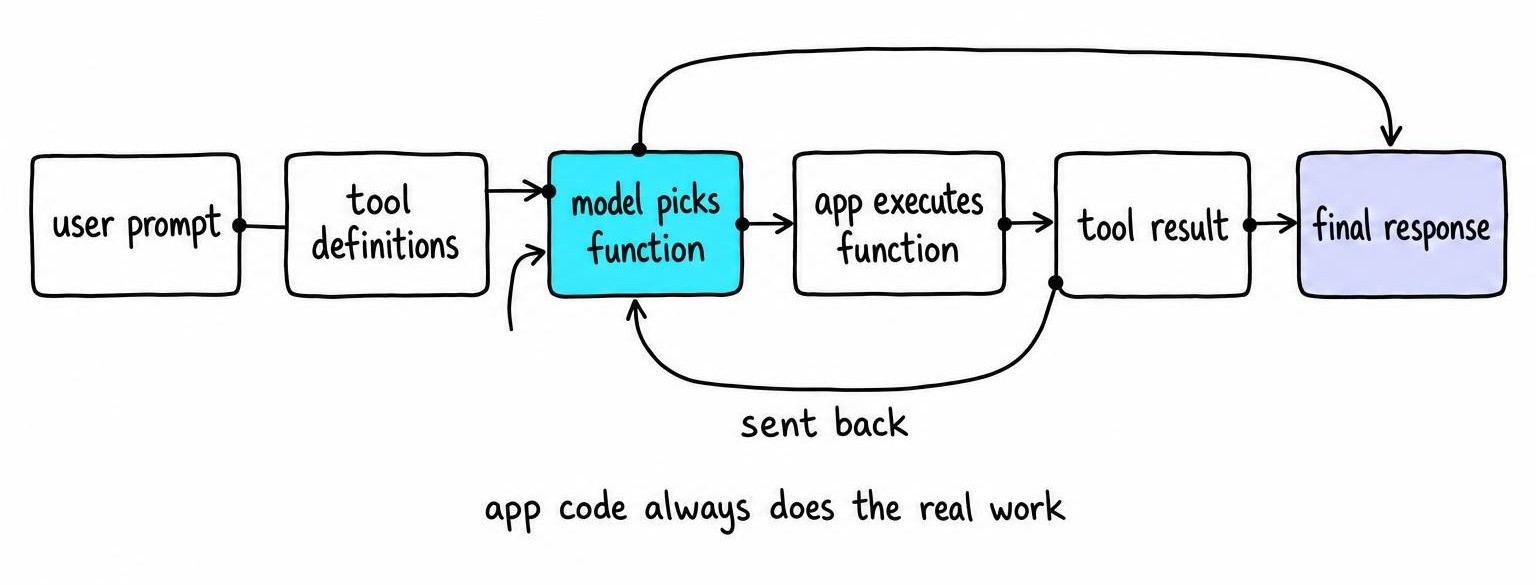
The lifecycle has six steps:
- Your app sends the user message plus tool definitions (JSON Schema) to the LLM.
- The model decides whether a tool is needed and, if so, which one.
- The model returns a structured call object: function name plus arguments.
- Your app validates the arguments, then executes the function.
- Your app sends the execution result back as a tool-result message.
- The model incorporates the result and generates a final natural-language response.
This loop can repeat - step 6 may trigger another tool call, restarting at step 2.
Function calling overlaps with but differs from related patterns. Plain JSON mode forces structured output yet carries no execution contract. Agents layer planning and memory on top of function calling but depend on it for every external action. Model Context Protocol standardizes how tools are discovered and served across hosts, but the call-validate-return loop underneath remains the same.
Define tool contracts with JSON Schema and Pydantic
A tool definition is a JSON Schema that tells the model what it can call and what types those arguments must have:
{
  "name": "get_weather",
  "description": "Return current weather for a location. Use when the user asks about temperature, conditions, or forecasts.",
  "parameters": {
    "type": "object",
    "properties": {
      "latitude": {"type": "number", "description": "Decimal latitude, e.g. 40.7128"},
      "longitude": {"type": "number", "description": "Decimal longitude, e.g. -74.0060"},
      "unit": {"type": "string", "enum": ["celsius", "fahrenheit"], "description": "Temperature unit"}
    },
    "required": ["latitude", "longitude", "unit"],
    "additionalProperties": false
  }
}
The Pydantic model mirrors this schema and catches bad arguments before your code touches them:
from pydantic import BaseModel, Field
from typing import Literal

class GetWeatherArgs(BaseModel):
    model_config = {"extra": "forbid"}

    latitude: float = Field(description="Decimal latitude")
    longitude: float = Field(description="Decimal longitude")
    unit: Literal["celsius", "fahrenheit"] = Field(description="Temperature unit")

# Coerces "40.7" string to 40.7 float automatically
args = GetWeatherArgs.model_validate({"latitude": "40.7", "longitude": -74.006, "unit": "celsius"})
Setting extra="forbid" rejects hallucinated parameters. Using Literal instead of open strings shrinks the space of valid outputs. Write descriptions that state when to use the tool - models pick between tools based on that text.
Build a provider-neutral LLM function-calling loop
The core loop is identical regardless of provider: send tools, check for calls, validate, execute, return results, repeat. Wrap provider-specific translation in an adapter so your tool registry and dispatch logic stay portable.
A minimal architecture needs: a TOOL_REGISTRY dict mapping function names to callables, a parallel dict mapping names to Pydantic models, a MAX_ROUNDS cap, and a conversation-state list. Each iteration inspects the response for tool-call objects, validates arguments through model_validate, executes the function, and appends the result keyed by the provider-issued call ID. When the response contains no tool calls - or MAX_ROUNDS hits - the loop returns the model's answer.
Implement the loop with the OpenAI Responses API
OpenAI expects tools with type: "function" and your JSON Schema under definition. The response contains function_call items, each carrying a call_id and stringified JSON arguments - parse with json.loads before Pydantic validation. Return results as function_call_output items matched by call_id.
Implement Anthropic tool use with Claude
Anthropic wraps tool definitions under an input_schema key instead of parameters. Claude returns tool_use content blocks with an id, function name, and an input dict (already parsed). Return results as tool_result blocks in a user-role message referencing the same id. Claude can return multiple tool_use blocks in a single response, so iterate over all of them. Keep looping until stop_reason switches to "end_turn".
Implement Gemini function calling
Google's Gen AI SDK accepts a function_declarations list. Gemini defaults to automatic function calling - disable with automatic_function_calling=False when you need validation. Response parts contain function_call objects with name and args (a dict). Send results as function_response parts. The schema uses Google's Type enum (STRING, NUMBER) instead of lowercase type strings; your adapter converts once at registration. How Gemini works covers the broader architecture.
Validate arguments and execute tools safely
Treat every model-generated function name and argument as untrusted input. Even with strict schema enforcement, the model can pass values that satisfy the type system but violate business rules - a quantity of negative ten million passes an int check.
Enforce three layers before execution:
- Allowlist dispatch. Only names present in
TOOL_REGISTRYexecute. Unknown names return a structured error to the model. - Pydantic validation with bounds. Use
Field(ge=0, le=1000)for numeric ranges,max_lengthfor strings. Setextra="forbid". - Runtime guards. Wrap each function with a timeout, per-tenant rate limits, and authorization checks. Destructive actions require explicit user confirmation.
Separate failure types in the result: validation_error, execution_error, and upstream_error. The model adjusts its next attempt differently for each.
Sanitize tool output before injecting it into the conversation. A malicious API response containing instructions like "Ignore previous instructions" becomes a prompt-injection vector if passed raw - strip or escape control-like phrases from tool results.
Log every call with a trace ID, tool-call ID, model name, argument payload (secrets redacted via Pydantic's SecretStr), execution latency, result status, and token usage.
Handle parallel tool calls, retries, and loop failures
OpenAI, Claude, and Gemini can all return multiple tool calls in a single response. Execute independent calls concurrently with asyncio.gather, but serialize calls that share state - a create_order must finish before get_order_status runs against the same order. Match every result to its provider-issued call ID; mismatched IDs cause silent failures.
Separate transport retries from tool retries. A 429 or 503 from the LLM API gets bounded exponential backoff with jitter. A tool execution failure gets a different path: return a structured error to the model with the failure reason, giving it one controlled repair attempt. Attach idempotency keys to side-effecting tools so a retry never double-fires.
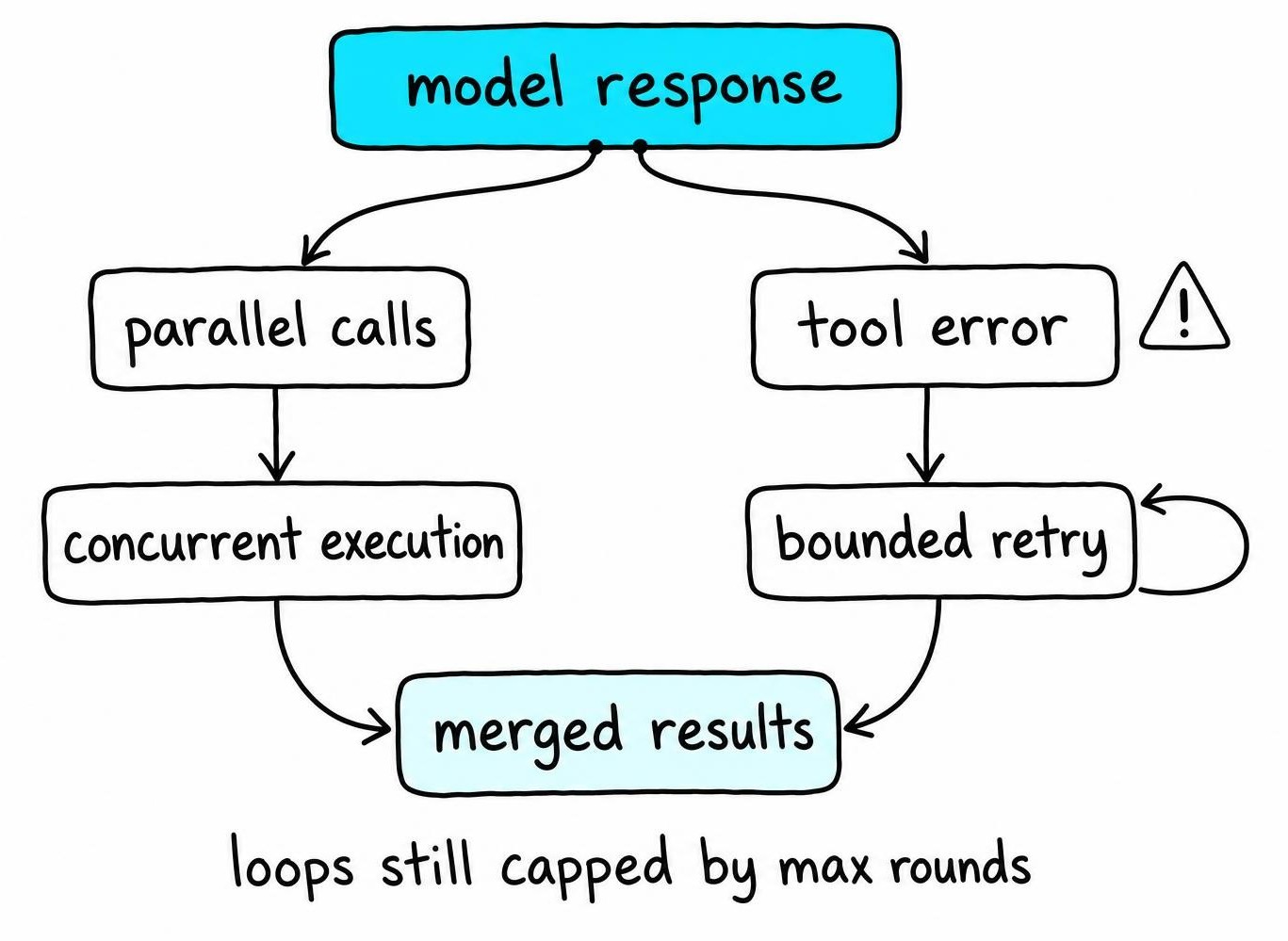
Stop infinite loops with guardrails: cap iterations at a fixed maximum, track (function_name, argument_hash) pairs to skip duplicate calls, enforce a cumulative token budget, and set a wall-clock deadline on the entire loop. When any guardrail triggers, return a human-readable explanation and log the full call history.
Compare OpenAI, Claude, and Gemini function calling
| Criteria | OpenAI Responses API | Claude (Anthropic) | Gemini (Google) |
|---|---|---|---|
| Tool declaration key | parameters |
input_schema |
function_declarations |
| Schema format | JSON Schema | JSON Schema | Google Type enum |
| Call identifier | call_id |
id (in tool_use block) |
None (match by name) |
| Arguments returned as | JSON string | Parsed dict | Parsed dict |
| Parallel calls | Yes | Yes | Yes |
| Result message type | function_call_output |
tool_result (user role) |
function_response part |
| Auto-execution option | No | No | Yes (SDK default) |
| Strict schema mode | strict: true |
No equivalent | No equivalent |
Three differences belong in your provider adapter: declaration shape, argument parsing, and result-message format. Everything else - tool registry, Pydantic validation, dispatch logic, retry policy - stays shared.
Test migration with a five-case fixture: a single valid call, parallel calls, an argument payload that fails validation, a tool that returns an execution error, and a multi-step chain where each call depends on the previous result.
Choose between direct APIs, LangChain, and MCP
Direct provider APIs give you the smallest dependency surface. When a tool call fails, you debug one HTTP exchange. For teams running fewer than five tools against a single provider, direct calls keep the stack legible.
LangChain earns its weight when you need provider-agnostic tool decorators, agent loops with memory, and integrated tracing. The @tool decorator auto-generates JSON Schema from type hints, and create_tool_calling_agent wires the validate-execute-return loop. The tradeoff: LangChain's adapters can silently normalize provider-specific behavior, making bugs harder to trace.
Model Context Protocol standardizes how applications discover and serve tools across hosts and runtimes. Provider function calling controls how a model requests a tool. The two compose: an MCP server exposes tool schemas, your LLM sends calls against those schemas, and your execution layer validates and dispatches.
Your Pydantic-validated tool registry sits beneath all three options. Register tools once, validate arguments in one place, log every execution with the same trace schema. Swap the layer above without duplicating safety guards.
FAQ
What is function calling LLM?
Function calling lets an LLM output a structured JSON object naming a function and its typed arguments instead of free-form text. Your application executes the actual function and returns the result to the model for a final answer.
What is function calling in LLMs primarily designed for?
Connecting a probabilistic language model to deterministic external operations - API requests, database queries, calculations - that the model cannot perform directly. It separates intent declaration (the model's job) from execution and side effects (your application's job).
How function calling works in LLM?
The application sends tool definitions as JSON Schema alongside the user prompt. The model returns a call object with function name and arguments. The application validates those arguments, executes the function, and sends the result back. The model uses that result to answer or request another tool call.
How to implement function calling in LLM?
Define each tool as a JSON Schema with strict types, mirror it with a Pydantic model, and build a loop that sends tools to the API, validates returned arguments via model_validate, executes the function, and returns results keyed by call ID. Add iteration caps, timeouts, and idempotency guards for production use.