How to Build Agent Orchestration: 7 Production Steps
Swarnava Dutta11 min read
AI Agent OrchestrationMulti Agent Orchestration
Contents

An "agent team" works beautifully in the sandbox - a planner, a researcher, and a writer agent passing tasks back and forth like a well-rehearsed relay team. Feed the same chain a malformed ticket in production and the researcher agent stalls on a tool call that never returns, leaving every downstream agent to burn tokens until somebody notices. How to build agent orchestration has almost nothing to do with prompting and everything to do with plumbing: state, retries, timeouts, and a human who can pull the plug.
Multi-agent demos fail quietly in production because nobody wires up the boring parts - recovery paths, approval gates, and visibility into what each agent actually did. This guide walks through the seven pieces that turn a fragile agent loop into something you can run unattended: contracts, topology choice, routing, state management, failure handling, observability, and framework rollout.
Quick answer
Agent orchestration is built by defining strict contracts for agents, tools, and shared state, then wiring a control loop that routes tasks, calls tools, and hands off between agents using explicit rules rather than free-form reasoning. Add bounded retries, human approval for risky actions, and structured logging of every step. The system holds up in production only when failures are recoverable, not when the happy path works.
How to Build Agent Orchestration Around a Production Control Loop
Orchestration isn't the model. It's the layer coordinating models, tools, sub-agents, shared state, policies, and the human who gets paged when things go sideways.
The architecture has a fixed shape once you strip the marketing: an input arrives, a planner or router decides what happens next, workers execute against a tool gateway, a state store tracks progress, an evaluator checks results, and an approval queue holds anything risky before it commits. Observability wraps all of it, logging every hop.
The core loop is boring on purpose: receive an objective, inspect current state, pick the next action, execute it, validate the result, update state, decide whether to stop or continue. Each of those verbs is a function you can unit test - not a paragraph of prompt begging the model to behave.
The real skill in agent orchestration architecture is separating probabilistic reasoning from deterministic control. Let the model decide what to do next; let code enforce permissions, schemas, budgets, timeouts, and termination conditions. Blur that line and you get agents that argue with your rate limiter instead of respecting it.
Define Agent, Tool, and State Contracts Before Writing Prompts
Before any prompt engineering, write down each agent's objective, its allowed tool list, and the exact schema for its inputs and outputs. Unbounded natural-language handoffs between agents are where most orchestration failures start - one agent's "done" doesn't mean the same thing as another's.
Force structured outputs and validate every handoff against a schema, rejecting and retrying malformed ones instead of passing them downstream.
Define explicit states - completed, failed, cancelled, escalated - so a stuck agent has somewhere to go besides an infinite loop. Make tool calls idempotent wherever possible, and attach a correlation ID to every action so you can trace a state change back to the exact call that caused it.
Single-Agent vs Multi-Agent Orchestration: Choose by Failure Cost
Most teams reach for multi-agent orchestration before they need it. A single agent with a well-curated tool list handles the majority of production workloads, and it's dramatically easier to evaluate, log, and debug because there's one prompt, one context window, one place things go wrong.
Multi-agent topologies earn their complexity when tasks genuinely need specialization, isolated context, or parallel execution. Supervisor-worker patterns route subtasks to specialists and merge results. Sequential pipelines pass work down a fixed chain. Hierarchical designs nest supervisors inside supervisors for deep workflows. Decentralized swarms let agents negotiate directly - flexible, but the hardest to audit and the easiest to spiral into loops.
| Criteria | Single-agent | Supervisor-worker | Decentralized multi-agent |
|---|---|---|---|
| Complexity | Low | Medium | High |
| Task parallelism | Poor | Good | Good |
| Context isolation | None | Strong | Weak |
| Latency | Low | Medium | Variable |
| Token cost | Low | Medium-high | High |
| Coordination risk | None | Moderate | High |
| Auditability | High | Medium | Low |
| Recovery difficulty | Low | Medium | High |
Start with one agent. Split only when specialization, hard context boundaries, real parallelism, or security isolation justify the coordination tax.
How Agent Orchestration Works: Routing Tasks and Tool Calls
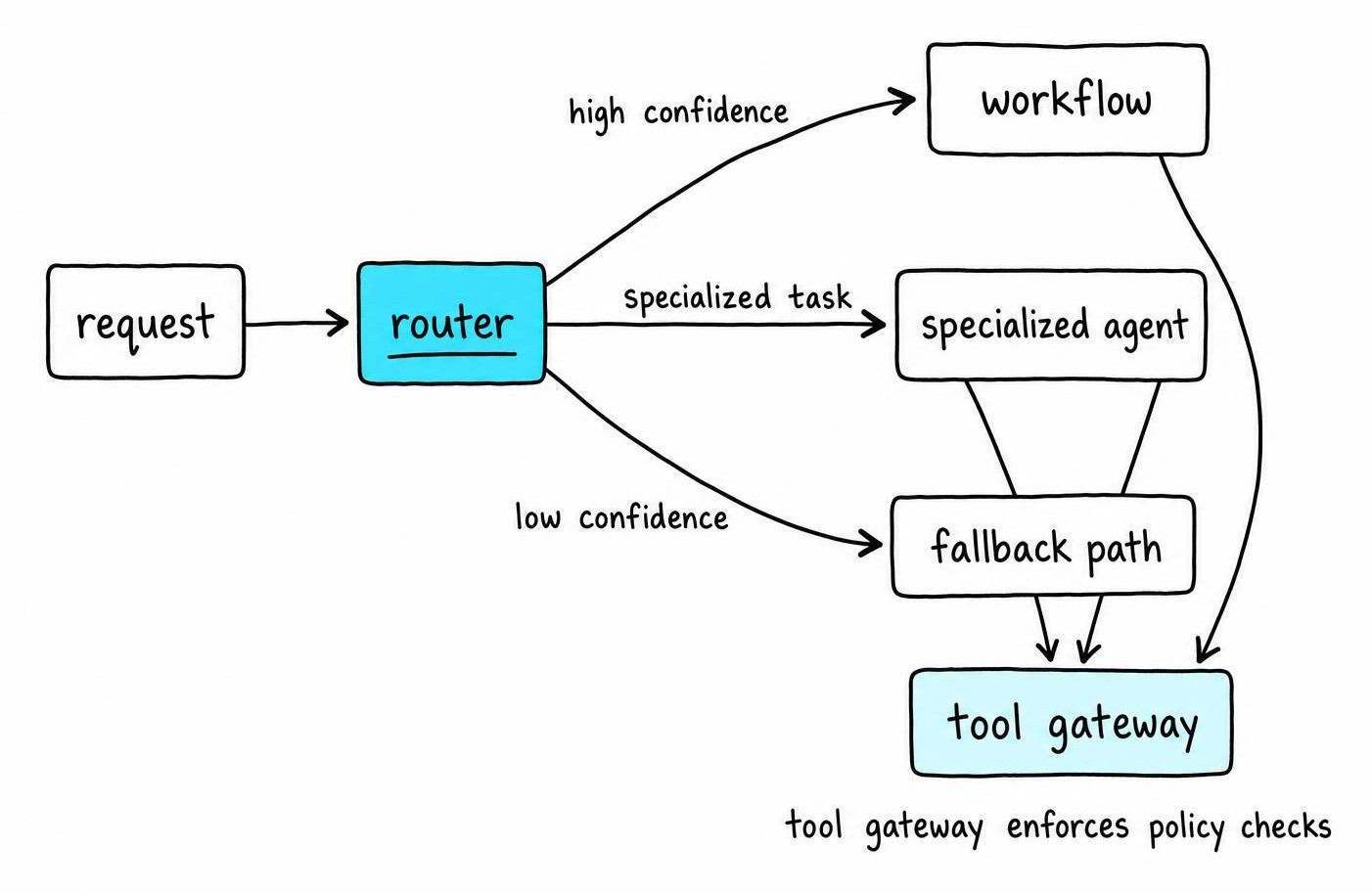
At the front of every request sits a router, and its only job is classification: is this a known intent that maps to a fixed workflow, a fuzzy task that needs a specialized agent, or garbage that should bounce to a fallback path?
Fixed routing rules - keyword matches, schema checks, regex on structured fields - handle the majority of traffic cheaply and predictably. Model-based routing kicks in for ambiguous requests, but only with a confidence threshold: below it, the router asks a clarifying question or escalates to a human instead of guessing.
Workflow shape depends on the task. Sequential chains suit linear pipelines like extract-then-summarize. Parallel branches fit independent subtasks that merge later. Conditional graphs branch on intermediate results. Event-driven workflows react to external triggers like webhook or queue messages. Map-reduce patterns fan a task out across many items and reduce results back into one.
Every tool call should pass through a single gateway enforcing auth, schema validation, rate limits, and policy checks - never a direct model-to-API connection. Cap every workflow and agent with max steps, token budget, wall-clock time, and spend, so a stalled loop dies on its own instead of burning wall-clock until someone notices.
Manage Shared State, Context, and Memory Without Contamination
Four kinds of state get lumped into "context" by teams that haven't been burned yet: transient execution state, conversation history, durable business records, and retrieved long-term memory. Mixing them into one growing prompt blob is how an agent starts confusing tickets that have nothing to do with each other.
That contamination surfaces as a support agent "remembering" a refund amount from a completely different customer's thread. The cause sits in the wrapper rather than the model. Replaying the last N messages from a shared conversation log hands one ticket's history to the next, so scope memory per ticket: give each agent its own namespace and make the workflow's state store, rather than the chat transcript, the thing every agent reads from.
Treat the workflow state store as the source of truth, not the agent's chat history. The prompt is a rendering of state for one call - the database is what survives a crash, a restart, or a routing change.
Give each agent scoped memory and least-privilege access, so a specialist can't read or clobber another agent's working set. As context grows, apply summarization, retrieval, and pruning deliberately, and version anything you compress so you can trace a decision back to the source record it came from.
Checkpoint state after every consequential action - a payment, a send, a write - so a resumed workflow replays from there instead of repeating the side effect.
Design Retries, Recovery, and Human Approval for Failure Paths
Not every failure deserves the same response, so classify before you retry. Transient infrastructure errors - a timeout, a 503 - get bounded retries with exponential backoff and jitter. Provider throttling needs more care, because stacked retry layers turn one throttled call into a retry storm. Tool errors, invalid outputs, reasoning failures, policy violations, and unrecoverable business conflicts each need a different path, not the same three-retries-then-panic loop.
Idempotency is where a notification workflow breaks first: a retry on a timed-out request fires after the original call has already succeeded downstream, and the recipient gets the same email twice in under a second. The timeout was never a real failure - the response just never made it back - but plain retry logic cannot tell the difference. An idempotency key on every send, checked against a log before the retry fires, closes that gap for good.
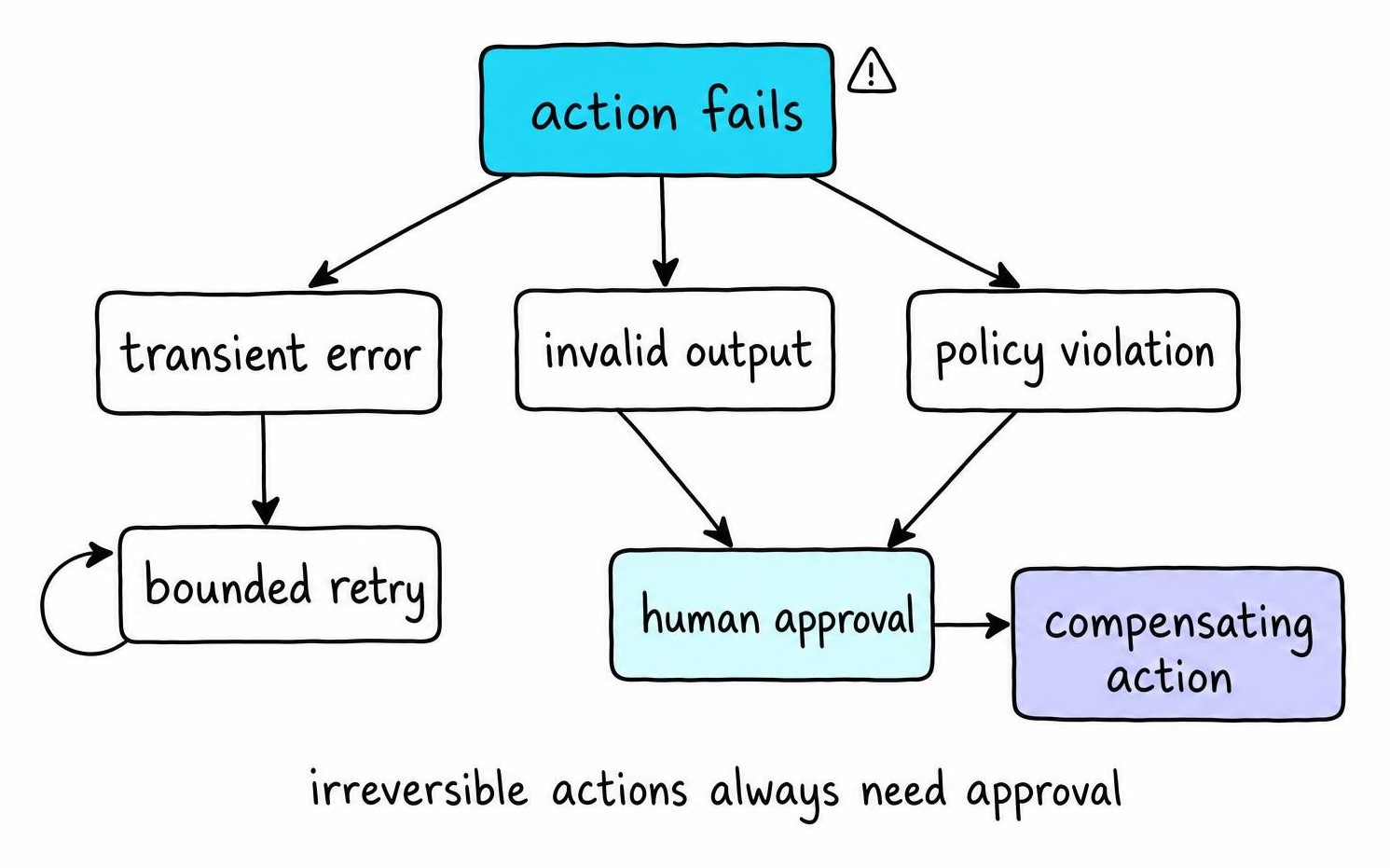
Retrying a semantic failure - a malformed schema, a hallucinated field - the same way you retry a network blip just burns tokens on the same wrong answer. Change strategy instead: switch prompts, drop to a smaller deterministic step, or escalate straight to a human.
Wrap flaky dependencies in circuit breakers, route unresolvable failures to a dead-letter queue for offline review, and keep a cheaper fallback model on standby for when your primary is degraded. Partially completed workflows need compensating actions - a refund, a cancellation - not a silent abandon.
Require human approval before anything irreversible, expensive, regulated, or below a confidence threshold. Persist the proposed action, the evidence behind it, and prior audit history alongside the approval request, so the reviewer isn't reconstructing context from a chat log.
Test and Observe AI Agent Orchestration in Production
You can't debug what you can't see, and agent chains hide a lot. Trace every run end to end - prompts, model calls, agent handoffs, tool calls, state transitions, approvals, retries - with one correlation ID threading the whole path.
Watch a small set of signals closely rather than a dashboard of everything: task success rate, tool error rate, human-escalation rate, and cost per task. A spike in escalation rate with flat error rate usually means your confidence threshold drifted, not your tools.
Build an offline evaluation set from real historical tasks plus known failure cases, and rerun it as a regression suite whenever a prompt, model, tool, or policy changes. Aggregate dashboards miss the weird edge cases - shadow traffic, canary releases, and manual review of sampled traces catch what metrics smooth over.
Redact secrets and personal data before traces hit storage, but keep enough provenance that an audit can reconstruct why an agent did what it did.
Control Security, Prompt Injection, and Runaway Cost
Treat retrieved documents, tool output, and agent-to-agent messages as untrusted input by default - this is the same discipline covered in how guardrails work for single-model systems. Enforce least-privilege credentials, per-tool authorization, and sandboxing in code, never in a prompt instruction.
Untrusted text should never be able to rewrite system policy or expand tool permissions - validate that outside the model layer. Cap tokens and tool calls per run, and cap total spend per tenant. Wire kill switches and anomaly alerts for looping agents or sudden cost spikes before they hit the invoice.
Choose an Agent Orchestration Framework and Roll Out Safely
Pick an agent orchestration framework by what it does when things break, not by how good its demo looks. Check for durable execution and checkpointing, explicit state semantics, first-class human-approval hooks, tracing out of the box, and how hard it is to leave once you're in.
Missing durable checkpointing is the clearest example of a framework that fails this test: a process restart mid-run sends the whole task back to the start, tool calls and all. That gap never shows in a notebook and surfaces the first time the system has to survive a deploy. That's roughly how AutoGen and the Agents SDK diverge once you push past prototypes - the gap shows up in exactly this kind of operational detail, not in demo quality.
Plenty of "agentic" problems don't need an agent-native framework at all. A plain workflow engine calling models as one more step is safer and easier to operate when your task graph is mostly fixed and only a few decision points need model reasoning.
Roll out in stages rather than all at once. Start with a narrow use case and typed contracts, build a single-agent baseline against an evaluation set, then add controlled tool access. Once that's stable, add recovery paths and observability, and only then move to staged deployment behind a flag.
Validate with failure injection, load tests, degraded-model tests, and approval-path drills before expanding autonomy. Gate production on measurable quality, bounded cost, recoverability, a completed security review, and a documented rollback path - anything less is still a demo.
FAQ
How does AI agent orchestration work?
A control loop receives an objective, checks current state, routes the task to an agent or workflow branch, executes tool calls through a governed gateway, validates the result against a schema, updates persistent state, and decides whether to continue, retry, escalate, or stop. Deterministic code enforces the rules; models handle the reasoning steps in between.
How do you build agent orchestration?
Start by writing explicit contracts for each agent's inputs, outputs, and allowed tools before touching prompts. Build a single-agent baseline first, add a state store as the source of truth, wrap tool calls in a validating gateway, add bounded retries and human approval for risky actions, then instrument tracing before expanding to multiple agents.
How do you do agent orchestration in production?
Production orchestration means treating every failure mode as a first-class path: classify errors, retry only transient ones, checkpoint state after side effects, and route irreversible or low-confidence actions to human approval. Add end-to-end tracing, an offline evaluation set for regression testing, and hard caps on steps, tokens, and spend before going live.
How does multi-agent orchestration work?
A supervisor agent decomposes a task, routes subtasks to specialist worker agents with scoped tools and memory, and merges their results back into a single output or decision. Handoffs pass through validated schemas rather than free-form text, and a shared state store tracks progress so no agent works from stale or contaminated context.
When should you use multiple agents instead of one agent?
Reach for multiple agents only when a task genuinely needs specialization, hard context isolation, real parallel execution, or security boundaries between roles. If a single agent with a well-scoped tool list can do the job, keep it single - the coordination overhead of multi-agent orchestration isn't worth paying until one agent's context or permissions start bottlenecking the workflow.
Further Reading
- Representations of task assignments in distributed systems using Young tableaux and symmetric groups - Dohan Kim (2010)
- A Survey of Multi-Agent Deep Reinforcement Learning with Communication - Changxi Zhu, Mehdi Dastani, Shihan Wang (2022)
- UniGuardian: A Unified Defense for Detecting Prompt Injection, Backdoor Attacks and Adversarial Attacks in Large Language Models - Huawei Lin, Yingjie Lao, Tong Geng et al. (2025)