Why Claude AI Is Not Working: 7 Fixes to Try Today
Swarnava Dutta9 min read
Claude AI Not Working RedditClaude AI Error TodayClaude AI Is Down
Contents

A long Claude conversation can stop mid-prompt, with every response just… ending. Blank output, no error, no spinner. The first instinct is to check whether Claude is down, and the status page shows green. That combination is the tell that why Claude AI is not working has nothing to do with Anthropic's servers - a browser extension silently killing the response stream produces exactly this symptom.
Quick answer
Claude AI stops working because of an Anthropic outage, a reached usage or rate limit, an expired session, a corrupted conversation, a browser extension or cache conflict, a VPN or firewall block, or a mobile-app bug. Check status.anthropic.com first. If the platform is operational, test in an incognito window, switch networks, or start a fresh conversation to isolate the cause.
Why Claude AI Is Not Working: Diagnose by Symptom
Before changing anything, copy unsaved prompts out of the conversation. Clearing site data or abandoning a thread loses everything.
| Symptom | Likely cause | Confirming check | Fix |
|---|---|---|---|
| Blank page / endless spinner | Browser, cache, or network | Load Claude in incognito | Clear site data or switch browser |
| Response cuts off or never appears | Conversation-level or service error | Start a new conversation | Reduce context length or remove attachments |
| Login loop / "session expired" | Authentication or cookie issue | Try a different browser | Log out everywhere, clear cookies, log back in |
429 or "usage limit" message |
Rate limit or plan cap | Check usage dashboard | Wait for reset or upgrade tier |
| Works on Wi-Fi, fails on mobile data | Network or regional block | Toggle VPN off | Switch networks or adjust firewall rules |
Isolate the failing layer by trying these in order, stopping when Claude responds:
- New conversation - same browser, same account.
- Incognito window - strips extensions and cached state.
- Different device - rules out OS-level corruption.
- Different network - eliminates firewall or ISP filtering.
Whichever step works tells you exactly where the problem lives.
Claude AI Error Today? Confirm an Outage First
Head to status.anthropic.com - but don't stop at the green banner. Anthropic breaks the page into components: Claude.ai, mobile apps, API, login, and individual models. The overall status can read "Operational" while a specific model endpoint is degraded. Check each component row and scan incident timestamps in your time zone; updates sometimes lag by ten or fifteen minutes.
Quick heuristic: if Claude fails on two devices across two separate networks, the problem is Anthropic's. If it fails on one browser or one network, the problem is yours.
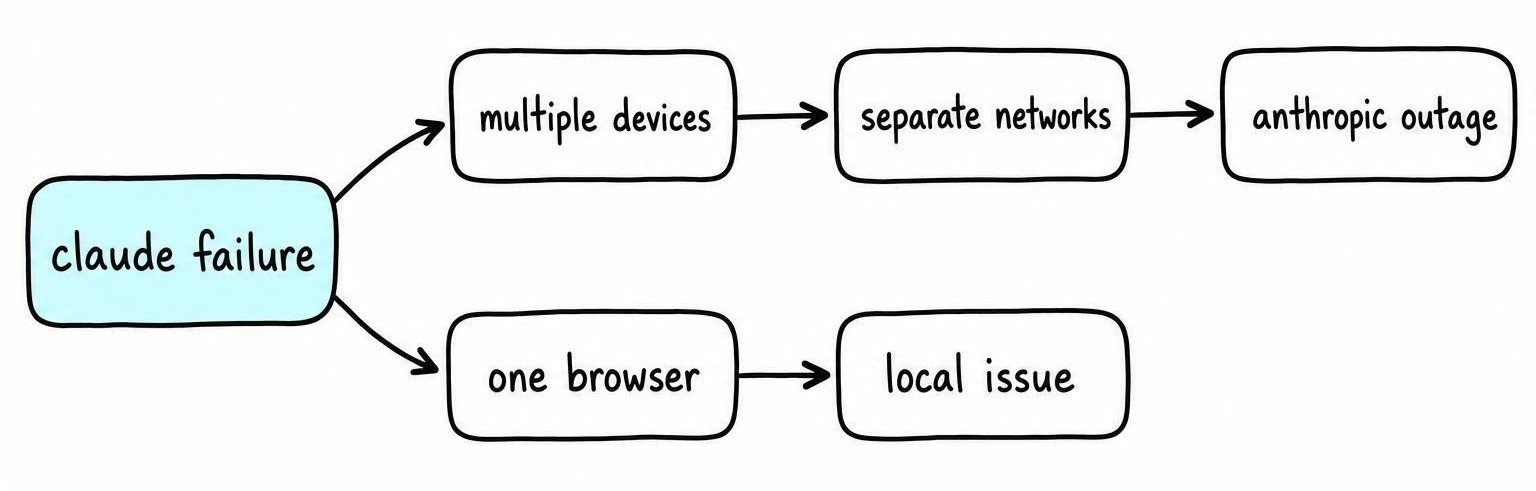
Subscribe to incident notifications at the bottom of the status page instead of repeatedly refreshing Claude. Anthropic pushes component-level alerts, so you'll know whether Claude AI is down before wasting time on local fixes.
Usage Limits, Login Loops, and Account Access Failures
Claude's message caps vary by plan (Free, Pro, Team, Enterprise), by model, by conversation length, and by current demand. Higher-capability models generally consume your allocation faster. If you see a reset time in the error, wait for it - hammering the same prompt won't speed the cooldown.
For login loops: close every duplicate Claude tab, sign out completely, restart the browser, then sign back in using the same method you originally registered with (Google, Apple, SSO, or email). Mixing auth providers on the same email causes silent failures.
If sign-in still spins, check:
- Cookies and pop-ups - third-party cookie blocks kill the OAuth redirect for Google and Apple logins.
- Identity-provider settings - SSO users need their org's IdP to whitelist Claude's callback URLs.
- Account eligibility - verify subscription status, workspace invitation, and any admin-imposed seat restrictions.
When only your account is affected and teammates work fine, the problem is almost always subscription status or workspace permissions.
Why Claude AI Is Not Responding in One Conversation
If new conversations work but one specific conversation is dead, the conversation itself is the problem. Long threads that accumulate large pasted JSON schemas are the usual culprit, and tool-calling pipelines hit the wall fastest because every schema and every tool result stays in the thread. Past a certain turn count Claude stops responding entirely - no error, no refusal, just a permanent spinner - because the accumulated context has silently hit the ceiling. Copying the system prompt into a fresh conversation fixes it immediately.
Test a stripped-down version of your prompt: remove attachments, tool calls, artifacts, and large pasted documents. Corrupted file uploads and unsupported formats (like password-protected PDFs) cause silent failures too.
Pay attention to what "not responding" actually looks like:
- Visible refusal - Claude explains why it won't answer. Rephrase or remove the triggering content.
- Blank or truncated response - likely a context or upload issue.
- Spinner that never resolves - often a failed tool call or server-side processing error.
Don't mash regenerate on a broken turn - that resubmits the same poisoned context. Open a fresh conversation and paste essential context in smaller segments. If you're building agent workflows that chain tool calls, a single failed tool invocation can wedge the entire conversation with no visible error.
Fix Claude Browser, Cache, and Extension Problems
Open a private/incognito window and load Claude. If it works, your default profile is the culprit. Confirm you're on a current version of Chrome, Firefox, Edge, or Safari with JavaScript enabled and cookies allowed for claude.ai.
Clear Site Data and Disable Conflicting Extensions
Go to your browser's site settings for claude.ai specifically and clear cached files plus cookies. Restart and log back in. Writing assistants are a common offender: one that injects its own spans into the response DOM breaks Claude's streaming renderer, and the result is the blank page described at the top of this guide.
Temporarily disable ad blockers, privacy tools, script blockers, writing assistants, and antivirus browser add-ons. Re-enable them one at a time to find the single offender.
Use Cross-Browser Testing to Find the Working Boundary
Same account, same prompt, different browser. If Claude loads in Firefox but not Chrome, the problem lives in your Chrome profile.
When a clean browser works, create a fresh profile in the broken browser rather than resetting everything. For advanced diagnosis, open the developer console (F12 → Console) before loading Claude - net::ERR_BLOCKED_BY_CLIENT points to an extension, while 401 or 403 errors point to auth. Screenshot those before contacting support.
Network, VPN, Firewall, and Regional Blocks
Toggle between Wi-Fi and cellular data. If Claude works on one but not the other, the problem is your network.
Disconnect any VPN or proxy and test again. Some VPN exit nodes land in regions where Claude isn't available, and Anthropic rejects the connection silently. Check these three things:
- DNS - try a public resolver (8.8.8.8 or 1.1.1.1) instead of your router's default.
- Device clock - TLS validation fails when your system clock drifts. NTP sync fixes this instantly.
- Router restart - clears stuck NAT tables and refreshes DHCP leases.
Corporate and school networks add another layer. Ask your admin whether TLS inspection, content filters, or WebSocket restrictions target Anthropic's endpoints. Claude streams responses over WebSockets, so a proxy that strips those connections produces the classic "spinner forever" symptom. If disabling your firewall fixes the issue, create a narrow allow rule for claude.ai and api.anthropic.com rather than leaving protection off.
Claude AI Not Working on Phone: iOS and Android Fixes
First, determine whether the failure hits the Claude mobile app, the phone's browser, or both. If the browser works but the app doesn't, the app is the problem.
- Force-close and update the app. Check the App Store or Google Play.
- Restart the phone. Verify date and time are set to automatic.
- Toggle connectivity. Switch between Wi-Fi and cellular. Disable VPN, iCloud Private Relay, or battery/data saver restrictions.
On Android, clear app cache (Settings → Apps → Claude) before clearing storage. On iOS, offload or reinstall - confirm your login credentials first. Check that your OS version meets minimum requirements and Claude has network permissions.
If the app stays broken, open claude.ai in Safari or Chrome on the phone as a workaround. Mobile-specific failures require app, OS, and connectivity checks that desktop-only guides miss entirely. If you're seeing content refusals rather than loading failures, the same guardrail policies apply regardless of client - test the identical prompt on desktop before assuming a phone-specific bug.
Claude API Errors and When to Escalate to Anthropic
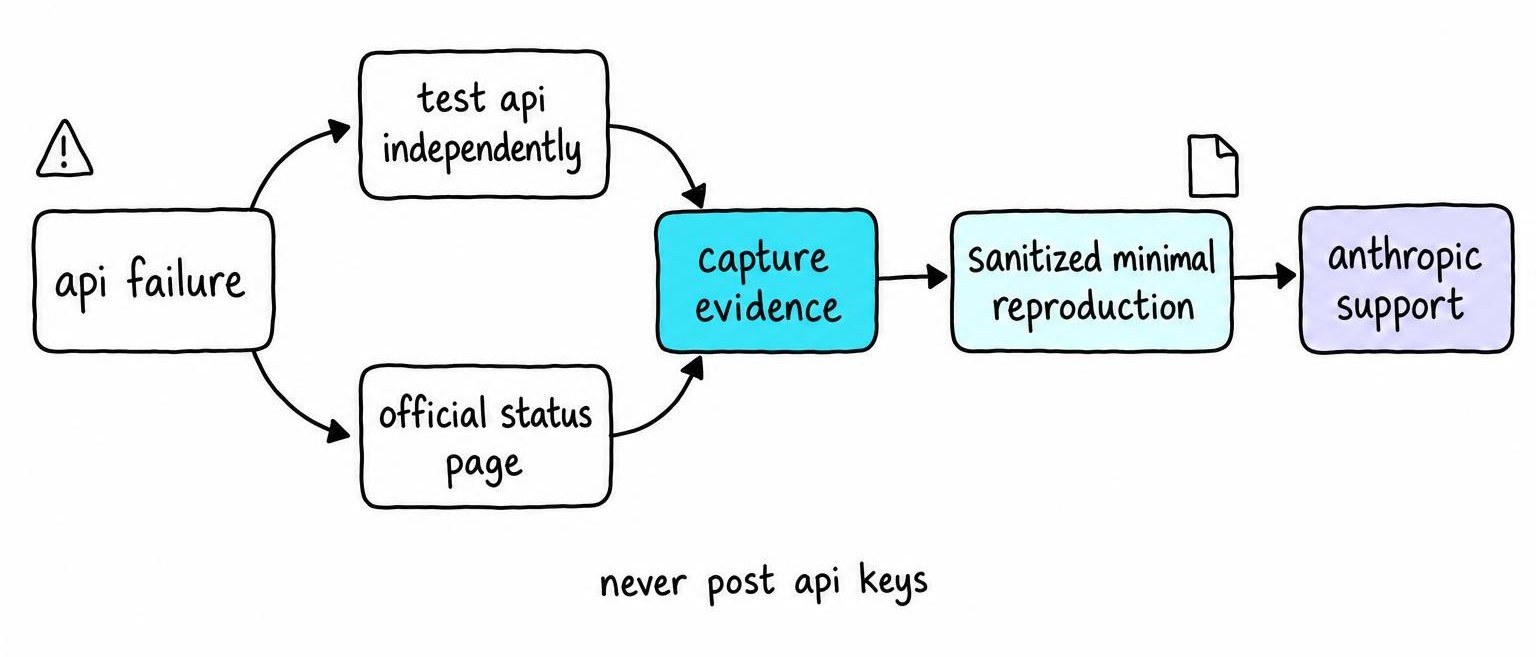
Test the API independently with a curl call to api.anthropic.com. Check the API component row on status.anthropic.com separately from Claude.ai.
Before filing a ticket, collect: timestamp, model name, endpoint, HTTP status, request ID (x-request-id header), SDK version, and a minimal reproduction with sensitive content stripped. Never post API keys or full prompts in public threads.
401/403 Authentication and Permission Errors
A 401 means the key is missing or invalid. A 403 means the key is valid but lacks permission - wrong org, disabled model access, or unpaid billing. Verify the key is loaded from the expected environment variable and tied to the correct workspace. Rotate keys only when you suspect exposure, not during a service-wide incident. Credential and model-name checks head the list in the same way when a command-line coding agent quits with nothing but "Terminated" and the kernel logs come back clean.
429 Rate Limits and Usage Caps
Read retry-after and rate-limit headers to identify which ceiling you hit: requests-per-minute, tokens-per-minute, concurrency, or plan-level quota. Each has a different fix.
Retry with bounded exponential backoff plus jitter. Tight loops without jitter create storms that worsen the problem. Reduce prompt size, limit concurrent requests, and queue work. Cached prefix tokens still count toward token-per-minute limits even though they cost less [1].
5xx Errors, Timeouts, and Empty API Responses
A 500 or 529 is usually transient. Retry with backoff, but check the status page first - retries during an acknowledged incident just add load.
Set client-side timeouts that account for long streaming generations. A 30-second timeout on a request that needs 90 seconds of streaming produces a client-side error that looks like a server failure. To isolate payload complexity as the trigger, send a minimal request without tools, files, or long context and compare.
FAQ
How Claude AI works
Claude processes text using a large language model running on Anthropic's servers. You send a prompt, the model predicts tokens sequentially, and streams the response back. Your device handles only the interface - web app, mobile app, or API. Training uses RLHF combined with Anthropic's constitutional AI methods.
How does prefix caching work?
Anthropic caches key-value pairs for the shared prefix of repeated prompts, so identical system prompts or few-shot examples skip redundant computation. Cached tokens still count toward rate limits but cost less per token than uncached input.
How Claude AI is different from ChatGPT
Both Anthropic and OpenAI use RLHF, but Anthropic adds constitutional AI methods to its alignment process. Claude tends to produce longer, more structured outputs and to follow system-prompt instructions more literally. ChatGPT offers broader plugin and tool integrations. Context windows, pricing, rate limits, and content policies differ, so the better choice depends on your workflow.
References
- Not All Tokens Are Worth Caching: Learning Semantic-Aware Eviction for LLM Prefix Caches - Shaoke Fang, Ziang Li, Wenfei Wu et al. (2026)