Pi Coding Agent Error 'Terminated': 5 Fixes for 2026
Swarnava Dutta8 min read
Pi Coding Agent Not WorkingPi Coding Agent AlternativePi Coding Agent Tutorial
Contents

Pi's output stops halfway through a refactor. One word on the screen: Terminated. No stack trace, no exit code, no hint whether the pi coding agent error terminated because it ran out of memory, lost its SSH session, or hit an API timeout. Scrollback rarely holds the answer, and the usual culprit sits one dmesg line away: an OOM kill that takes thirty seconds to fix once you know it fired, and an afternoon to find if you don't look there.
That message tells you something died without telling you what sent the signal. This article is a five-fix runbook for diagnosing and resolving the failure.
Quick answer
A "Terminated" error from the Pi coding agent means the process received a signal, most often SIGKILL (exit code 137) from the OS out-of-memory killer or SIGTERM (exit code 143) from a dead parent session. Run echo $? immediately and check dmesg | grep -i oom for kernel kills. The fix depends on the signal source.
Pi coding agent error "Terminated": identify the failure path
Start by locating which process died. Three things can exit: the Pi process itself, a child command Pi spawned (a build, a test suite, a git operation), or the surrounding session (terminal, SSH, container, IDE). Each points to a different fix.
Before you type anything else, grab the exit status:
echo $?
# 137 = SIGKILL (often OOM killer)
# 143 = SIGTERM (graceful shutdown signal)
# 130 = SIGINT (Ctrl-C or equivalent)
Those codes follow POSIX convention (128 + signal number) but not every shell on every OS reports them identically. Treat them as strong hints.
Record context while it's still on screen: the last prompt or tool call, model and provider endpoint, Pi's version (pi --version), OS, shell, installation method, and working directory. Copy terminal output into a file and scrub API keys and secrets before sharing.
A quick decision tree:
- Failure during a memory-heavy task (large repo indexing, big test suite) → resource pressure.
- Failure at logout, screen lock, or network blip → session lifecycle problem.
- HTTP 401/403 or authentication error in the output → provider or config issue, similar to patterns covered in troubleshooting Claude API failures.
- Failure right after a version bump → install regression.
Fix resource-limit and out-of-memory terminations
Exit code 137 means the kernel sent SIGKILL. Pi can't catch SIGKILL - no cleanup, no error message. The process just vanishes.
Start with the basics:
free -h
df -h
ulimit -a
dmesg | grep -i oom
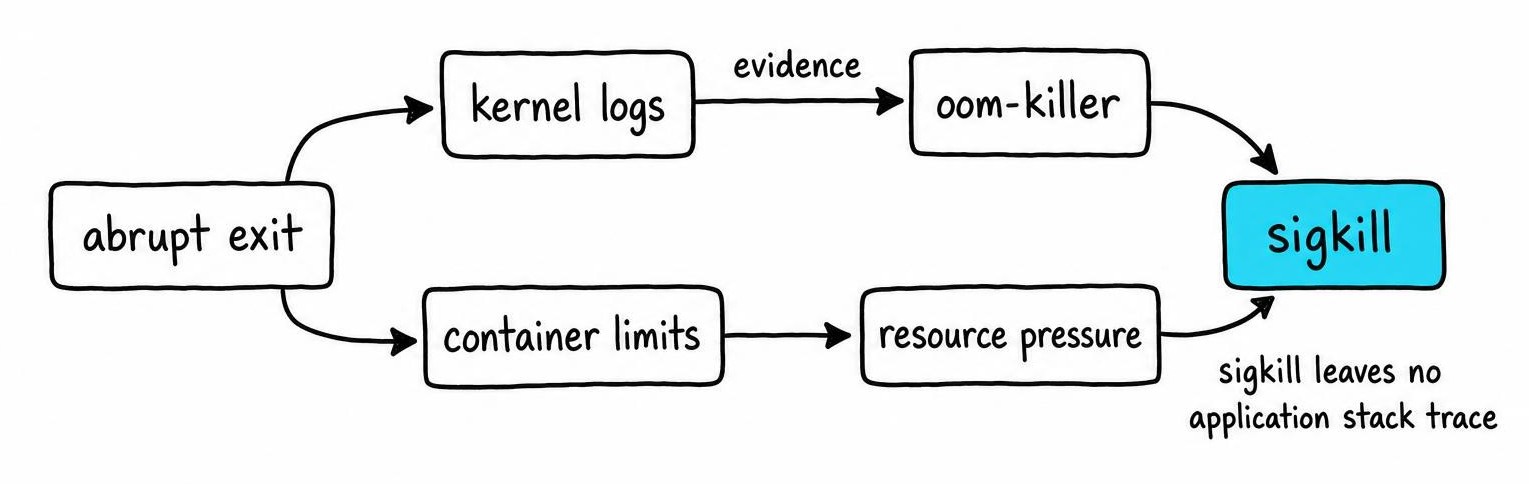
On macOS, replace free -h with vm_stat and use log show --predicate 'eventMessage contains "killed"' --last 1h instead of dmesg. Both may need sudo.
The host machine can look fine while the container starves. Check your actual ceilings:
- Docker Desktop: defaults vary by version and platform - open Settings → Resources to see the current cap.
- GitHub Actions standard Linux runners: 7 GB RAM per job [1]. Other runner types differ.
Once you've confirmed OOM pressure, reduce the load. Kill background processes, shrink the repo context Pi ingests by passing specific files, and add swap if possible. Then retry the exact task that failed. If dmesg stays clean and the exit code is 0, resource limits were your culprit.
Keep the shell, SSH session, and process supervisor alive
If exit code 143 shows up - or Pi dies right when your laptop sleeps or your SSH drops - the agent itself was fine. Its parent process died first, and the OS sent SIGTERM to every child.
Closing a laptop lid for a meeting is enough to take an in-progress refactor down with it: reopen it and Pi is gone. The fix: tmux. Run tmux new -s pi, start Pi inside, and detach whenever you want.
For CI pipelines, check your runner's configured timeout. GitHub Actions and GitLab shared runners each impose a default per-job timeout, though the specific limits vary by provider and plan, so check your CI provider's documentation for the current values. Pi indexing a large repo can exceed those limits silently.
Watch for non-interactive shell differences too. Your .bashrc may set PATH or API key variables that a non-interactive shell never sources. Compare env in both shells to catch the mismatch.
Container entrypoints deserve attention. If Pi isn't PID 1, signals from docker stop hit PID 1 first. If PID 1 is a bare shell script without exec, it absorbs SIGTERM instead of forwarding it. Use exec pi... in your entrypoint or run tini so signals propagate correctly.
When Pi coding agent is not working: test provider and config
A kernel kill leaves evidence in dmesg. An API failure leaves evidence in Pi's output - HTTP 401, 403, 429, model-not-found, or a network timeout. If dmesg is clean and the exit code isn't 137, the provider side is your next suspect.
Verify credentials are visible in the shell where Pi runs: echo ${API_KEY:0:8} - never the full secret. Confirm the model name matches what your provider currently serves; providers retire model IDs without warning.
Strip your setup to bare defaults. Remove custom instructions, MCP tools, extensions, and config overrides, then add them back one at a time. A stale tool definition pointing at a localhost port nothing is listening on surfaces as a plain "terminated" error: Pi tries to call it, gets connection refused, and dies.
Test provider reachability independently with a minimal curl against the same endpoint. If your network routes through a corporate proxy, check DNS and TLS inspection separately. Agent orchestration layers add their own failure surfaces on top of raw HTTP calls.
Rule out a Pi update, dependency, or install regression
Correlate the first failure with any recent change. Check Pi's version, your runtime, OS patches, and shell plugin updates. Use your package manager's info command for the Pi package to pin when something shifted.
Multiple installs cause silent confusion. Run which pi and pi --version in the exact shell where the failure happens. A stale project-local binary can shadow a freshly updated global one.
Before touching your real setup, reproduce the crash with a throwaway config and a tiny repo. If it succeeds there, the regression lives in your config or extensions. When the failure started right after an upgrade, back up your config directory, then reinstall or roll back through the same package manager. Search the project's issue tracker using the exact version string, OS, and exit code.
Verify the fix and benchmark Pi with a repeatable task
Rerun the smallest prompt that originally failed. If it passes, increase complexity one variable at a time - larger repo, more tool calls, longer runtime.
Run each test several times. Record peak memory (/usr/bin/time -v on Linux), elapsed wall time, provider errors, and whether the output was actually correct. A process that stays alive but produces broken code hasn't been fixed.
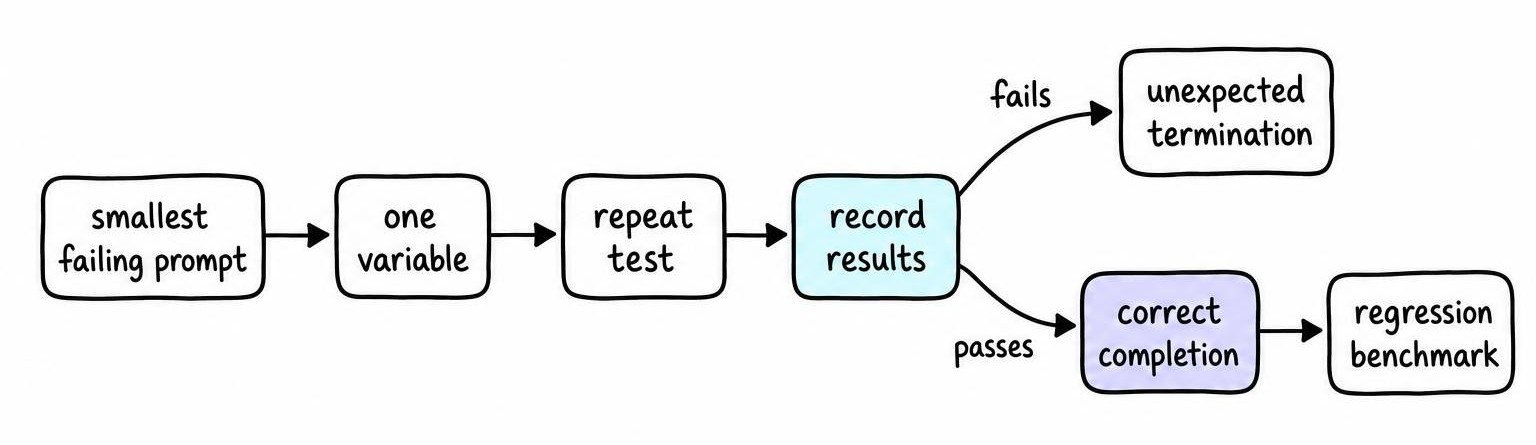
Keep a control task in a tiny disposable repo - three files, no build hooks. This isolates agent behavior from project-specific traps like a postinstall script that hangs.
Turn your reproduction into a lightweight regression benchmark. Save sanitized logs, the Pi version, OS, and memory ceiling alongside each run. Next time "Terminated" appears, you compare against a known-good baseline instead of starting from scratch.
Choose a Pi coding agent alternative if failures persist
If Pi terminates more than twice on the same task after walking through every fix above, evaluate alternatives. Run your control task against each candidate rather than choosing from headline benchmark scores.
| Criterion | Pi | Aider | Claude Code | OpenCode |
|---|---|---|---|---|
| Deployment | CLI / IDE plugin | CLI, self-hosted | CLI, Anthropic-hosted | CLI, self-hosted |
| Provider flexibility | Multiple | Multiple (incl. local) | Anthropic only | Multiple |
| Repo workflow | Git-aware | Git-native (auto-commits) | Git-aware | Git-aware |
| Permission controls | Configurable | Minimal sandboxing | Approval-gated | Configurable |
| Extensibility | Tool/MCP plugins | Limited plugins | MCP support | Plugin system |
| Cost model | Subscription + API | OSS + API costs | Anthropic subscription | OSS + API costs |
"Open-source" means the agent code is free to self-host. Every tool still calls an LLM provider, so API costs apply regardless.
Migration is straightforward if you've been committing. Git holds your code. Export custom instructions but strip secrets. Recreate permissions conservatively and review every diff the new agent produces. For broader patterns across multiple agent tools, the same principle applies.
FAQ
How do coding agents work?
Coding agents wrap an LLM in a loop that reads files, edits code, and runs shell commands. The agent receives a prompt, generates tool calls (file writes, terminal commands, API requests), observes outputs, and iterates until the task completes or a stop condition triggers.
How do coding agents fail their users?
Silent termination with no actionable error is the most common failure. Others include hallucinated code that introduces subtle bugs, runaway token usage that exhausts API budgets, and session drops that lose in-progress work.
How should you use coding agents safely?
Commit or stash before every session. Restrict file-system and network permissions to what the task requires. Review every diff before accepting it. Break large tasks into checkpointed prompts and never grant sudo access you wouldn't give to an untrusted script.
How do you benchmark coding agents?
Create a small deterministic task in a disposable repo with known-correct output. Run the agent multiple times, recording peak memory, wall time, exit code, and output correctness. Vary one parameter per run so failures isolate cleanly.
What coding agents are free?
Aider and OpenCode are open-source and free to install. Both require API access to an LLM provider, which carries per-token costs unless you run a local model. No coding agent offers zero-cost operation at production quality [2].
References
- Testing GitHub projects on custom resources using unprivileged Kubernetes runners - Igor Sfiligoi, Daniel McDonald, Rob Knight et al. (2023)
- A Dual Model of Open Source License Growth - Gottfried Hoffmann, Dirk Riehle, Carsten Kolassa et al. (2014)