How to Install FlashAttention-2 for PyTorch and ComfyUI
Swarnava Dutta7 min read
Cuda 12.8Nvidia Ampere GpusNvidia Hopper Gpus
Contents
You run pip install flash-attn and watch the build churn for ten minutes before it dies with a cryptic compiler error. The problem is rarely the package itself - it's a mismatch between your NVIDIA GPU architecture, CUDA toolkit, PyTorch build and system compiler. Knowing how to install Flash Attention 2 means resolving those dependencies before the build starts.
Quick answer
FlashAttention-2 requires an NVIDIA GPU with compute capability 8.0 or higher (Ampere, Ada Lovelace, Hopper), PyTorch 2.0+ built against a matching CUDA toolkit, and a C++17-capable host compiler such as GCC 9+. Install with pip install flash-attn --no-build-isolation after confirming torch.version.cuda and nvidia-smi report compatible CUDA versions. On Hopper H100 GPUs, FlashAttention-3 offers better throughput and should be installed instead.
Check compatibility before you install Flash Attention 2
FlashAttention-2 restructures attention into tiled blocks that stay in GPU SRAM, reducing HBM reads and writes because it avoids materializing the full attention matrix. For a deeper look at the tiling mechanics, see How Flash Attention Works: Tiling, Softmax, GPU I/O.
The kernel requires NVIDIA Ampere GPUs (compute capability 8.0) or newer - A100, RTX 30-series, Ada Lovelace RTX 40-series, and Hopper H100/H200. FP16 and BF16 work on all these architectures; FP8 kernels exist only on Hopper. Head dimensions must be a multiple of 8, and most pre-built wheels cap at 256.
nvidia-smi
nvcc --version
python -c "import torch; print(torch.__version__, torch.version.cuda, torch.cuda.get_device_name(0))"
gcc --version
That output reveals three distinct CUDA version numbers, each with a different role. The driver CUDA version (nvidia-smi top-right) is the maximum toolkit the driver supports. The system toolkit (nvcc --version) compiles extensions. The PyTorch runtime (torch.version.cuda) is baked into the wheel. The system toolkit must be ≤ the driver version and must match or be close to the PyTorch runtime - a PyTorch built against CUDA 12.4 won't compile extensions with a CUDA 11.8 nvcc.
CUDA 12.8 works only if both PyTorch and FlashAttention publish wheels or confirm source compatibility for that toolkit. Check the Dao-AILab GitHub compatibility matrix before assuming the newest toolkit is safe.
Compiling from source needs GCC 9+ (C++17), adequate RAM, and ~5 GB free disk. Linux and WSL2 give the most reliable builds. Native Windows source builds fail on MSVC incompatibilities in the CUDA extension's C++ code - use WSL2 instead. Community-built Windows .whl files exist but each is locked to an exact Python, PyTorch, CUDA, and flash-attn combination; a mismatched wheel produces undefined symbol crashes at runtime.
Install FlashAttention-2 in a clean PyTorch environment
Isolate the build from existing CUDA extensions. A fresh venv or Conda environment eliminates stale triton, torch, or packaging versions that silently break compilation.
--no-build-isolation prevents pip from creating a temporary venv that lacks your PyTorch headers. Without it, the build fails searching for torch or ATen includes.
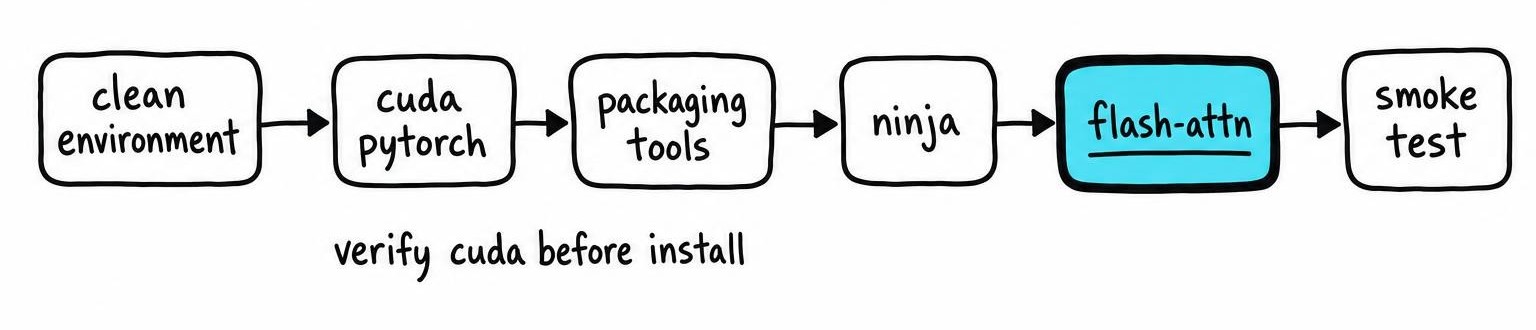
When a prebuilt wheel on PyPI matches your Python version, PyTorch version, and CUDA toolkit, pip skips compilation entirely. When no wheel matches, pip compiles from source - expect 10-20 minutes. Pin versions for reproducibility: flash-attn==2.7.3 locks the build. On memory-constrained machines, set MAX_JOBS=2 to limit parallel nvcc processes that can each consume significant RAM.
Linux and WSL2 installation commands
python -m venv fa2-env && source fa2-env/bin/activate

pip install --upgrade pip setuptools wheel packaging
pip install ninja

pip install torch torchvision --index-url https://download.pytorch.org/whl/cu124
python -c "import torch; assert torch.cuda.is_available(), 'CUDA not visible'"

MAX_JOBS=4 pip install flash-attn --no-build-isolation
pip freeze > requirements.txt
If nvcc is not on your PATH, set the toolkit location explicitly:
export CUDA_HOME=/usr/local/cuda-12.4
export PATH=$CUDA_HOME/bin:$PATH
WSL2 users need the NVIDIA Windows host driver (525+). Do not install a separate Linux GPU driver inside WSL - the Windows driver passes through automatically.
Install FlashAttention-2 in ComfyUI's Python environment
ComfyUI portable (Windows) ships an embedded Python under ComfyUI_windows_portable\python_embeddable\. Packages in your system Python are invisible to that interpreter. Stop ComfyUI, then run pip through its own binary - .\python_embeddable\python.exe -m pip install flash-attn --no-build-isolation. On Linux, activate ComfyUI's venv first.
Do not upgrade PyTorch as a side effect. ComfyUI pins specific torch, torchvision, and xformers versions; replacing them breaks custom nodes. Check the existing build with ComfyUI's Python - python -c "import torch; print(torch.__version__, torch.version.cuda)" - and confirm the flash-attn release supports that combination.
Installation alone does not activate FlashAttention-2 across every workflow. The loaded model or custom node must request the kernel explicitly. Restart ComfyUI and watch console output for import errors or no available kernel warnings.
Use FlashAttention-2 in PyTorch and verify the version
Check the installed version with pip show flash-attn or python -c "import flash_attn; print(flash_attn.__version__)". The pip distribution is flash-attn, but the Python import is flash_attn.
For a smoke test, import flash_attn.flash_attn_func, create random BF16 tensors on CUDA in (batch, seqlen, heads, headdim) layout, and call the function. Head dimension must be a multiple of 8 and ≤ 256; FP32 tensors raise a dtype error.
Hugging Face Transformers wraps this behind attn_implementation="flash_attention_2" in from_pretrained. Check model.config._attn_implementation after loading to confirm the flag stuck - some architectures silently fall back to eager attention.
PyTorch's built-in scaled_dot_product_attention dispatches to its own flash backend at runtime, which is separate from the external flash-attn package [1]. The external package ships newer kernels and supports features like sliding-window attention. For kernel options beyond FlashAttention-2, see Flash Attention vs Sage Attention: Kernel Comparison.
Fix metadata generation and extension compilation errors
A metadata generation failed message is a wrapper - scroll up to the first error: line. The most common cause is pip trying to import torch in an isolated build environment where PyTorch doesn't exist. Fix with --no-build-isolation after confirming python -c "import torch" succeeds.
When the log says error compiling objects for extension, work through this checklist:
nvccis onPATHandCUDA_HOMEpoints to the correct toolkit- GCC is version 9+ (
gcc --version) torch.version.cudamatchesnvcc --versionmajor.minor- Sufficient RAM available (
free -h) - lowerMAX_JOBSifdmesg | tailshows OOM kills - Stale caches cleared:
rm -rf ~/.cache/pip ~/.cache/torch_extensions && pip cache purge
A system toolkit at CUDA 12.8 paired with a PyTorch wheel built against CUDA 12.4 fails even though nvidia-smi reports 12.8 - the driver version is a ceiling, not a build target.
Fix no available kernel and undefined symbol errors
A successful import flash_attn does not mean every call finds a kernel. The runtime matches GPU compute capability, tensor dtype (FP16/BF16 only on Ampere/Ada), head dimension (multiple of 8, ≤ 256), and tensor layout. If any parameter falls outside the compiled range, you get no available kernel. Confirm tensors are contiguous (t.is_contiguous()) and on CUDA.
An undefined symbol error on import is a binary ABI mismatch. Uninstall flash-attn, delete ~/.cache/torch_extensions, pin or reinstall the exact PyTorch version you need, then rebuild FlashAttention-2 targeting that combination. Mixed Conda and system CUDA libraries cause the same symptom - run ldd on the compiled .so to confirm a single libcudart path.
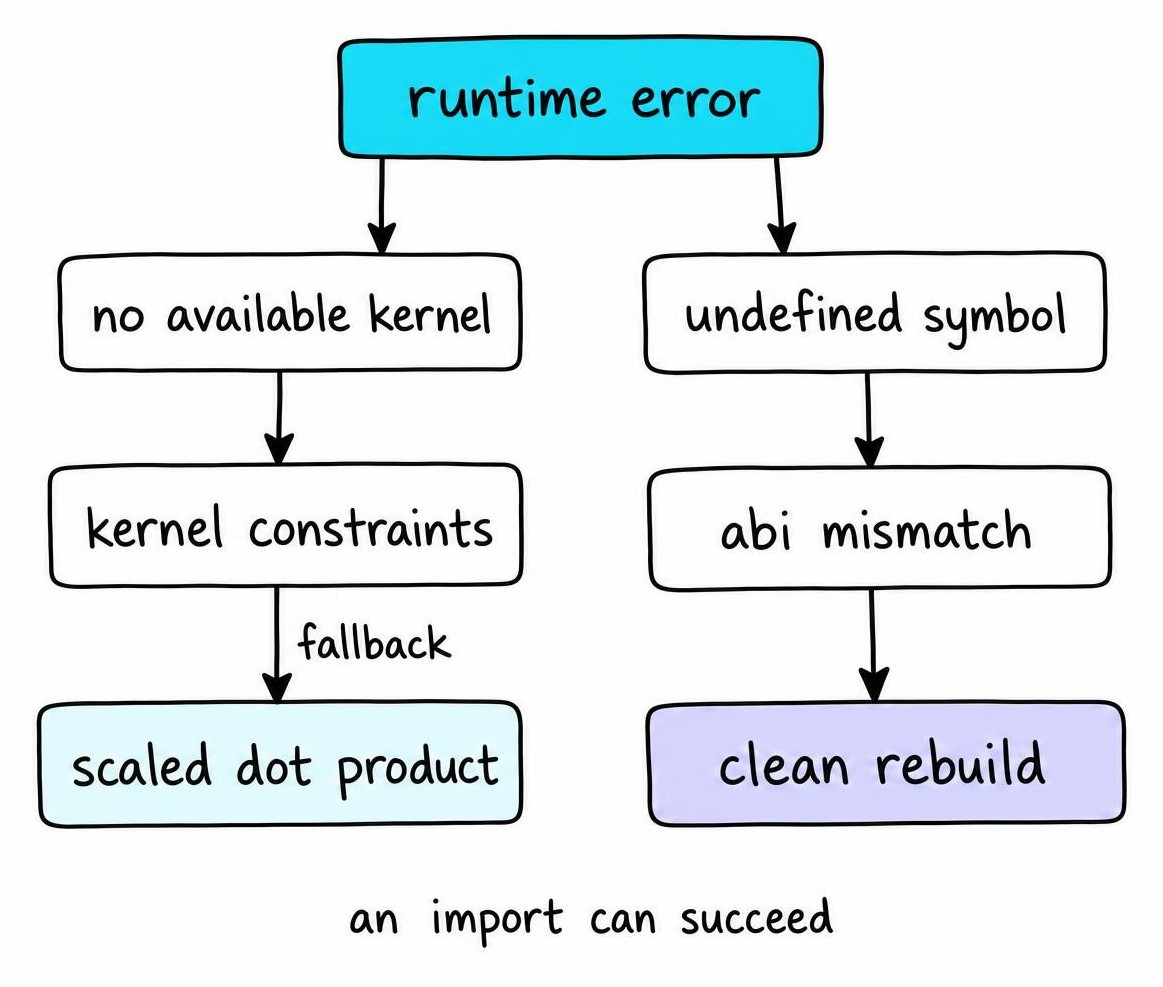
When the external kernel cannot support your input shape, torch.nn.functional.scaled_dot_product_attention serves as a drop-in fallback. For production stability considerations, see Is Flash Attention Stable? Production Guide 2026.
Choose FlashAttention-2 or FlashAttention-3 on Hopper GPUs
FlashAttention-2 runs on every supported NVIDIA GPU from Ampere onward. FlashAttention-3 targets Hopper exclusively, exploiting FP8 tensor cores, warp-specialized kernels, and asynchronous block-level operations unique to the H100/H200. Installing FlashAttention-3 on Ampere or Ada fails at the kernel level.
Confirm a Hopper GPU before proceeding: torch.cuda.get_device_capability() must return (9, 0).
| Criterion | FlashAttention-2 | FlashAttention-3 |
|---|---|---|
| GPU architecture | Ampere, Ada, Hopper | Hopper only (sm90a) |
| Minimum CUDA toolkit | 11.8+ | 12.3+; 12.8 recommended |
| Install path | pip install flash-attn |
Dao-AILab repo, Hopper subdirectory |
| HF Transformers integration | attn_implementation="flash_attention_2" |
Not yet a named backend |
| FP8 support | No | Yes |
| Maturity | Stable, widely deployed | Experimental, API may change |
FlashAttention-3 lives in a separate directory of the Dao-AILab/flash-attention repository. Check the repo's README for current compiler and PyTorch pins before building.
Stay with FlashAttention-2 when you run non-Hopper hardware, need Hugging Face Transformers' built-in backend, require reproducibility across GPU generations, or cannot upgrade past CUDA 11.x. After installing FlashAttention-3, run a separate smoke test - a passing FlashAttention-2 test does not validate FlashAttention-3 binaries.
FAQ
How do I install Flash Attention 2?
Install PyTorch 2.0+ with CUDA support first, then run pip install flash-attn --no-build-isolation in the same environment. The --no-build-isolation flag lets the build find your installed PyTorch headers. Confirm your GPU is Ampere or newer (compute capability 8.0+) and that nvcc --version matches torch.version.cuda.
How to install Flash Attention 3?
FlashAttention-3 targets Hopper GPUs exclusively (H100, H200). Confirm torch.cuda.get_device_capability() returns (9, 0), install CUDA toolkit 12.3 or newer, and build from the Hopper subdirectory in the Dao-AILab/flash-attention repository. A working FlashAttention-2 install does not provide FlashAttention-3 kernels.
How to install Flash Attention ComfyUI?
Run pip through ComfyUI's own Python interpreter, not your system Python. On the Windows portable build, use .\python_embeddable\python.exe -m pip install flash-attn --no-build-isolation. On Linux, activate ComfyUI's venv first. Do not upgrade PyTorch during the process - ComfyUI pins specific torch versions and breaks if they change.
How to use Flash Attention in PyTorch?
Call flash_attn.flash_attn_func.flash_attn_func with BF16 or FP16 tensors in (batch, seqlen, heads, headdim) layout on CUDA. In Hugging Face Transformers, pass attn_implementation="flash_attention_2" to from_pretrained. PyTorch's built-in scaled_dot_product_attention also dispatches to a flash backend for supported shapes.
How to check Flash Attention version?
Run pip show flash-attn in the environment where the package is installed. The Version: line gives the installed release. Alternatively, python -c "import flash_attn; print(flash_attn.__version__)" works, but pip show catches broken installs where the import succeeds yet compiled kernels are missing.
References
- TiledAttention: a CUDA Tile SDPA Kernel for PyTorch - Taimur Khan (2026)