How to Install FlashAttention-3 on NVIDIA Hopper GPUs
Swarnava Dutta9 min read
Nvidia H100Nvidia H800Hopper Architecture
Contents

You clone the FlashAttention-3 repo, run python setup.py install, and the build dies with a cryptic CUDA arch mismatch - or worse, it compiles cleanly but loads FlashAttention-2 kernels at runtime. The problem is that installing FlashAttention-3 requires a narrow stack: an NVIDIA Hopper GPU, a matching CUDA Toolkit version, and a PyTorch build compiled against that same toolkit. Miss any one prerequisite and the compiler either fails or silently falls back.
This guide walks through the eligibility check, environment setup, source build, verification, error fixes, and ComfyUI integration - in that order, because each step gates the next.
Quick answer
FlashAttention-3 requires an NVIDIA Hopper GPU (H100, H800, or GH200), CUDA Toolkit 12.3 or later, and a PyTorch build linked against the same CUDA major version. Clone the Dao-AILab/flash-attention repository, check out the hopper branch, install Ninja, then run pip install -e. from the hopper/ directory. Verify with python -c "import flash_attn_interface" to confirm Hopper kernels loaded.
Before You Install FlashAttention-3: Check Hopper Eligibility
FlashAttention-3 kernels use Hopper-specific instructions - TMA asynchronous copies and WGMMA matrix ops - that do not exist on Ampere (A100), Ada Lovelace (RTX 4090), Turing, or any AMD/CPU-only system. Confirmed supported GPUs are the NVIDIA H100 and H800. GH200 shares the Hopper SM but check the upstream hopper branch README before assuming parity.
Run one command to read your compute capability:
nvidia-smi --query-gpu=name,compute_cap --format=csv,noheader
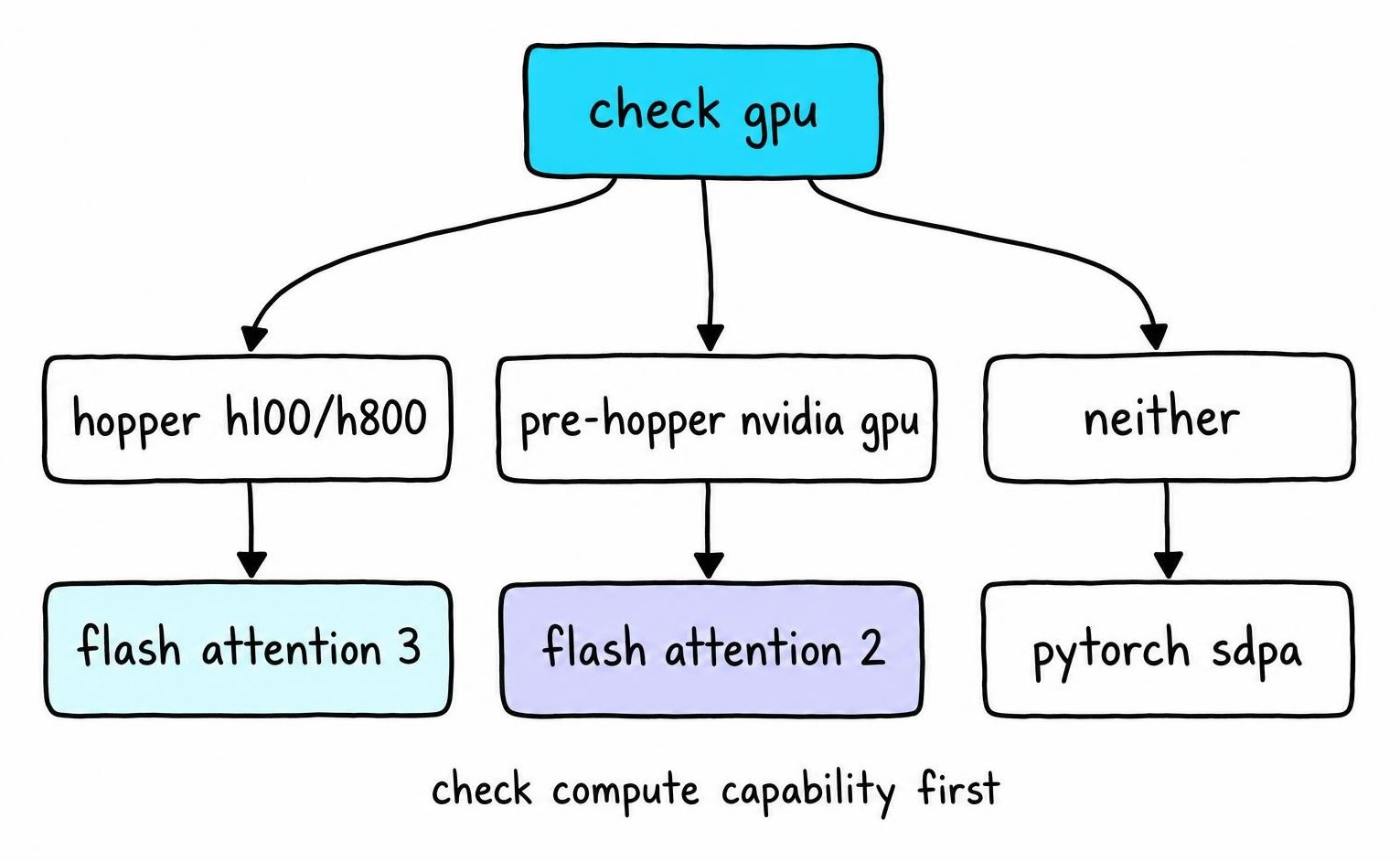
You need compute capability 9.0. Anything below - 8.0 for A100, 8.9 for RTX 4090 - rules out FlashAttention-3.
Your decision path from here:
- Compute capability 9.0 → continue with FlashAttention-3.
- Compute capability 8.0-8.9 → install FlashAttention-2, which covers Ampere and Ada Lovelace.
- Below 8.0 or non-NVIDIA → fall back to
torch.nn.functional.scaled_dot_product_attention(PyTorch SDPA), which ships with PyTorch 2.0+ and requires no extra package.
I would not spend time attempting an FA3 build on an A100 - the compiler may finish, but the resulting kernels cannot dispatch on sm_80 hardware.
Match the CUDA Toolkit, Driver, and PyTorch Build
Three different CUDA version strings exist on any given machine, and they frequently disagree. The NVIDIA driver reports a maximum supported CUDA version (visible in nvidia-smi). The system CUDA Toolkit installed at /usr/local/cuda has its own version (nvcc --version). PyTorch ships a bundled CUDA runtime baked into the wheel, reported by torch.version.cuda. A build succeeds only when nvcc and PyTorch's bundled CUDA share the same major version and the driver supports that version or higher.
Collect every relevant string in one pass:
import torch

print("PyTorch:", torch.__version__)
print("PyTorch CUDA:", torch.version.cuda)
print("GPU capability:", torch.cuda.get_device_capability())
print("CUDA available:", torch.cuda.is_available())
Cross-check nvcc --version from your shell against the torch.version.cuda output. FlashAttention-3's hopper branch requires CUDA Toolkit 12.3+ at the nvcc level - do not assume FlashAttention-2's CUDA 11.8 floor applies here. The driver version shown by nvidia-smi must meet or exceed the minimum for your toolkit release; NVIDIA's CUDA compatibility matrix documents the exact floor [1].
Save all five outputs to a text file before building. When a build fails, this snapshot turns a vague bug report into a reproducible one - and if you hit a compile error, maintainers will ask for these versions first.
Prepare an Isolated Build Environment with Ninja
An existing flash-attn 2.x package in your site-packages will shadow the FlashAttention-3 import. Build inside a fresh environment to avoid that collision.
conda create -n fa3 python=3.11 -y
conda activate fa3
pip install torch --index-url https://download.pytorch.org/whl/cu124
pip install packaging psutil ninja
ninja --version
That last line matters. The ninja PyPi package sometimes installs without placing the binary on PATH. If ninja --version returns "command not found," install it via conda install ninja or your system package manager instead. Without a working Ninja executable, the build falls back to Make and runs single-threaded - turning a 5-minute compile into 30+ minutes on a 64-core Hopper node.
Confirm your host C++ compiler is gcc 11 or 12; gcc 13 introduces warnings that the CUDA 12.3 front-end treats as errors. Check available RAM - the Hopper kernel compilation spawns parallel nvcc jobs that each consume 4-8 GB. A 64 GB machine with 8 parallel jobs can OOM silently, producing a truncated .so.
When the host toolchain is locked down or shared, I reach for NVIDIA's nvidia/cuda:12.4.1-devel-ubuntu22.04 Docker image instead of modifying system packages. Pass the GPU with --gpus all, bind-mount the cloned source tree, and build inside the container. The resulting wheel installs cleanly on any host whose PyTorch CUDA version matches the container's toolkit.
Install FlashAttention-3 from the Hopper Source Tree
Clone the Dao-AILab/flash-attention repository and pin to a specific commit or tag so every teammate builds the same binary:
git clone https://github.com/Dao-AILab/flash-attention.git cd flash-attention git checkout hopper git log --oneline -1 > build-commit.txt
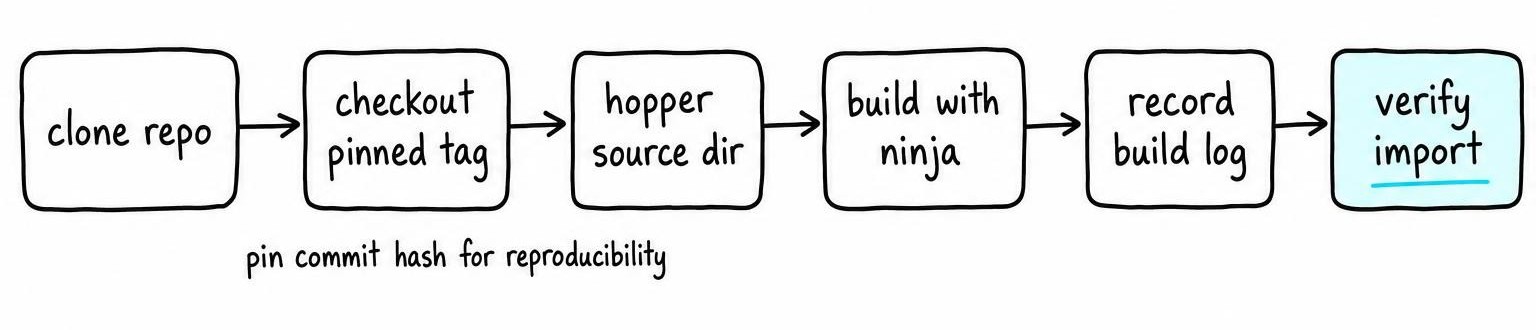
The hopper/ subdirectory contains the FlashAttention-3 source and its own setup.py. Running pip install flash-attn from PyPI installs FlashAttention-2 - not what you want. Change into hopper/ and build from there:
cd hopper pip install -e.
Record the commit hash, nvcc --version, torch.__version__, and the exact pip install invocation in the same build-commit.txt file. When you revisit months later or hand the environment to someone else, that file reproduces the build exactly.
To limit memory pressure on machines with less than 64 GB RAM, restrict parallel jobs with MAX_JOBS=4 pip install -e.. Setting MAX_JOBS too high causes nvcc workers to OOM and produces corrupt object files with no clear error - the linker just fails downstream.
Do not copy build commands from the main branch README or a six-month-old blog post. The hopper branch has changed package names and import paths across commits, and stale instructions produce imports that resolve to FlashAttention-2 kernels without warning.
Verify the Import, Version, and Hopper Kernel Output
Import flash_attn_interface, not flash_attn. The latter resolves to FlashAttention-2 if both packages coexist in your environment. A successful import flash_attn_interface confirms the Hopper kernels loaded.
Editable installs from the hopper branch rarely expose a clean semantic version through pip show or __version__. Treat the commit hash in your build-commit.txt as the authoritative identifier. Cross-check the module's file path with flash_attn_interface.__file__ to confirm Python is loading from your cloned tree, not a stale site-packages copy.
Run the project's own test suite under hopper/tests/ on your H100 or H800. For a quick smoke test, call flash_attn_func with a small random (batch, seqlen, heads, dim) tensor on cuda:0, then compare against torch.nn.functional.scaled_dot_product_attention using torch.allclose with atol=1e-2. FP16 Hopper kernels diverge from FP32 reference beyond 1e-3, so tighten tolerance only under BF16. If your workload involves training, verify gradients by calling .backward() on both paths and comparing parameter .grad tensors.
Confirm the kernel actually dispatched on Hopper by checking torch.cuda.get_device_name() returns H100 or H800. A multi-GPU node can silently route to a non-Hopper device if CUDA_VISIBLE_DEVICES is misconfigured.
Fix FlashAttention-3 Build and Runtime Errors
Failures cluster into predictable stages. Matching the symptom to its stage saves hours of blind rebuilding.
Dependency resolution - pip cannot find a compatible torch or packaging version. Pin torch to a CUDA 12.x wheel explicitly; never let the solver pull a CPU-only build.
C++ / CUDA compilation - nvcc dies with an arch mismatch or treats gcc 13 warnings as fatal errors. Check nvcc --version against PyTorch's bundled CUDA, confirm gcc --version is 11 or 12, and verify Ninja is on PATH. If parallel jobs OOM, lower MAX_JOBS to 2.
Import and shared-library loading - import flash_attn_interface raises ModuleNotFoundError or silently loads FlashAttention-2. Uninstall any flash-attn 2.x wheel first (pip uninstall flash-attn), then confirm flash_attn_interface.__file__ points to the hopper/ tree.
Illegal instruction / unsupported architecture - the kernel compiled but the GPU lacks sm_90. Re-run nvidia-smi --query-gpu=compute_cap --format=csv,noheader. If the result is below 9.0, no rebuild will help - FlashAttention-2 is your ceiling.
Undefined symbol or missing .so - the wheel was built against a different PyTorch ABI or CUDA runtime than the one active now. Rebuild inside the identical environment you use at inference time, or use the Docker workflow from the previous section.
Before filing an upstream issue, collect one diagnostic bundle: the commit hash from build-commit.txt, full traceback, nvcc --version, torch.version.cuda, torch.__version__, GPU name, OS release, and container image tag if applicable. Maintainers close issues missing this context without investigation.
Use FlashAttention-3 with ComfyUI or Fall Back Safely
ComfyUI is a node-based inference UI for diffusion models. It does not expose Flash Attention as a visual node - attention backends are consumed by the underlying model loader or custom node extensions. Adding flash-attn to your system Python does nothing if ComfyUI runs its own bundled interpreter, which portable installations on Windows and some Linux bundles do.
Find ComfyUI's actual Python first. Check which python inside the virtual environment ComfyUI activates, or inspect the launcher script for a hardcoded path. Install FlashAttention-3 into that interpreter's environment, not a separate conda env.
Even after installation, ComfyUI model nodes and custom extensions must explicitly call flash_attn_interface to use Hopper kernels. Most existing attention flags (--use-flash-attn, environment variables) route to FlashAttention-2 imports. Confirm the specific custom node or model wrapper you use documents FA3 support before assuming the Hopper path activates.
After restarting ComfyUI, check startup logs for the attention backend string. A successful import flash_attn_interface in a standalone script does not prove ComfyUI selected it - the application may still default to PyTorch SDPA or FlashAttention-2.
When to fall back:
- GPU compute capability below 9.0 → FlashAttention-2 or PyTorch SDPA.
- Custom node lacks FA3 integration → stay on the node's default backend.
- Build breaks ComfyUI's existing workflow → roll back immediately.
Clean rollback: uninstall the editable FA3 build with pip uninstall flash-attn-hopper (or whatever pip list shows), restore your environment lockfile or rebuild the container from the last known-good image, and retest generation end to end before resuming production work.
FAQ
What is Flash Attention?
Flash Attention is an exact attention algorithm that reorders the softmax computation into tiles, keeping intermediate matrices in GPU SRAM instead of HBM. This cuts memory reads by orders of magnitude and speeds up transformer training and inference without changing model output. FlashAttention-3 extends the approach with Hopper-specific instructions like TMA and WGMMA for H100/H800 GPUs.
How to install Flash Attention?
Clone the Dao-AILab/flash-attention repository on GitHub. For FlashAttention-2, run pip install flash-attn from PyPI. For FlashAttention-3, check out the hopper branch, change into the hopper/ subdirectory, and run pip install -e. with CUDA Toolkit 12.3+ and a matching PyTorch CUDA build. FlashAttention-3 requires an NVIDIA Hopper GPU with compute capability 9.0.
How to install Flash Attention in ComfyUI?
Install flash-attn into the exact Python interpreter ComfyUI uses, not a separate environment. Locate ComfyUI's Python by inspecting its launcher script or virtual environment. After installation, confirm the model node or custom extension you use explicitly calls Flash Attention - most ComfyUI attention flags default to FlashAttention-2 or PyTorch SDPA, not FlashAttention-3.
How to check the Flash Attention version?
Run python -c "import flash_attn; print(flash_attn.__version__)" for FlashAttention-2. The FlashAttention-3 hopper branch often lacks a clean __version__ attribute. Use the git commit hash from your build and verify the loaded module path with flash_attn_interface.__file__ to confirm the correct build is active.
How do I fix a Flash Attention error?
Start by matching the error to its stage. Compilation failures usually stem from a CUDA Toolkit / PyTorch version mismatch or gcc 13 treating warnings as errors. Import errors mean a stale FlashAttention-2 package is shadowing the Hopper build - uninstall it with pip uninstall flash-attn first. Illegal-instruction crashes at runtime confirm the GPU lacks compute capability 9.0, and no rebuild resolves that.
References
- CUDA-L2: Surpassing cuBLAS Performance for Matrix Multiplication through Reinforcement Learning - Songqiao Su, Xiaoya Li, Albert Wang et al. (2025)