Flash Attention Error Compiling Objects for Extension Fix
Swarnava Dutta8 min read
PytorchCuda ToolkitNvidia Nvcc
Contents
pip install flash-attn fails, the terminal dumps hundreds of lines, and the last one reads "error compiling objects for extension". Scroll up in the log to find version mismatches, missing headers, or compiler errors - each has a different fix. This guide maps those earlier log lines to the exact check and repair for the flash attention error compiling objects for extension.
Quick answer
The "error compiling objects for extension" failure during FlashAttention installation signals a CUDA/PyTorch version mismatch, a missing or incompatible C++ compiler, or a broken Python build-isolation environment. Fix it by matching the installed CUDA Toolkit version to the PyTorch CUDA tag, confirming GCC and Ninja are present and compatible, then rebuilding with pip install flash-attn --no-build-isolation if metadata generation fails.
Trace the Flash Attention error compiling objects for extension
Capture the full build output. Default pip install flash-attn truncates early errors, so rerun with verbose logging:
pip install flash-attn --no-build-isolation -v 2>&1 | tee flash_build.log
Scroll past the final generic exception and find the first compiler error. That line determines your fix path:
nvcc: not foundorCUDA_HOME is not set→ CUDA Toolkit missing or not on$PATH.unsupported gpu architecture 'sm_XX'→ PyTorch was compiled against a different CUDA version than the installed toolkit.ninja: build stopped→ Ninja missing or crashed (often OOM on machines with limited RAM).cc1plus: error: unrecognized command-line option→ GCC too old or too new for the CUDA toolkit.metadata-generation-failed→ Python packaging broke before compilation started.
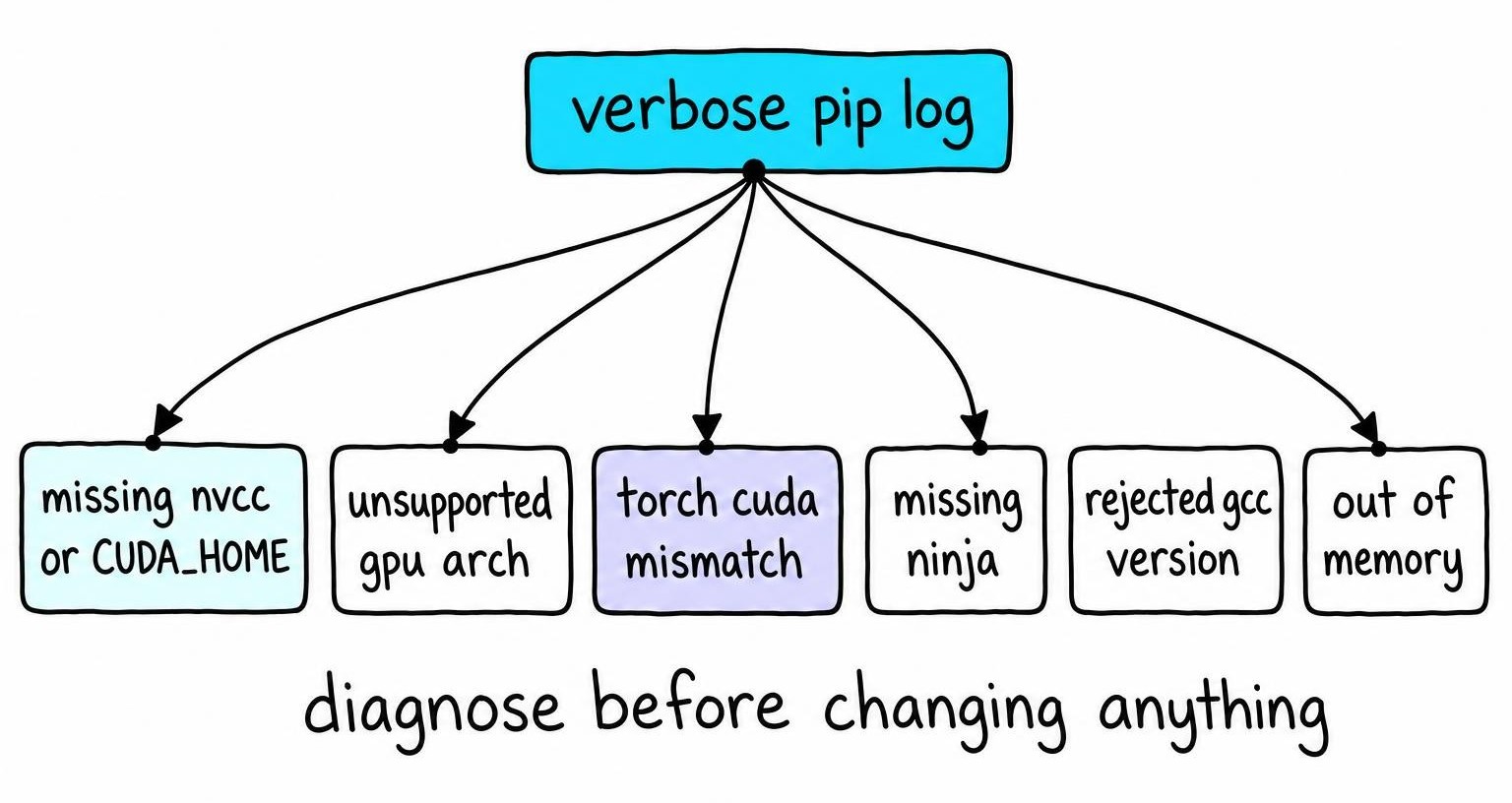
Before changing anything, record your Python version, OS, GPU model, driver version (nvidia-smi), torch.__version__, nvcc --version, target flash-attn version, GCC version, and the exact install command. Environment drift between attempts turns one bug into three.
Verify the PyTorch, CUDA Toolkit, driver, and GPU combination
Run this block to surface every mismatch at once:
import torch

print("PyTorch:", torch.__version__)
print("CUDA (PyTorch):", torch.version.cuda)
print("CUDA available:", torch.cuda.is_available())
if torch.cuda.is_available():
    print("GPU:", torch.cuda.get_device_name(0))
    print("Compute capability:", torch.cuda.get_device_capability(0))
The torch.version.cuda value is the CUDA version PyTorch was compiled against. Compare it to nvcc --version - these must share the same major.minor (e.g., both 12.4). A mismatch here causes most of these build failures.
nvidia-smi shows the maximum CUDA version your driver supports, not the toolkit used for compilation. Confirm CUDA_HOME points to the right toolkit directory and that which nvcc resolves inside it, not to a stale conda or system path.
FlashAttention-2 requires compute capability ≥ 7.5 (Turing and newer). If get_device_capability() returns (7, 0) or lower, the build targets an unsupported sm_ arch and fails. CPU-only PyTorch wheels (torch.cuda.is_available() returns False) fail immediately.
Before rebuilding from source, check whether a prebuilt flash-attn wheel exists for your PyTorch + CUDA + Python combination.
Repair Ninja, GCC, and native build-tool failures
Confirm Ninja is installed and visible: python -c "import ninja; print(ninja.__version__)". If that import fails, pip install ninja. Also verify which ninja resolves - some virtualenvs shadow the system binary.
Check GCC compatibility next. Each CUDA Toolkit version caps the supported GCC major version [1]. Run gcc --version and g++ --version. If the default compiler is too new, install an older version and point the build at it:
export CC=/usr/bin/gcc-12export CXX=/usr/bin/g++-12export CUDAHOSTCXX=/usr/bin/g++-12
Stale values in CC, CXX, or CUDAHOSTCXX from a previous session silently override whatever you intend. Run env | grep -E 'CC|CXX|CUDA' before every build attempt.
Linux machines also need python3-dev (or python3-devel on RHEL-family distros), build-essential, and enough space in /tmp for intermediate .o files.
If dmesg or the build log shows Killed, the compiler ran out of RAM. Reduce parallelism with export MAX_JOBS=2 (default equals CPU count). Containers with hard memory limits hit this constantly.
After recording the original error, clear stale artifacts: pip cache purge and rm -rf build/ *.egg-info.
Fix metadata-generation-failed and Python build isolation
A metadata-generation-failed error fires before any CUDA kernel compiles. Resolve dependency issues first; compiler fixes have no effect at this stage.
PEP 517 builds create an isolated temporary environment and install only what pyproject.toml declares. FlashAttention's build script calls import torch during setup to detect CUDA paths - but the isolated environment lacks PyTorch. The build crashes before a single .cu file is touched.
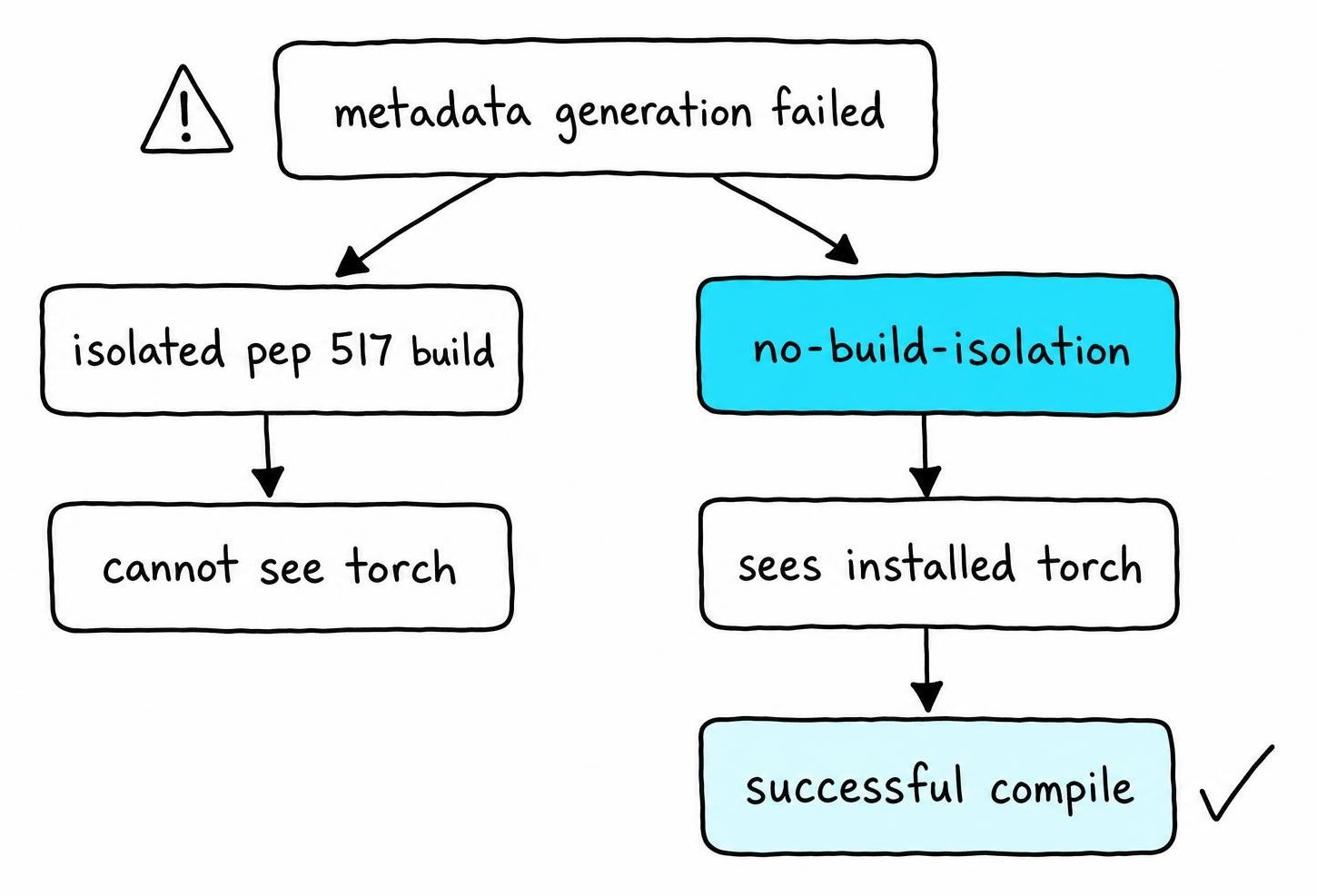
Confirm prerequisites exist in the active environment: pip list | grep -iE "torch|setuptools|wheel|ninja". All four must appear. Then bypass isolation:
pip install flash-attn --no-build-isolation
This flag tells pip to use your existing environment instead of creating a throwaway one. It only works when every build dependency is already installed.
Another common cause is pip and python resolving to different environments. Run which pip && which python and confirm both paths share the same virtualenv or conda prefix. Mixed interpreters cause setuptools backend errors that look identical to metadata failures but vanish once paths align.
Separate the three failure types: dependency-resolution errors name a missing package, pyproject.toml backend errors reference setuptools.build_meta, and metadata failures print MetadataGenerationFailed with a nested traceback.
Install FlashAttention-2 and confirm the selected version
Once all compatibility checks pass, install with isolation disabled and a pinned version:
pip install flash-attn==2.7.3 --no-build-isolation
Adjust the version tag to match your PyTorch + CUDA combination - Dao-AILab's GitHub releases page lists which wheels match which configurations. Drop back one minor release until the build succeeds.
Confirm the installed version without relying on __version__:
python -c "from importlib.metadata import version; print(version('flash-attn'))"
Then verify the extension loads on GPU: python -c "from flash_attn import flash_attn_func; import torch; print(torch.cuda.is_available())". A successful pip install alone proves nothing - broken .so files only surface at import time.
Never pip install --upgrade torch after flash-attn is compiled. The new PyTorch ships different CUDA stubs and the existing extension throws undefined symbol errors. Rebuild flash-attn any time PyTorch changes. The full installation walkthrough covers wheel availability by platform.
Install FlashAttention-3 only on supported Hopper environments
FlashAttention-3 requires SM 9.0 Hopper GPUs: H100, H200, and GH200. Attempting compilation on Ampere or Ada Lovelace cards produces unsupported gpu architecture 'sm_90a' errors that no compiler swap resolves. Check torch.cuda.get_device_capability() - anything below (9, 0) rules out FlashAttention-3.
The package ships from the hopper branch of the Dao-AILab/flash-attention repository, not via standard pip install flash-attn. It requires CUDA Toolkit ≥ 12.3 and a PyTorch build compiled against the same toolkit, and the source build for Hopper GPUs walks through matching those versions before you compile.
If your hardware or toolkit falls short, stick with FlashAttention-2 or use PyTorch's built-in torch.nn.functional.scaled_dot_product_attention, which selects a memory-efficient kernel automatically on Ampere and newer cards.
Apply platform-specific fixes for ComfyUI, Linux, and WSL2
The same pip install command targets different interpreters, CUDA installations, and compiler paths on each platform.
ComfyUI: install into the Python instance that launches the app
ComfyUI ships portable builds with an embedded Python runtime outside your system or conda Python. Run python_embeded/python.exe -m pip list | grep torch (Windows portable) or identify the venv ComfyUI activates at launch. Compare torch.version.cuda from that interpreter against your toolkit.
Do not upgrade ComfyUI's pinned PyTorch to chase a newer flash-attn wheel - custom nodes pin against specific torch APIs. After installation, restart ComfyUI and check startup logs for the attention backend line.
Linux: check headers, compilers, libraries, and resource limits
Install python3-dev, build-essential, and linux-headers-$(uname -r) before compiling. Confirm /usr/local/cuda symlinks to the correct toolkit version and that ldconfig -p | grep libcudart resolves. Docker containers built from nvidia/cuda:*-runtime-* images lack nvcc and headers - switch to *-devel-* images.
WSL2: keep the Windows driver and Linux CUDA tools separate
Run nvidia-smi inside WSL2 first. If it fails, update the Windows-side NVIDIA driver - never install a separate Linux kernel driver inside the distribution. Install only the CUDA Toolkit (without the driver component) inside WSL2. Compile from the Linux filesystem (~/), not /mnt/c/; mounted Windows paths introduce permission errors and slow I/O. Confirm which nvcc, which gcc, and which python all resolve within the same WSL distribution.
Confirm the FlashAttention extension loads after rebuilding
Uninstall the broken package first: pip uninstall flash-attn -y, then delete any lingering build/ and *.egg-info directories. Iterate on one env var at a time - CUDA_HOME, then MAX_JOBS, then CC - and pipe each build attempt to a separate log file.
After pip install reports success, verify three layers. importlib.metadata.version('flash-attn') confirms metadata. from flash_attn import flash_attn_func confirms the extension loads. Pass a small torch.float16 tensor through flash_attn_func on GPU to confirm the kernel executes without illegal memory access errors.
An undefined symbol at import time means the compiled extension links against a different PyTorch or C++ ABI than the one in your environment. Rebuild flash-attn from scratch after any PyTorch change.
Once the import and a real workload succeed, lock the environment: pip freeze > requirements-flash.txt. Review the stability and maintenance profile before committing to a production deployment pattern.
FAQ
How do I install Flash Attention?
Run pip install flash-attn --no-build-isolation with PyTorch already installed and a matching CUDA Toolkit on $PATH. Confirm nvcc --version and torch.version.cuda share the same major.minor version, and that GCC is within the range your CUDA Toolkit supports. A prebuilt wheel avoids compilation entirely when one exists for your PyTorch/CUDA/Python combination.
How do I install Flash Attention 2?
Use pip install flash-attn==2.7.3 --no-build-isolation, adjusting the version to match your environment. Your GPU needs compute capability ≥ 7.5 (Turing or newer) and PyTorch, CUDA Toolkit, and GCC versions must be compatible. After installation, confirm the extension loads by importing flash_attn_func rather than trusting pip's success message alone.
How do I install Flash Attention 3?
FlashAttention-3 compiles only on Hopper-architecture GPUs (H100, H200, GH200) with compute capability 9.0 and CUDA Toolkit ≥ 12.3. Clone the hopper branch from the Dao-AILab/flash-attention repository and build from source - it is not available via standard pip install flash-attn. Non-Hopper hardware cannot run FlashAttention-3 regardless of compiler or toolkit configuration.
What's Flash Attention?
FlashAttention is a fused GPU kernel that computes exact multi-head attention without materializing the full N×N attention matrix in HBM [2]. It reduces memory usage from quadratic to linear in sequence length while accelerating training and inference on NVIDIA GPUs with compute capability 7.5 and above.
How does Flash Attention work?
FlashAttention tiles the Q, K, and V matrices into SRAM-sized blocks, computes partial softmax statistics per tile, and rescales them on the fly to produce mathematically exact output. This tiling strategy minimizes HBM reads and writes - the dominant bottleneck in standard attention. A detailed breakdown of the tiling and IO mechanics covers the algorithm step by step.
References
- PyGraph: Robust Compiler Support for CUDA Graphs in PyTorch - Abhishek Ghosh, Ajay Nayak, Ashish Panwar et al. (2025)
- FlashAttention: Fast and Memory-Efficient Exact Attention with IO-Awareness - Tri Dao, Daniel Y. Fu, Stefano Ermon et al. (2022)