Fix LM Studio Speculative Decoding Not Working on GGUF
Swarnava Dutta10 min read
Draft ModelTarget ModelGguf
Contents

You enable speculative decoding in LM Studio, load a draft model, and generation either stalls, silently falls back to standard autoregressive sampling, or runs slower than before. No error, no warning - just wasted VRAM and confusion. When LM Studio speculative decoding is not working, the cause sits in one of three layers: model compatibility, backend support, or acceptance-rate tuning. Each layer fails differently and demands a different fix.
Quick answer
LM Studio speculative decoding fails when the draft model uses a different tokenizer than the target model, when the llama.cpp backend lacks GPU-offload support for the loaded GGUF quant, or when draft-model quality is too low for the target to accept enough tokens. Fix it by matching tokenizer vocabularies exactly, confirming CUDA or Metal offload is active for both models, and raising draft-model quality until the acceptance rate exceeds 40%.
Why LM Studio speculative decoding is not working
The symptom determines the fix. Classify what you see into one of four buckets: the feature never activates, the draft model refuses to load, generation errors out mid-sequence, or everything runs but slower than without speculative decoding.
Before touching any setting, establish a baseline. Run the same prompt through the target model alone - same context length, same sampling temperature, same hardware offload - and record tokens per second. Then enable the draft model and compare. Without that baseline, you cannot tell whether speculative decoding is hurting or helping.
Capture your environment: LM Studio version, the llama.cpp runtime it bundles (visible in the server logs), CUDA or Vulkan backend, and the exact GGUF filenames for both models. These details make every later diagnostic step reproducible.
Work the problem in order:
- Compatibility - tokenizer and architecture match between draft and target
- Runtime support - backend offload active for both models
- Resource limits - enough VRAM to hold both model contexts
- Performance tuning - draft length and acceptance rate
Check draft model and target model compatibility
Similar model names mean nothing. A Mistral-7B-v0.1 draft paired with a Mistral-7B-v0.3 target will fail silently because v0.3 expanded the vocabulary from 32,000 to 32,768 tokens [CITE: Mistral v0.Mistral v0.3 expanded its vocabulary. Same brand, different tokenizer, zero accepted drafts.
Pick a draft model from the same family as the target - ideally an official small variant. Llama 3.1 8B target works with a Llama 3.1 1B draft because both share the tiktoken-based 128,256-token vocabulary. A quantized Q4_K_M draft paired with a Q8_0 target is fine; quantization level affects quality, not tokenizer compatibility.
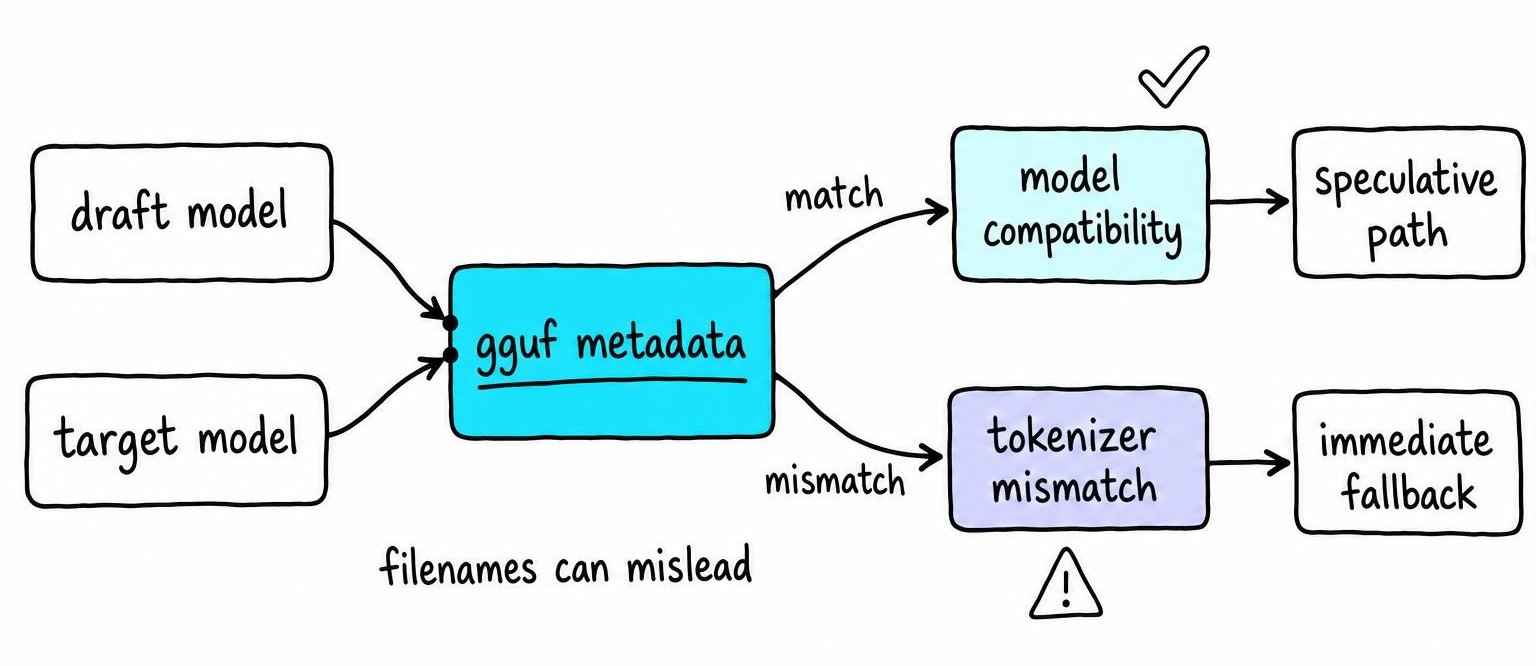
Never trust filenames alone. Open the GGUF metadata (LM Studio's model inspector or gguf-py) and compare three fields: tokenizer.ggml.model, tokenizer.ggml.tokens array length, and general.architecture. If any differ, the pair is incompatible regardless of what the repo README claims.
Detect a tokenizer mismatch before generation fails
Before running a full chat session, send a short plain-text prompt - no system message, no chat template. This isolates tokenizer problems from template-formatting problems.
Warning signs of a mismatch:
- Acceptance rate drops below 5% on the first generation
- Output contains repeated tokens or garbled fragments
- LM Studio falls back to standard decoding with no error logged
- BOS/EOS token IDs differ between draft and target metadata
Compare tokenizer.ggml.bos_token_id and tokenizer.ggml.eos_token_id across both GGUF files. A single-token mismatch in these special tokens causes the target model to reject every drafted sequence, reducing speculative decoding to expensive overhead.
Confirm llama.cpp, CUDA, and Vulkan backend support
LM Studio bundles multiple llama.cpp runtime builds. The one it selects depends on your GPU, driver version, and model architecture - and it can switch silently. Open the server log panel before loading models. Look for the runtime identifier (e.g., llama-cuda12.2 or llama-vulkan) and confirm GPU layers are offloaded, not falling back to CPU.
CUDA and Vulkan builds differ in kernel coverage. A CUDA build on an NVIDIA GPU with enough VRAM typically handles speculative decoding without issue. Vulkan builds lag behind on some operations; if you see the draft model load but acceptance stays at zero, try forcing the CUDA runtime in LM Studio's developer settings.
Two models consume roughly twice the VRAM. Check nvidia-smi or LM Studio's resource monitor for actual allocation. When VRAM runs short, LM Studio offloads layers to CPU for one or both models - killing the latency advantage speculative decoding exists to provide. A Llama 3.1 8B Q4_K_M target plus a 1B Q4_K_M draft fits comfortably in 10 GB; a 70B target with the same draft needs 40+ GB or aggressive layer splitting.
Before changing runtimes or updating LM Studio, screenshot your current configuration. Runtime updates can alter default offload behavior, context allocation, and even which speculative decoding codepath runs.
Fix low token acceptance and speculative decoding slowdowns
Speculative decoding activating and speculative decoding helping are different things. The draft model runs before the target model verifies, so every rejected token is pure overhead - wasted compute with no output to show for it. A token acceptance rate below 40% means the draft model guesses wrong more often than right, and you lose throughput compared to standard autoregressive generation.
Track four numbers, not one:
- Token acceptance rate - fraction of draft tokens the target keeps
- Tokens per second - end-to-end output throughput
- Time to first token - increases when the draft model adds a loading step
- Total completion time - the metric users feel
When acceptance is low, swap in a closer draft model or drop the speculative lookahead length if your LM Studio version exposes that slider. Aggressive sampling (high temperature, top-k below 10) makes draft predictions harder; the target rejects more tokens because the distribution sharpens unpredictably. Short outputs and small target models (7B and under) leave little room for speculative decoding to recoup its overhead.
VRAM pressure matters here too. Both models share memory bandwidth, and if the draft model forces CPU offload on even a few target-model layers, the bandwidth bottleneck erases any acceptance-rate gains.
Benchmark the draft model without changing multiple settings
Warm the KV cache by running two throwaway generations before recording. Then use the same prompt, same temperature, same context length, same GPU offload for every trial. Change one variable per run - draft model, backend, speculative-token count, or context size - so you can attribute the difference.
Record output token counts alongside tokens-per-second. A generation that stops at 30 tokens looks faster per-token than one that produces 300 because early tokens benefit from a shorter KV cache. Median over at least five runs; single-run numbers in LM Studio fluctuate by 10-15% from scheduling jitter alone.
Verify that LM Studio is actually using speculative decoding
Two models loaded in VRAM proves nothing. LM Studio can hold both models resident while routing every token through standard autoregressive decoding.
Open the server log panel and search for entries referencing speculative batches, draft token counts, or acceptance/rejection tallies. If the log shows only target-model forward passes with no draft-model activity, the speculative path never activated - regardless of what the UI toggle says. An explicit fallback message (common after a context-length mismatch) confirms the engine gave up silently.
Run the same prompt twice: once with the draft model enabled, once disabled. Compare tokens per second and total VRAM allocation. If both runs produce identical throughput and memory footprint, speculative decoding is off.
When filing a bug or asking for help, capture this checklist in one screenshot or paste:
- LM Studio version and bundled llama.cpp runtime string
- CUDA/Vulkan/Metal backend and driver version
- GPU model and total VRAM
- GGUF filenames and
tokenizer.ggml.tokensarray length for both models - Exact prompt text and sampling settings (temperature, top-k, top-p)
- Server log lines covering model load through generation end
- Tokens-per-second and acceptance-rate numbers from both enabled and disabled runs
Without that bundle, no one - including LM Studio's developers - can reproduce your failure.
How speculative decoding works and stays lossless
The draft model generates k candidate tokens autoregressively - cheap, because the model is small. The target model then scores all k candidates in a single forward pass, processing them as a batch rather than one at a time. Each draft token gets accepted or rejected by comparing the draft model's probability to the target model's probability at that position. Accepted tokens stay. The first rejected token gets resampled from a corrected distribution, and everything after it is discarded.
Speed comes from parallelism. One target-model forward pass can confirm, say, five tokens that would otherwise require five sequential passes. The draft model's compute cost is a fraction of the target's, so the net wall-clock time drops whenever multiple tokens survive verification.
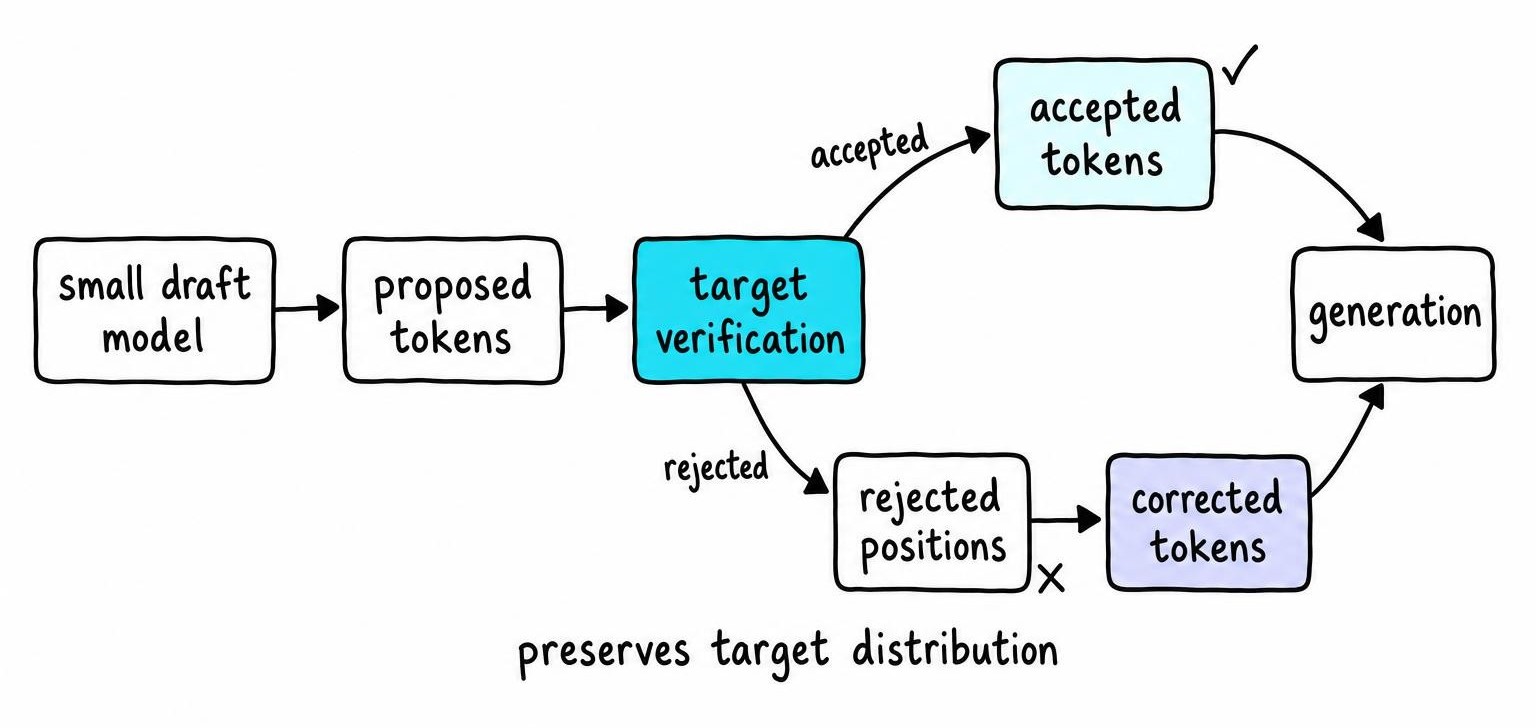
Speculative decoding is algorithmically lossless - the accepted distribution matches the target model's distribution exactly [1]. Every token the user sees could have been sampled from the target model alone. No approximation, no distillation loss.
Distributional equivalence does not mean bit-for-bit identical output. Change the CUDA kernel, the floating-point accumulation order, the random seed, or the backend from CUDA to Vulkan, and you get different token sequences that are all valid samples from the same distribution. Lossless means the distribution is preserved, not that a specific completion is reproducible across hardware.
KV cache optimization and attention during decoding
Every transformer generation step computes attention over all previous tokens. KV cache optimization stores the key and value tensors from prior positions so the model reads them directly instead of recomputing the full prefix. Without this cache, latency scales quadratically with sequence length; with it, each new token requires attention computation only against its own query vectors and the stored KV pairs.
Draft and target models maintain separate KV caches. The draft model fills its cache during candidate generation, then the target model runs a single batched forward pass that extends its cache by up to k verified positions. Some llama.cpp implementations share cache memory pools; others allocate independently. Either way, two caches compete for the same VRAM budget.
Longer context lengths balloon cache size linearly with sequence length and layer count. A 32-layer model at 8K context with FP16 KV values already occupies several gigabytes per model. Double that for two models and you crowd out GPU memory fast, forcing layer offload to CPU - which destroys the bandwidth advantage speculative decoding depends on. KV cache optimization cuts memory cost per token, but it cannot fix a tokenizer mismatch or an incompatible draft architecture.
Prefix caching in LLMs is not speculative decoding
Prefix caching reuses stored KV-cache state when consecutive requests share an identical prompt prefix. The engine skips recomputation for the shared portion and starts generating from where the prefix ends. This happens across requests. Speculative decoding accelerates token generation within a single request by drafting and verifying multiple tokens per forward pass. One saves redundant prefill compute; the other reduces sequential decode steps.
The two techniques can stack. A cached prefix shortens time-to-first-token, then speculative decoding speeds the autoregressive phase that follows. Enabling prefix caching does nothing for draft-token acceptance or tokenizer compatibility - those remain speculative-decoding problems.
vLLM users often assume prefix caching is on by default. It depends on the vLLM version and engine configuration; older releases required --enable-prefix-caching explicitly, while newer versions changed the default [2]. Check your startup flags and server logs rather than transferring vLLM assumptions to LM Studio, which manages its own llama.cpp-based cache lifecycle independently. Prefix caching helps when many requests hit the same system prompt. It cannot fix a vocabulary mismatch or raise a failing acceptance rate.
FAQ
What is KV cache optimization?
KV cache optimization stores previously computed key and value tensors from each transformer layer so the model reads them during subsequent generation steps instead of recomputing attention over the entire sequence. This reduces per-token latency from quadratic to linear in sequence length, making autoregressive decoding practical at long contexts. Both draft and target models maintain separate KV caches during speculative decoding.
How does prefix caching work?
Prefix caching saves the KV-cache state produced during prompt processing and reuses it when a later request shares the same prompt prefix. The engine detects the shared portion, skips its recomputation, and begins generation from the first diverging token. This eliminates redundant prefill work across requests that share system prompts or few-shot examples.
What is prefix caching in LLM?
Prefix caching is a serving-layer optimization that stores KV-cache entries for common prompt prefixes across multiple requests. When a new request matches a stored prefix, the engine loads the cached tensors instead of running a forward pass over those tokens again. It reduces time-to-first-token for workloads with repeated system prompts but does not affect per-token decode speed the way speculative decoding does.
Is prefix caching enabled by default in vLLM?
It depends on the vLLM version. Older releases required the --enable-prefix-caching flag at server startup. Recent vLLM versions changed this default so prefix caching activates automatically. Check your actual startup flags and server logs rather than assuming either behavior, especially after upgrading between major releases.
References
- Component-Aware Self-Speculative Decoding in Hybrid Language Models - Hector Borobia, Elies Seguí-Mas, Guillermina Tormo-Carbó (2026)
- Attention to Detail: Evaluating Energy, Performance, and Accuracy Trade-offs Across vLLM Configurations - Nada Zine, Tristan Coignion, Vincenzo Stoico et al. (2026)