Is Ollama Safe? Privacy Risks & Hardening Guide 2026
Swarnava Dutta10 min read
Ollama SecurityOllama PrivacyOllama Local API Security
Contents
Bind Ollama to 0.0.0.0 on a spare box and anyone who can reach http://<box-ip>:11434 can pull the model list, read the loaded context, and issue generate requests without so much as a password prompt. No auth, no TLS, nothing. "It runs locally" is not a synonym for "it's secure", which is why whether Ollama is safe deserves an answer rather than an assumption.
That distinction matters more every month as local LLM adoption grows. Ollama genuinely keeps model weights and inference on your own hardware, which is a real privacy win over hitting a hosted API for every prompt. But local execution says nothing about whether your API port is bound to 0.0.0.0, whether the model file you pulled off a random registry mirror is what it claims to be, or whether the agent framework you wired up has shell access it shouldn't.
This piece is a practical audit: what data actually stays on your machine, what security risks come with exposed ports and untrusted models, and how to harden a real deployment - desktop or server - before you trust it with anything sensitive.
Quick answer
Ollama is conditionally safe: local inference keeps prompts and model weights on the machine, but the HTTP API on port 11434 ships with no built-in authentication. Ollama binds to 127.0.0.1 by default, and changing OLLAMA_HOST to 0.0.0.0 exposes the model list, prompts, and generate requests to anyone on the LAN. Hardening means loopback binding, a low-privilege service user, and TLS with real auth behind a reverse proxy.
Is Ollama Safe? The Short Answer and Threat Model
Short answer: is Ollama safe? Conditionally. Local inference removes the "your prompts go to someone else's server" risk that hosted LLMs carry, but that's only one slice of the picture.
"Safe" isn't a single property. Separate it into four questions: does data leave the machine (privacy), is the API and network posture sound (application security), can a downloaded model do something malicious (model safety), and does the process have more host access than it needs (host security). A deployment can win on one and fail badly on another.
Think in terms of threat actors and assets. On the actor side: other users on a shared box, a malicious local app hitting an open port, a network attacker scanning your LAN, an untrusted model file, a compromised MCP or agent integration. On the asset side: your prompts, any files an agent can read, credentials in environment variables, and the generated output itself.
Personal use on a laptop with no exposed ports is genuinely low-risk. A shared workstation, a cloud VM, or anything wired into tools and internet-facing traffic is a different threat model entirely - and that's where most of the real incidents start.
How Ollama Works: Local Inference, APIs, and Data Flow
At its core, what does Ollama do? It pulls model weights from its registry, stores them on disk, and runs them locally through a lightweight runtime, exposing that runtime as an HTTP API on port 11434 by default.
The normal data path looks like this: you send a prompt (or a file, for multimodal models) to the local API, the runtime loads the model into memory if it isn't already resident, generates a response token by token, and hands it back to whatever client called it - a CLI, a chat UI, or your own script. Logs of that exchange typically stay on disk unless something upstream ships them elsewhere.
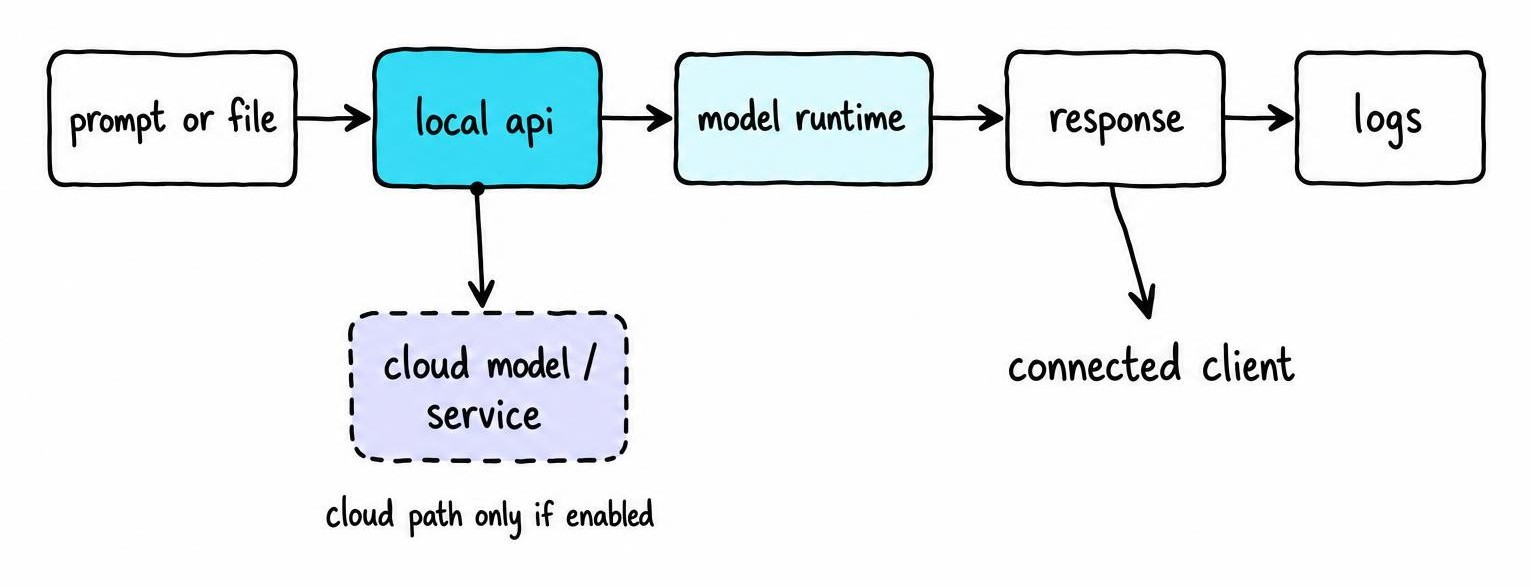
That's the local-model path. Ollama also offers optional cloud models and account-based services, documented on its own site, where inference runs on remote infrastructure instead of your hardware. Mixing local and cloud models in the same workflow is easy to do without noticing which one you just called.
The API itself is dumb in a useful way - it doesn't know or care what called it. That means an application using Ollama may bolt on its own analytics, vector storage, web browsing, or cloud sync, and none of that behavior is Ollama's to control or audit.
Ollama Privacy: What Stays Local and What May Reach the Cloud
When you're running a purely local model, your prompt goes to localhost:11434, gets processed in memory, and the response comes back without touching the internet. That's the core privacy claim, and for local models it holds up under a packet capture.
Outbound traffic still happens elsewhere. Ollama checks for updates, pulls model manifests and layers from its registry, and - if you've signed in or invoked a cloud model - sends requests to remote infrastructure exactly as Ollama's own documentation describes for its cloud offering. Ollama's published privacy policy also outlines what account data, usage information, and telemetry it collects when you use those hosted features rather than pure local inference.
Don't take any of that on faith. Run Ollama behind a monitoring proxy or with a tool like Wireshark, send a controlled test prompt, and watch what actually leaves the box versus what the docs claim.
Even fully local inference leaves traces you might not expect: prompts sitting in shell history, application logs, crash reports, swap files, or backups of Ollama's own local database. "Local" describes where inference runs, not where sensitive data ends up living.
Ollama Security Risks: Exposed Ports, Models, and Permissions
Not every risk deserves equal weight. A laptop with loopback-only access is low risk; a shared workstation or public server running Ollama with default settings is where real damage happens.
Model output is never trustworthy by default - treat it like any other untrusted input. It can hallucinate convincingly, embed instructions from prompt-injected content, or drive a tool call you never intended when wired into an agent framework.
Ollama's own risk profile is only part of the equation. The OS hardening, client apps, reverse proxies, browser extensions, and automation layers sitting on top of it usually decide whether an incident actually happens.
Network Exposure and an Unprotected Local API
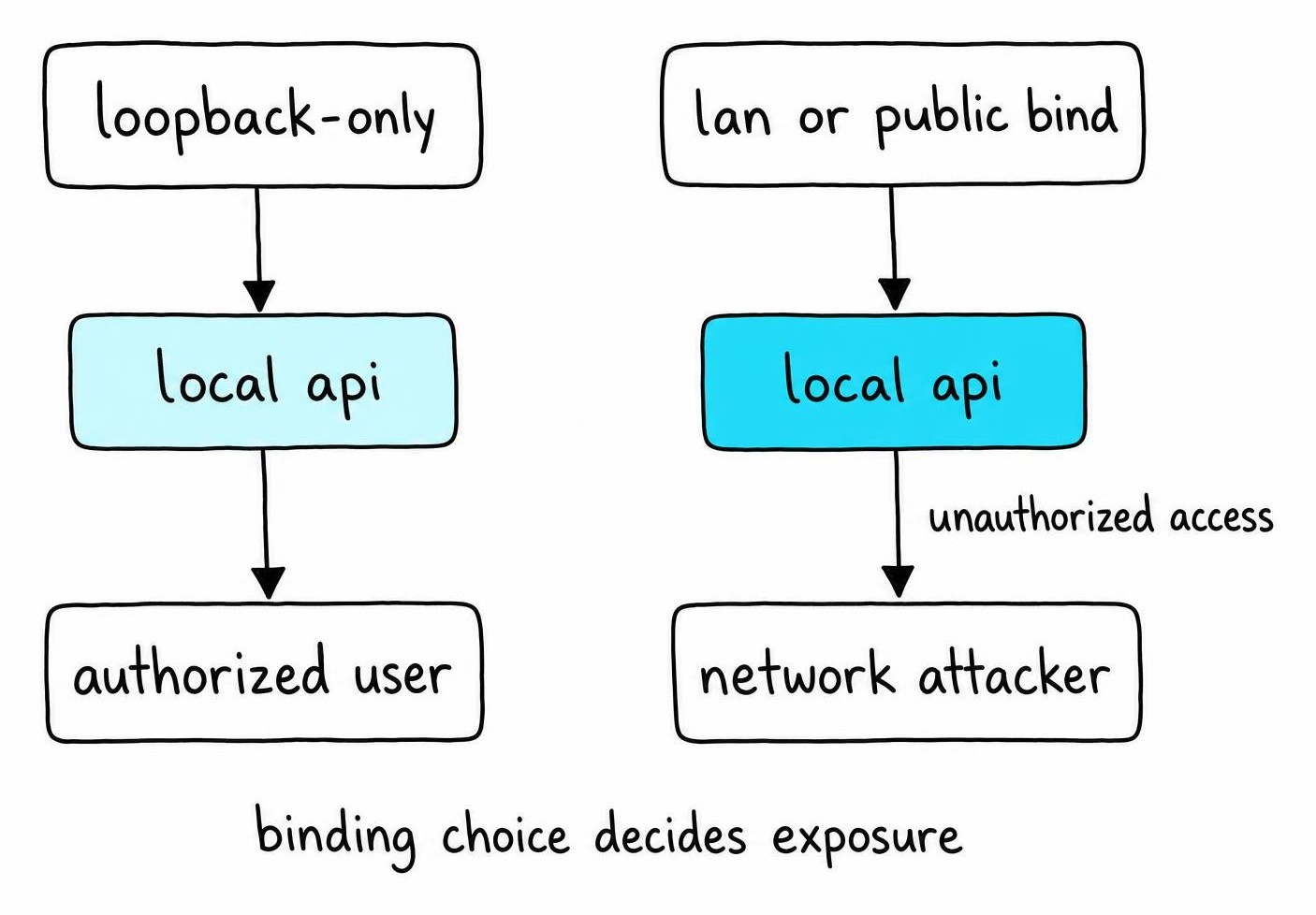
By default, Ollama binds to loopback - 127.0.0.1 - which is fine until someone changes OLLAMA_HOST to 0.0.0.0 for "convenience" and forgets about it. That single flag turns a private tool into an open API reachable by anyone on the LAN, or the internet if the host has a public IP.
Consequences: unauthorized inference burning your GPU, prompt and response disclosure, and straightforward denial-of-service from anyone hammering the endpoint. There's no built-in authentication layer.
If you need remote access, put it behind a reverse proxy with TLS and real auth, restrict origins, or tunnel through a VPN - never expose the raw port directly.
Untrusted Models and Software Supply-Chain Risk
Ollama the runtime and the models you pull are separate trust boundaries. Stick to official or well-known publishers, pin versions, and check licenses before promoting anything to production.
Unofficial installers, third-party web UIs, and model-conversion tools widen the supply chain considerably - vet what you add.
Host Permissions, Secrets, and Tool-Enabled Damage
Never run Ollama as root or an admin account; scope it to its own user with limited filesystem access. Keep it away from SSH keys, cloud credentials, and source repos, and require approval or sandboxing before any tool call touches your files or network.
How to Audit an Ollama Deployment Before Trusting It
Before I let anything Ollama-related near real data, I run the same checklist regardless of how "obviously fine" the box looks.
- Inventory: Ollama version, model sources and their publishers, listening interfaces, cloud account status, connected clients, and any agent integrations touching it.
- Network: run
netstatorssto see what's actually listening, then try reaching the API from another device on the LAN to confirm it isn't exposed. - Filesystem and secrets: check the service account's permissions, mounted directories, log verbosity, environment variables, and whether backups quietly capture prompt history.
- Vulnerabilities: check current release notes and advisories yourself rather than trusting a "known vulnerabilities" claim that ages badly within months.
Then set separate acceptance bars: personal tinkering can tolerate looseness, but confidential work, regulated data, or anything production-facing needs every box above checked before go-live.
How to Secure Ollama on Desktops and Servers
Here's the priority order I actually follow, not a flat checklist:
- Bind to loopback and drop privileges first. Leave
OLLAMA_HOSTalone unless you've built proper access control, and run the service under its own low-privilege user, never root. - Patch everything in the stack, not just Ollama - the OS, container base images, client apps, and any reverse proxy sitting in front. Remove models and integrations you're not actively using; unused surface area is still attack surface.
- Gate remote access properly: host firewall rules, TLS termination, real authentication, request rate limits, timeouts, and quotas. Segment the network so the Ollama host can't reach things it doesn't need to.
- Isolate anything sensitive in a dedicated user, container, or VM. Containers help, but a shared kernel and mounted volumes mean they're not a full security boundary on their own.
- Restrict what the model or app can touch - files, secrets, network egress, tools. Never drop unrestricted credentials into a prompt or environment variable Ollama's process can read.
- Log for incident response, not surveillance - capture connection metadata and errors, but avoid retaining full sensitive prompt content longer than you need it.
- Back up configs, track model versions, watch for resource spikes and odd connections, and keep a tested rollback path for updates.
Is Ollama Open Source, Meta-Owned, or Completely Free?
The question "is Ollama owned by Meta" comes up often enough that the naming, not the ownership, is clearly the source of the confusion. Ollama the runtime is an independent project; Meta owns the Llama model family, one of many models Ollama can run alongside Mistral, Qwen, Gemma, and others. Pulling llama3 doesn't hand Meta any control over your Ollama installation.
Is Ollama open source? The client and server code is publicly available on its repository, but that's a separate question from model licensing. Each model you pull carries its own license terms - some permissive, some with usage restrictions - and those don't automatically match the runtime's license.
Is Ollama completely free? The software itself costs nothing to run. Your real costs are hardware, electricity, storage for model files that easily run tens of gigabytes each, and your own time administering the thing. Optional cloud models and hosted plans carry separate pricing, detailed on Ollama's own pricing page - check current terms there before assuming anything is free at scale.
Ollama vs ChatGPT: Which Is Better for Privacy and Security?
Is Ollama better than ChatGPT? Wrong question - they solve different problems. Ollama gives you data residency, offline availability, and full control over what a model can see, provided you actually configure it that way. ChatGPT gives you managed security operations, centralized patching, and a support team, provided you trust OpenAI's infrastructure and policies more than your own hardening skills.
Model capability tips toward the hosted service most of the time - frontier models are usually cloud-first. Convenience, team collaboration features, and automatic updates favor ChatGPT too; setup effort, hardware cost, and ongoing maintenance favor whichever you're already comfortable running.
Total cost isn't obvious either: Ollama is "free" until you count GPU hardware and your own time; ChatGPT bills per seat or usage.
Scenario-based picks:
- Private experimentation or offline coding: local Ollama, locked to loopback.
- Solo development work: either, depending on model quality needs.
- Team deployments: hosted service, unless you can staff real Ollama ops.
- Regulated or highly sensitive data: local, air-gapped Ollama with the full hardening checklist above - or nothing leaves the building at all.
FAQ
What exactly does Ollama do?
Ollama downloads open-weight models to your machine, runs inference locally on your CPU or GPU, and exposes that runtime through a local HTTP API on port 11434. It handles model management - pulling, storing, and switching between models - without needing a hosted service for local models.
Is Ollama owned by Meta?
No. Ollama is an independent project maintained separately from Meta, which only owns the Llama model family that Ollama happens to support. You can run Ollama entirely with non-Meta models like Mistral or Qwen and never touch anything Meta-related.
Is Ollama completely free?
The Ollama software itself is free to download and run. Your actual costs are hardware, power, and disk space for model files, plus separate charges if you opt into its hosted cloud models or paid plans rather than sticking to fully local inference.
Is Ollama better than ChatGPT?
Neither wins outright - they answer different needs. Ollama wins on data control, offline use, and privacy when configured correctly; ChatGPT wins on model capability, convenience, and zero setup. Pick based on whether your priority is control over your data or access to the strongest available model.