How to Do LoRA Fine-Tuning: Practical LLM Workflow for 2026
Swarnava Dutta9 min read
LoRA Fine Tuning Tutorial
Contents

Learning how to do LoRA fine-tuning usually starts the same way: rank 64, alpha left at its default, every linear layer targeted, and a 24 GB GPU that runs out of memory on a 7B model. The adapter is "small" - barely 1% of total parameters - yet enough knobs sit misconfigured to turn a Saturday into a queue of failed jobs.
This guide covers what sits between "it works on a blog post" and "it works on my GPU." I'll walk through the tensor math, a runnable PEFT workflow, and the parameter choices that actually matter.
Quick answer
LoRA fine-tuning freezes a pretrained LLM's weights and injects small low-rank matrices into selected transformer layers. Only these adapter matrices train, cutting trainable parameters by roughly 100x. To run one, load a base model with Hugging Face PEFT, configure rank, alpha, and target modules in a LoraConfig, then train with a standard Trainer loop.
How LoRA Fine-Tuning Works: Low-Rank Updates by Shape
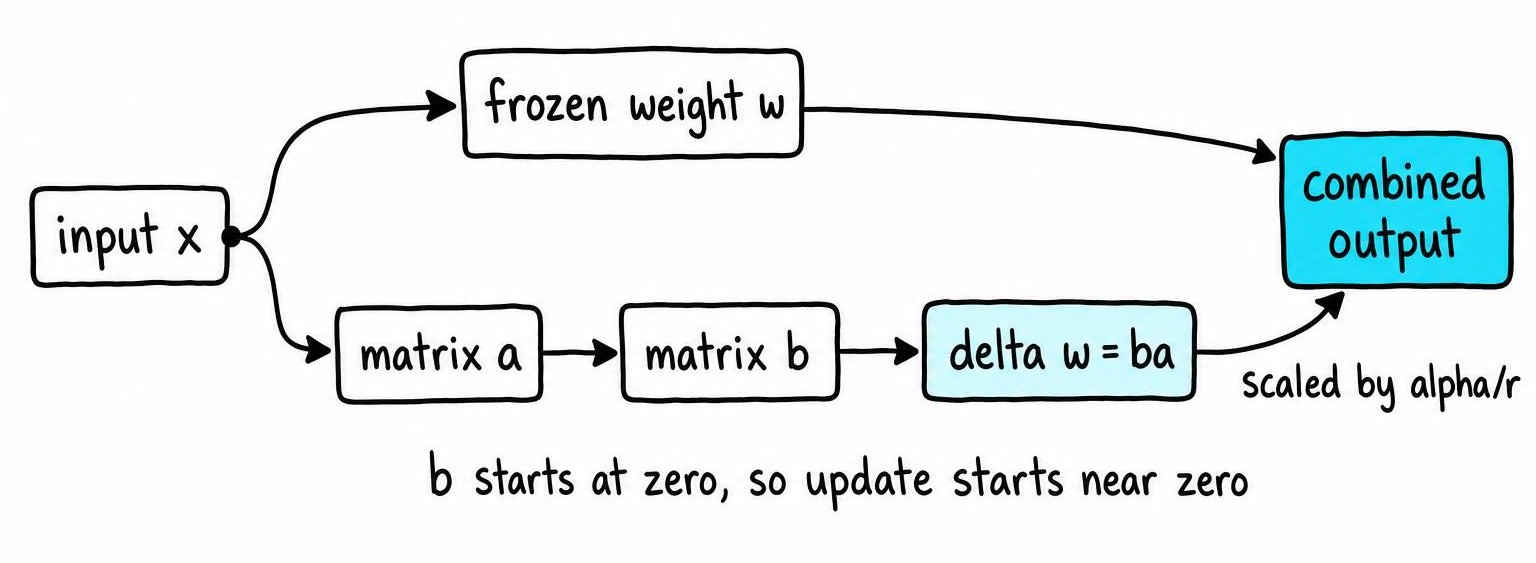
LoRA freezes every pretrained weight matrix and injects two small matrices that together learn a low-rank update. During training, gradients flow only through these adapters. During inference, you add the adapter product back into the frozen weight - the model architecture never changes.
This works because task-specific adaptations tend to live in a low-dimensional subspace of the full weight space [1]. You don't need a complete copy of every parameter to teach a model a new behavior.
Tensor Shapes and the LoRA Update Equation
Take a frozen linear layer with weight W of shape d_out × d_in. LoRA decomposes the update as ΔW = BA, where A has shape r × d_in and B has shape d_out × r.
The layer output becomes (W + BA)x. A scaling factor α/r multiplies BA so you can tune alpha independently of rank. At init, A gets a random Gaussian fill and B starts at zero - the initial ΔW is exactly zero, so training begins from pretrained behavior.
Trainable-Parameter Math for One Layer and the Full Model
One adapted layer adds r × (d_in + d_out) trainable parameters instead of d_in × d_out for full fine-tuning.
Worked example: A q_proj layer in a 7B Llama-style model has d_in = d_out = 4096. Full fine-tuning that layer means 4096 × 4096 = 16.8M parameters. With rank 16, LoRA adds 16 × (4096 + 4096) = 131K - roughly 128× fewer.
Scale that across q_proj and v_proj in 32 transformer layers and you're training about 8.4M parameters total versus billions frozen. Those frozen parameters still consume GPU memory for the forward pass - the savings come from optimizer states and gradients, which only track adapter weights. Understanding how quantization interacts with this matters when VRAM is tight.
Build the LLM Fine-Tuning Dataset, Metrics, and Baseline
Your fine-tuning dataset needs to mirror production exactly - same prompt templates, same response style, same task distribution. Format each example into instruction, input, and response fields, then apply label masking so loss ignores prompt tokens.
Split into train, validation, and held-out test sets. Check for duplication between splits, silent truncation at your max sequence length, and skewed length distributions that bias the model toward short outputs.
Silent truncation is the usual explanation for an adapter that looks broken for no visible reason: when examples get cut at 2048 tokens, the model never sees the response portion of the long ones, so it learns nothing useful from them. A quick histogram of tokenized lengths catches that in minutes.
Data quality deserves more scrutiny than hyperparameters. Inconsistent formatting - mixing chat-template styles, leaving stray system prompts in some examples but not others - teaches the model noise. Clean ten examples by hand and spot-check another twenty before committing to a run.
Before touching any adapter, run the base model on your test split and record task metrics, generation samples, and memory usage. Adapters that look better during training routinely score below the untouched base on held-out data when the training set is too narrow.
How to Do LoRA Fine-Tuning with Hugging Face PEFT
The workflow needs four libraries: transformers, datasets, peft, and accelerate. Training produces a small adapter directory containing config, weights, and tokenizer files. The base model never gets modified.
Set Up the Model, Tokenizer, and Training Environment
from transformers import AutoModelForCausalLM, AutoTokenizer

model_name = "meta-llama/Llama-3.1-8B"
tokenizer = AutoTokenizer.from_pretrained(model_name)
tokenizer.pad_token = tokenizer.eos_token

model = AutoModelForCausalLM.from_pretrained(
    model_name,
    torch_dtype="bfloat16",
    device_map="auto",
    attn_implementation="flash_attention_2",
)
model.gradient_checkpointing_enable()
If you add special tokens, call model.resize_token_embeddings(len(tokenizer)) before attaching any adapter. Leveraging Flash Attention here cuts activation memory significantly.
Attach the Adapter and Run the Fine-Tune
from peft import LoraConfig, get_peft_model, TaskType
from transformers import TrainingArguments, Trainer

lora_config = LoraConfig(
    task_type=TaskType.CAUSAL_LM,
    r=16,
    lora_alpha=32,
    lora_dropout=0.05,
    target_modules=["q_proj", "v_proj", "k_proj", "o_proj"],
    bias="none",
)
model = get_peft_model(model, lora_config)
model.print_trainable_parameters()  # expect < 1% trainable

args = TrainingArguments(
    output_dir="./lora-checkpoints",
    per_device_train_batch_size=4,
    gradient_accumulation_steps=4,
    num_train_epochs=3,
    learning_rate=2e-4,
    bf16=True,
    eval_strategy="steps",
    eval_steps=200,
    save_steps=200,
    seed=42,
)

trainer = Trainer(model=model, args=args, train_dataset=train_ds, eval_dataset=val_ds)
trainer.train()
If a job crashes, pass resume_from_checkpoint=True to pick up from the latest saved step.
Choose Rank, Alpha, Dropout, Target Modules, and Initialization
Rank controls adapter capacity. Rank 8 handles style shifts; rank 64+ suits complex domain adaptation but increases overfitting risk. Start at 16 and adjust based on validation loss. Rank-8 adapters can outperform rank-64 on classification simply because the higher rank overfits a small dataset.
Alpha scales the update by α/r. Doubling alpha with fixed rank doubles the adapter's effective learning rate. A common default sets alpha to twice the rank, but don't tune alpha independently from your optimizer LR - they multiply.
Dropout acts as regularization when your dataset is small. Values around 0.05-0.1 help when you have fewer than around 10K examples. On larger datasets, dropout tends to slow convergence without improving generalization, so I typically set it to zero and rely on early stopping instead.
Target modules determine which layers get adapters. Attention projections are the minimum viable choice. Adding MLP layers (gate_proj, up_proj, down_proj) increases expressiveness at a memory cost. Don't copy module names from tutorials written for a different architecture - print them with model.named_modules() and match yours.
Initialization: Standard LoRA uses Gaussian A and zero B. PEFT also supports PiSSA and LoftQ for quantization-aware scenarios [2]. Treat every default as a starting point and tune against validation behavior.
LoRA vs QLoRA vs Full Fine-Tuning: Memory and Compute
| Criterion | Full Fine-Tuning | LoRA (bf16) | QLoRA (4-bit base) |
|---|---|---|---|
| Base-weight precision | bf16 / fp32 | bf16 | NF4 (4-bit) |
| Trainable parameters | 100% | ~0.5-2% | ~0.5-2% |
| Optimizer memory | All params | Adapter only | Adapter only |
| Training speed | Slowest | Faster | Slower than LoRA |
| Min VRAM (7B, approx) | ~60 GB+ | ~18-24 GB | ~10-14 GB |
| Deployment | Ship full model | Merge or serve separately | Merge, then re-quantize |
VRAM estimates above are approximate and vary significantly by optimizer, sequence length, and framework version.
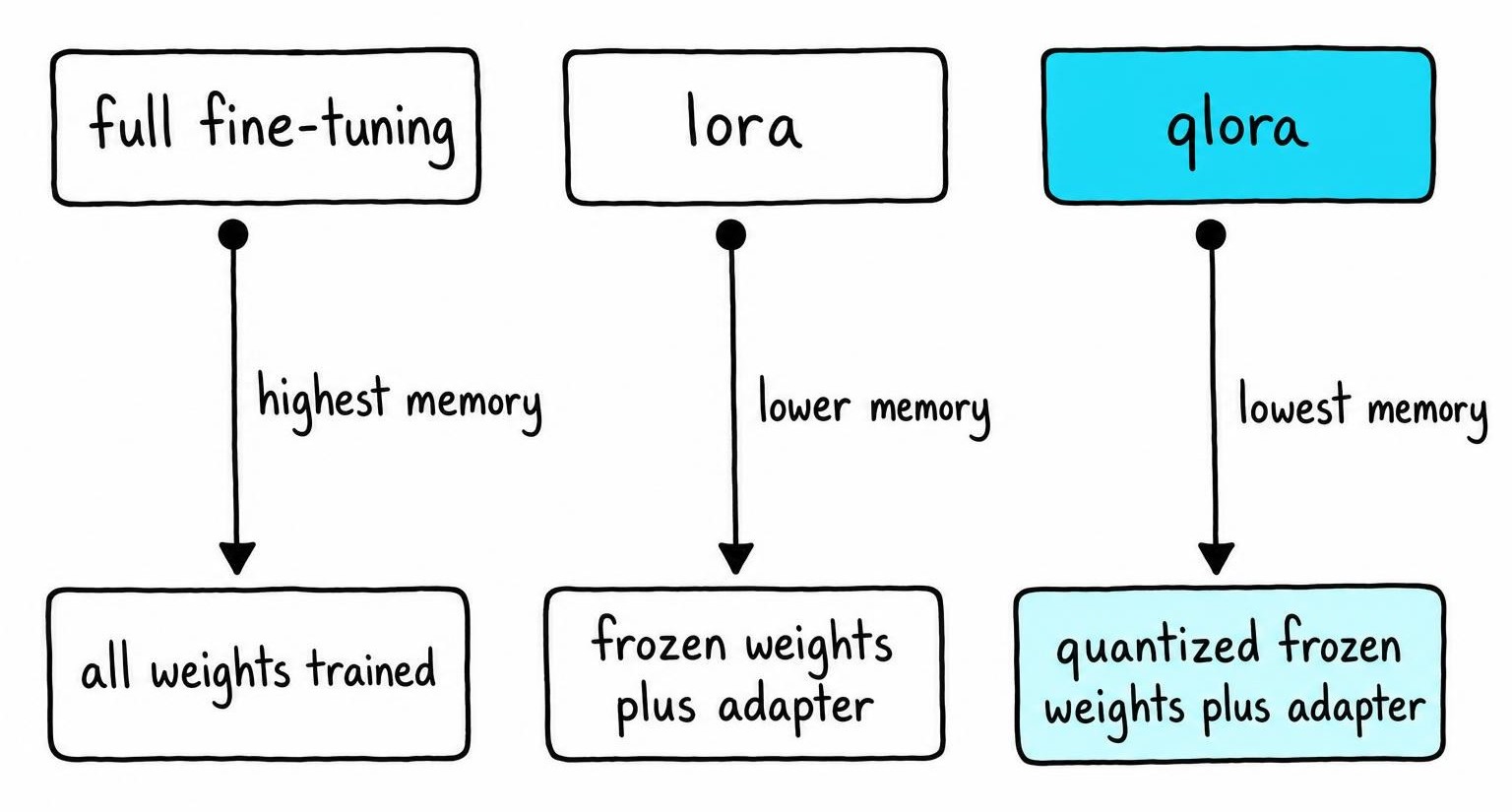
QLoRA loads the base model in 4-bit NF4 format, cutting base-weight footprint roughly 4x because each weight is stored in fewer bits than standard 16-bit precision. Peak VRAM still depends heavily on sequence length and micro-batch size - gradient checkpointing trades compute for memory by recomputing activations during the backward pass.
Before committing to a long run, do a preflight:
- Run 5-10 training steps on real data
- Call
torch.cuda.max_memory_allocated()after those steps - Verify peak usage stays under 85% of GPU capacity
- Watch for variable-length batches that spike memory later
The expensive failure mode is an OOM that lands hundreds of steps in, when a longer-than-average batch finally appears.
Evaluate and Debug a LoRA Fine-Tune Before Deployment
Run your adapter model against the same test split, prompts, and decoding settings used for the baseline. Check both task improvement and regressions in instruction following, formatting, and safety.
Always pair loss curves with actual generation samples. Validation loss can drop steadily while the model memorizes training examples verbatim, so loss keeps improving for epochs after generation quality has already peaked.
Print ten random completions from each checkpoint against the same held-out prompts and read them. No metric substitutes for seeing the model repeat a training example word-for-word when you expected generalization. Compare outputs side-by-side with the base model - if the adapter improves task performance but mangles general instruction following, you've overfit to your narrow distribution.
Diagnose OOM Errors, Weak Learning, and Overfitting
OOM: Reduce batch size first, then sequence length. Enable gradient checkpointing. Switch to QLoRA as a last resort.
Flat loss: Verify print_trainable_parameters() shows non-zero trainable count, target module names match the architecture, label masking isn't zeroing all labels, and training data format matches the tokenizer's chat template.
Overfitting: Reduce epochs, lower rank, add dropout, or pick an earlier checkpoint. Watch for silent truncation - samples exceeding max_seq_length lose response tokens without warning. Understanding how guardrails interact with fine-tuned models helps catch safety regressions early.
Save, Merge, and Serve the LoRA Adapter Safely
Save adapter and tokenizer separately with model.save_pretrained(). Record the exact base-model revision hash - without it, you can't reproduce the merge later.
Keep adapters separate for small artifacts, multi-task hot-swapping, or frameworks like vLLM. Merge when you want a standalone model with no PEFT dependency.
Merging with merge_and_unload() creates a full-precision copy in memory. If the base was loaded in 4-bit for QLoRA, reload in bf16 before merging, since PEFT can't merge into quantized weights. Before publishing, compare merged outputs against adapter-based outputs with greedy decoding.
A dtype mismatch at merge time shifts outputs just enough to break structured JSON generation, with greedy decode diverging partway through a response. Keep the original adapter archived even after merging, then benchmark latency and output quality in your actual serving stack.
FAQ
How does LoRA fine-tuning work?
LoRA freezes all pretrained weights and injects two small matrices (A and B) into selected layers. These matrices multiply to form a low-rank update scaled by alpha/rank. Only the adapter matrices receive gradients during training. At inference, the adapter product merges back into the original weight, adding zero architectural overhead.
What's LoRA fine-tuning?
LoRA (Low-Rank Adaptation) fine-tuning is a parameter-efficient method for adapting large language models to new tasks without retraining all weights. It inserts trainable low-rank matrix pairs into transformer layers, typically reducing trainable parameters by around 100× while preserving most quality.
How to do LoRA fine-tuning
Load a pretrained model with Hugging Face PEFT, define a LoraConfig specifying rank, alpha, dropout, and target modules, then wrap the model with get_peft_model. Train using a standard Trainer loop with label masking on prompt tokens. Save the adapter, evaluate against your baseline, and merge when ready for deployment.
What is LoRA fine-tuning LLM?
LoRA fine-tuning for LLMs applies low-rank adapter matrices to specific linear layers - typically attention projections like q_proj and v_proj - inside a large language model. The base model stays frozen, requiring far less GPU memory than full fine-tuning. The resulting adapter files are small enough to version-control and hot-swap between tasks.
References
- Low-Rank Adapters Meet Neural Architecture Search for LLM Compression - J. Pablo Muñoz, Jinjie Yuan, Nilesh Jain (2025)
- Put the Space of LoRA Initialization to the Extreme to Preserve Pre-trained Knowledge - Pengwei Tang, Xiaolin Hu, Yong Liu et al. (2025)