How to Use QLoRA Hugging Face on a Single GPU
Swarnava Dutta8 min read
Hugging Face PeftBitsandbytesTrl Sfttrainer
Contents

A 7B-parameter model in float16 needs roughly 14 GB of VRAM just to load - before a single gradient is computed. QLoRA solves this by quantizing frozen weights to 4-bit NF4 and training only small LoRA adapters in 16-bit. Learning how to use QLoRA with Hugging Face means wiring together bitsandbytes, PEFT, and TRL with the right configuration to stay inside that VRAM budget.
Quick answer
Load a model via AutoModelForCausalLM with a BitsAndBytesConfig set to 4-bit NF4 quantization and double quantization enabled. Attach LoRA adapters through PEFT's get_peft_model, then train with TRL's SFTTrainer using paged AdamW 8-bit. This fine-tunes Llama 3 8B on a single 24 GB GPU in roughly 10 GB of VRAM.
Prepare to Use QLoRA with Hugging Face on Your GPU
QLoRA freezes every base-model weight in 4-bit NF4 precision and trains only small low-rank adapters in bfloat16. The base parameters never receive gradients - optimizer states scale with adapter size, not the full model.
Before you start, confirm you have:
- A CUDA-capable GPU with ≥16 GB VRAM (24 GB for comfortable 8B runs)
- Python 3.10+, a matching CUDA toolkit (11.8 or 12.1), and Hugging Face account with gated-model access for Llama 3
- Roughly 16 GB free disk for the quantized checkpoint and adapter weights
pip install transformers==4.44.0 peft==0.12.0 trl==0.10.1 \
  accelerate==0.33.0 datasets==2.20.0 bitsandbytes==0.43.3
On a 16 GB card, expect to need device_map="auto" with CPU offloading for the largest layers. A 24 GB RTX 3090 or 4090 fits an 8B model without offloading. For background on how quantization compresses weights without destroying accuracy, the choice between NF4 and FP4 matters in the next step.
Load Llama 3 with 4-Bit NF4 Quantization
Llama 3 8B Instruct (meta-llama/Meta-Llama-3-8B-Instruct) is gated. Run huggingface-cli login with an approved token before calling from_pretrained.
NF4 outperforms FP4 because pretrained transformer weights roughly follow a normal distribution, and NF4's quantization levels are designed to minimize error for that shape. Double quantization quantizes the quantization constants themselves from FP32 to FP8, saving an additional ~0.4 bits per parameter.
from transformers import AutoModelForCausalLM, AutoTokenizer, BitsAndBytesConfig
import torch

bnb_config = BitsAndBytesConfig(
    load_in_4bit=True,
    bnb_4bit_quant_type="nf4",
    bnb_4bit_use_double_quant=True,
    bnb_4bit_compute_dtype=torch.bfloat16,  # float16 if no Ampere+ GPU
)

model_id = "meta-llama/Meta-Llama-3-8B-Instruct"
tokenizer = AutoTokenizer.from_pretrained(model_id)
model = AutoModelForCausalLM.from_pretrained(
    model_id, quantization_config=bnb_config, device_map="auto"
)
model.config.use_cache = False
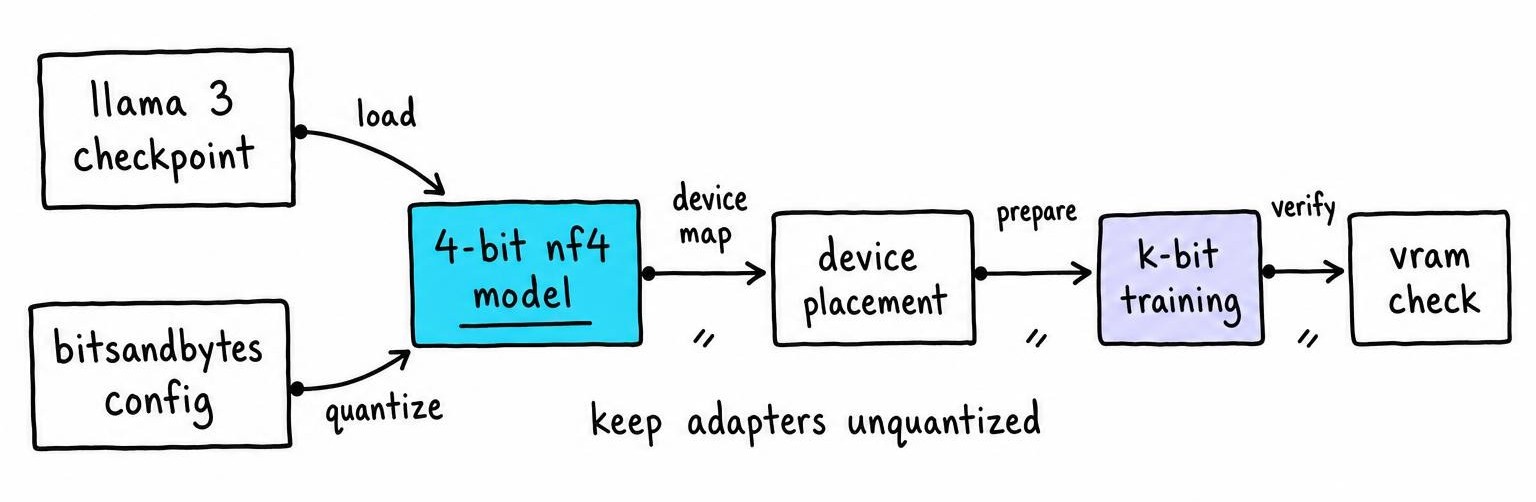
After loading, model.get_memory_footprint() should show roughly 5-6 GB, with storage dtype uint8 for quantized layers and computation in bfloat16.
Configure the 4-Bit Quantization Settings Safely
Use bfloat16 as compute dtype on Ampere or newer GPUs (RTX 30xx/40xx, A100). On Turing cards (T4, RTX 20xx), fall back to float16 - bfloat16 silently produces garbage on hardware without native support.
Only base-model weights get quantized. The LoRA adapters stay in bfloat16/float16; quantizing trainable parameters destroys gradient flow. The bnb_4bit_compute_dtype controls the dtype during forward-pass dequantization, not adapter storage.
A mismatch between your CUDA toolkit and the bitsandbytes wheel causes a libcudart.so error at import time. Pin bitsandbytes==0.43.3 against CUDA 12.1. If model.hf_device_map shows any layer on cpu, quantized kernels won't run - bitsandbytes 4-bit requires GPU execution for every quantized module.
Build an Instruction-Tuning Dataset and Chat Template
Instruction tuning trains on prompt - response pairs so the model follows task instructions rather than completing raw text. It improves compliance with user requests but does not inject reliable factual knowledge, so curate examples for format and reasoning rather than memorization.
Load a dataset with the Hugging Face Datasets library and map each example into the model's chat format. Drop malformed rows, check sequence lengths, and split train/validation before deduplication.
from datasets import load_dataset

dataset = load_dataset("yahma/alpaca-cleaned", split="train")

def format_chat(example):
    messages = [
        {"role": "user", "content": example["instruction"]},
        {"role": "assistant", "content": example["output"]},
    ]
    text = tokenizer.apply_chat_template(
        messages, tokenize=False, add_generation_prompt=False
    )
    return {"text": text + tokenizer.eos_token}

# Drop empty responses before formatting
dataset = dataset.filter(lambda x: len(x["output"].strip()) > 0)
dataset = dataset.map(format_chat)
dataset = dataset.train_test_split(test_size=0.05, seed=42)
Truncate anything above max_seq_length (1024 is a safe starting point on 24 GB). Verify zero instruction overlap across splits to prevent train-validation leakage.
Configure QLoRA Adapters with Hugging Face PEFT
For Llama 3, set target_modules to the actual module names in LlamaForCausalLM. Copying names from a Mistral or Falcon config silently creates zero adapters because PEFT matches by string.
At r=16 across seven projections, you train under 1% of an 8B model's parameters. I default to r=16 and only increase after validation loss plateaus.
from peft import LoraConfig, get_peft_model, prepare_model_for_kbit_training

prepare_model_for_kbit_training(model)  # skipping this causes NaN gradients

lora_config = LoraConfig(
    r=16,
    lora_alpha=32,
    lora_dropout=0.05,
    bias="none",
    task_type="CAUSAL_LM",
    target_modules=[
        "q_proj", "k_proj", "v_proj", "o_proj",
        "gate_proj", "up_proj", "down_proj",
    ],
)

model = get_peft_model(model, lora_config)
model.print_trainable_parameters()
# Expected: ~50M trainable out of ~8B total
Rank and target-module coverage control adapter capacity directly. Wider coverage (all seven projections vs. only q_proj/v_proj) increases trainable parameters and memory but improves convergence on complex tasks.
Set Up TRL SFTTrainer and Training Arguments
Set per_device_train_batch_size=2, gradient_accumulation_steps=4, one GPU - effective batch size is 2 × 4 × 1 = 8. Enable gradient_checkpointing=True to trade slower backward passes for noticeably lower activation memory usage.
Paged AdamW offloads optimizer states to CPU RAM only when GPU memory pressure triggers a page fault - it prevents OOM crashes during activation spikes rather than accelerating every step.
from trl import SFTTrainer
from transformers import TrainingArguments

training_args = TrainingArguments(
    output_dir="./qlora-llama3-out",
    per_device_train_batch_size=2,
    gradient_accumulation_steps=4,
    gradient_checkpointing=True,
    optim="paged_adamw_8bit",
    learning_rate=2e-4,
    warmup_ratio=0.03,
    lr_scheduler_type="cosine",
    num_train_epochs=1,
    logging_steps=10,
    eval_strategy="steps",
    eval_steps=100,
    save_steps=200,
    bf16=True,
)

trainer = SFTTrainer(
    model=model,
    train_dataset=dataset["train"],
    eval_dataset=dataset["test"],
    peft_config=lora_config,
    max_seq_length=1024,
    packing=False,
    tokenizer=tokenizer,
    args=training_args,
)
Pass LoraConfig directly to SFTTrainer via peft_config instead of wrapping the model yourself. With TRL's SFTTrainer wired to a reward model, you can later extend this adapter into RLHF.
Run QLoRA Training and Measure VRAM and Speed
Call trainer.train() and watch the first 20 steps. You should see loss begin to drop within the first 50 steps on a well-formatted instruction set; a flat line means the chat template is malformed or adapters attached to zero modules.
Reset CUDA memory counters before training with torch.cuda.reset_peak_memory_stats(), then read torch.cuda.max_memory_allocated() afterward. Record GPU model, CUDA version, bitsandbytes version, sequence length, batch size, and whether gradient checkpointing is enabled - without these, no one can reproduce the number.
OOM on step 1 means reducing batch size to 1 or cutting max_seq_length to 512. NaN loss usually traces to a missing prepare_model_for_kbit_training call or float16 compute dtype on a non-Ampere GPU. If print_trainable_parameters() shows 8 B trainable instead of 50 M, PEFT matched zero modules and the full model trains unfrozen.
Save, Reload, and Test the QLoRA Adapter
Call trainer.model.save_pretrained("llama3-qlora-adapter") and tokenizer.save_pretrained("llama3-qlora-adapter"). This writes only adapter weights (~100 MB for r=16) and adapter_config.json - never a second copy of the base model.
Reload the base checkpoint with the same BitsAndBytesConfig, then call PeftModel.from_pretrained(base_model, "llama3-qlora-adapter"). Compare a held-out prompt before and after tuning. A few qualitative examples catch broken templates and degenerate repetition but do not substitute for a scored benchmark.
For deployment, model.merge_and_unload() merges adapters into base weights. Merging dequantizes frozen layers to bfloat16 temporarily, spiking peak memory. Serving frameworks like vLLM often need a merged or freshly quantized GPTQ/AWQ artifact - raw PEFT adapters on a 4-bit base are not universally supported. Always version-lock the base-model commit hash, LoraConfig parameters, and bitsandbytes + PEFT versions alongside the adapter directory.
Diagnose Why QLoRA Can Be Slower Than LoRA
QLoRA trades compute for memory. Every forward pass dequantizes frozen NF4 weights to bfloat16 before matrix multiplication - LoRA skips that step because its base weights already sit in 16-bit.
Common bottlenecks, in the order I check them:
- Data loading:
nvidia-smishows <80% GPU utilization while CPU is pegged - adddataloader_num_workers=4. - Gradient checkpointing: recomputes activations during backward. Disable temporarily to isolate whether the slowdown is checkpointing or dequantization.
- Padding waste: short sequences padded to
max_seq_lengthburn FLOPs on pad tokens. Enablepacking=Truewhen average example length is under half the max.
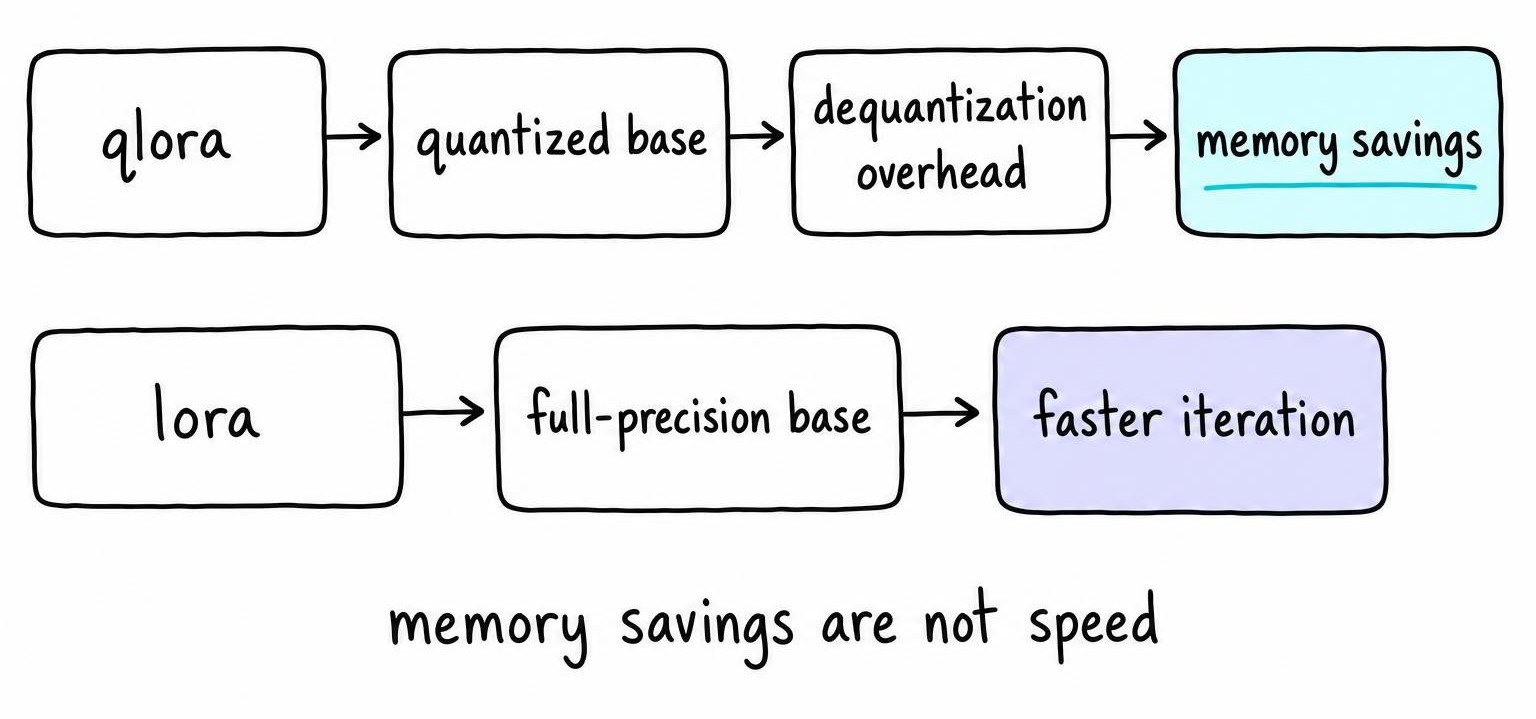
QLoRA frees enough VRAM to double batch size or extend sequence length, which reduces optimizer-step overhead per token and narrows the throughput gap once the GPU is fully saturated.
Choose Between QLoRA, LoRA, DoRA, and Full Fine-Tuning
PEFT is Hugging Face's library for parameter-efficient fine-tuning - LoRA, DoRA, and QLoRA are methods within it. DoRA splits each adapter update into magnitude and direction components, adding compute overhead in exchange for improved adaptation on format-sensitive tasks.
| Criterion | Full Fine-Tuning | LoRA | QLoRA | DoRA |
|---|---|---|---|---|
| Base-weight precision | bf16/fp16 | bf16/fp16 | 4-bit NF4 | bf16/fp16 |
| Trainable params (8B) | 100% | <1% | <1% | ~1% |
| VRAM demand (8B model) | ~48 GB+ | ~18 GB | ~10 GB | ~20 GB |
| Training speed | Fastest per step | Fast | Slower (dequant overhead) | Slower than LoRA |
| Adapter size on disk | Full checkpoint | ~100 MB | ~100 MB | ~120 MB |
| Deployment complexity | Ship full weights | Merge or serve adapter | Merge; limited 4-bit serving | Merge; limited serving support |
| Best-fit workload | Multi-task, large cluster | Fast iteration, ≥48 GB GPU | Single 24 GB GPU | Style/format-sensitive tasks |
On a single 24 GB card, QLoRA is the only option that fits an 8B model end to end. When iteration speed matters and an A100 is available, standard LoRA removes the dequantization tax. I reach for DoRA only when LoRA plateaus on format-heavy tasks - its serving support in vLLM and TGI lags behind vanilla LoRA. Full fine-tuning stays reserved for teams with multi-node budgets shifting the entire weight distribution. For a complementary approach that shrinks a model without fine-tuning adapters, model distillation trades a different set of costs.
FAQ
What is QLoRA used for?
QLoRA fine-tunes large language models on GPUs with limited VRAM by quantizing frozen base weights to 4-bit NF4 and training only small LoRA adapters in 16-bit. This makes it possible to adapt an 8B-parameter model on a single 24 GB consumer GPU like the RTX 4090.
Is QLoRA faster than LoRA?
No. QLoRA is slower per step than LoRA because every forward pass dequantizes NF4 weights before matrix multiplication. The advantage is memory, not speed: QLoRA frees enough VRAM to increase batch size or sequence length, which can raise overall throughput once the GPU is fully saturated.
What are the key differences between PEFT, LoRA, and QLoRA?
PEFT is Hugging Face's library for parameter-efficient fine-tuning. LoRA adds low-rank adapter matrices to frozen 16-bit base weights. QLoRA applies the same adapter approach but first quantizes frozen weights to 4-bit NF4 via bitsandbytes, cutting VRAM at the cost of dequantization overhead during training.
How to instruction tune an LLM?
Format training examples as prompt - response pairs using the model's chat template, then train with a causal language modeling objective. With Hugging Face, load a quantized base model, attach LoRA or QLoRA adapters via PEFT, and pass the formatted dataset to TRL's SFTTrainer. Validate on held-out examples to confirm instruction following improves on your target task.